FieldPulse Estimating: Full Breakdown for Contractors (2026)
By Ryan Mitchell, field service management and technology writer at Field Services HQ. Last verified September 21, 2026.
According to FieldPulse’s Estimates and Invoices page, you can email or text an estimate as soon as it is ready. Plus, with the click of a button, you can turn an approved estimate into an invoice.

Here are three quick takeaways:
- Estimating is a critical function in FieldPulse and the best estimates are generated in its pricebook and proposal tools.
- Cost and some integrations require a conversation with a sales rep to finalize.
According to G2’s comparison pages, FieldPulse holds a 4.7 out of 5 rating from about 349 reviews. Most reviewers are small businesses.
| Item | What we know | Where it comes from |
|---|---|---|
| Has estimating? | Yes | FieldPulse |
| Multiple options | Yes, Good-Better-Best or repair vs replace | Help Center |
| Pricebook | Flat-rate pricebook, web and mobile | Help Center |
| Dimension pricing | Yes, for size-driven trades | Help Center |
| E-signature | Yes, in Dynamic Proposals | Help Center |
| Send methods | Email and SMS | FieldPulse |
| Accounting sync | QuickBooks Online and Desktop | Help Center |
| Pricing model | Seat-based, custom quote | FieldPulse Pricing |
For a broader look at the software, read our FieldPulse review.
Who Is FieldPulse Estimating For?
Service businesses
Small service companies make up the largest portion of FieldPulse reviewers, according to Capterra. 98% of FieldPulse reviewers are from small companies.
Small company = small staff, small office, no time to spare
Supported/target trades
FieldPulse is focused on field-service businesses, including HVAC, plumbing, electrical, garage door, locksmith, septic, and appliance repair.
Other contractor and home-service businesses are also covered by FieldPulse’s larger ecosystem.
Business roles
Owners: view quote status, conversion rates
Office admins: create and send estimates
Technicians: quote on site via the mobile app
Estimators and sales techs: present tiered options
Business situations
FieldPulse works best in the following situations:
- You quote the same job multiple times
- You want technicians to present options
- You’re sick of typing quotes into invoices
- You need estimates to sync with Quickbooks
According to the BLS, 68% of HVAC technicians work for plumbing, heating and air-conditioning contractors . Repeating jobs are a good fit for a pricebook-style estimator.
Who Is FieldPulse Estimating NOT For?
According to ServiceMag, FieldPulse is geared toward mid-sized HVAC, plumbing, and electrical shops with 5-20 technicians; ServiceMag suggests that solo operators or very small crews may prefer a simpler estimating tool.
Vendors and reviewers disagree on the cutoff for “small business” – use your own criteria.
Complex/specialized estimating
FieldPulse is an estimating tool for service businesses, not a takeoff or bid package system.
If you price most jobs from blueprints or quantity takeoffs, consider a dedicated estimating tool that includes takeoff features.
Advanced project requirements
Multi-phase builds require schedule of values, change orders and retainage.
FieldPulse’s website includes project management as a core feature, but ask in a demo if it can handle your billing preferences.
High customization requirements
Estimates that require intense customization (formula-driven pricing beyond units and dimensions) may not work in FieldPulse.
Ask the sales team to walk through one of your thorniest quotes in a demo.
Existing workflow already works
If your existing estimating workflow (Excel + Quickbooks) is working, switching tools will create overhead without value.
Only switch tools if you can identify the specific pain point the new tool will resolve.
Integration/offline constraints
FieldPulse includes offline estimating and invoicing as of this writing; the FieldPulse documentation states that estimates and invoices can be created or edited without service and will sync when connectivity resumes.
If your sales team works in areas with spotty connectivity, make sure to test the offline estimating workflow with your typical process before committing.
What This Guide Covers
According to Capterra’s FieldPulse listing, FieldPulse includes scheduling and dispatching, estimate and invoice management, and CRM features. This guide will focus on the estimating functionality specifically.
| Topic | Covered here? | How deep |
|---|---|---|
| Estimate creation and pricebook | Yes | Deep |
| Good-Better-Best and add-ons | Yes | Deep |
| Send, sign, invoice, payment | Yes | Deep |
| QuickBooks sync | Yes | Medium |
| Pricing and total cost | Yes | Medium |
| Trade-by-trade fit | Yes | Medium |
| Scheduling, dispatch, reporting | No | See our FieldPulse review |
| Live hands-on account test | No | Not performed |
What Is FieldPulse Estimating?
FieldPulse estimating is the quote and proposal toolset included with the FieldPulse field service platform. You’ll create an estimate, send it out, get sign-off on it, then invoice it.
What does it solve?
It solves the pain of rebuilding a price from scratch on every quote.
And it solves the need to maintain pricing consistency when materials fluctuate, which is increasingly important today.
Replace the construction-price paragraph with:
FieldPulse lets you edit pricing across services, materials, and labor in real-time, helping ensure estimates remain current as costs change.
Old pricing erodes margin.
Where does it fit in FieldPulse?
Per the FieldPulse Help Center, Pricebook is a flat-rate sales tool. It includes tiered Good-Better-Best proposals, signatures, and payments.
The same help collection places Pricebook within Dynamic Proposals under the Sales Suite. Simple estimates and invoices are part of the core platform.
How FieldPulse Estimating Works
Per the FieldPulse Help Center, Option 1 displays by default on a new estimate. Click Add Estimate Option to add more. Here’s the process.
Create an estimate
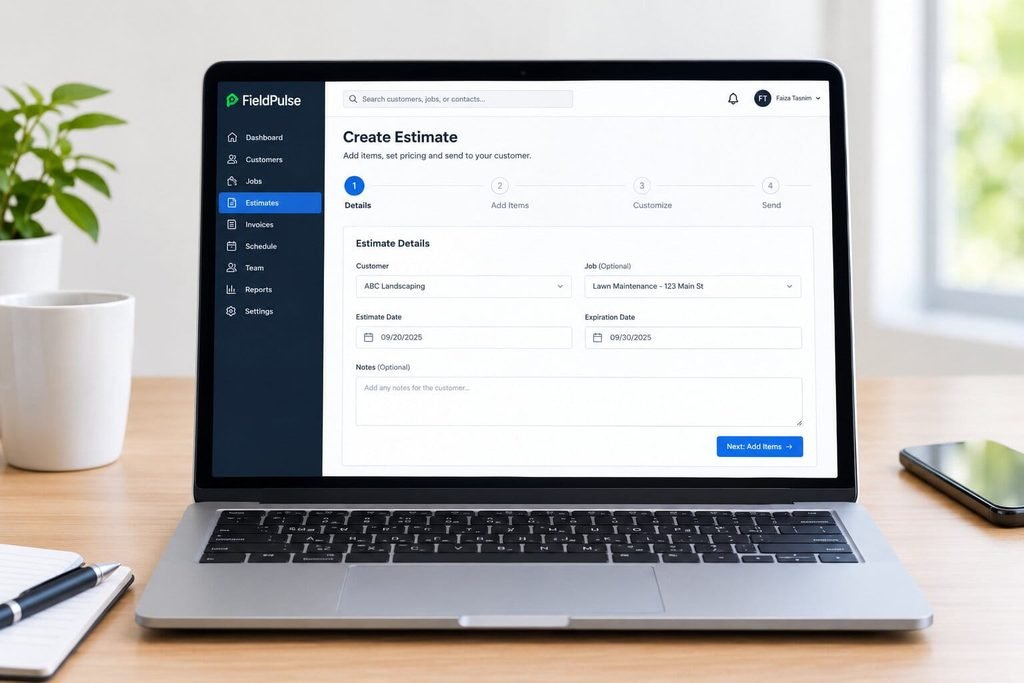
From a customer record or job, open a new estimate.
This can be done from the web or mobile app.
Add labor/materials/services
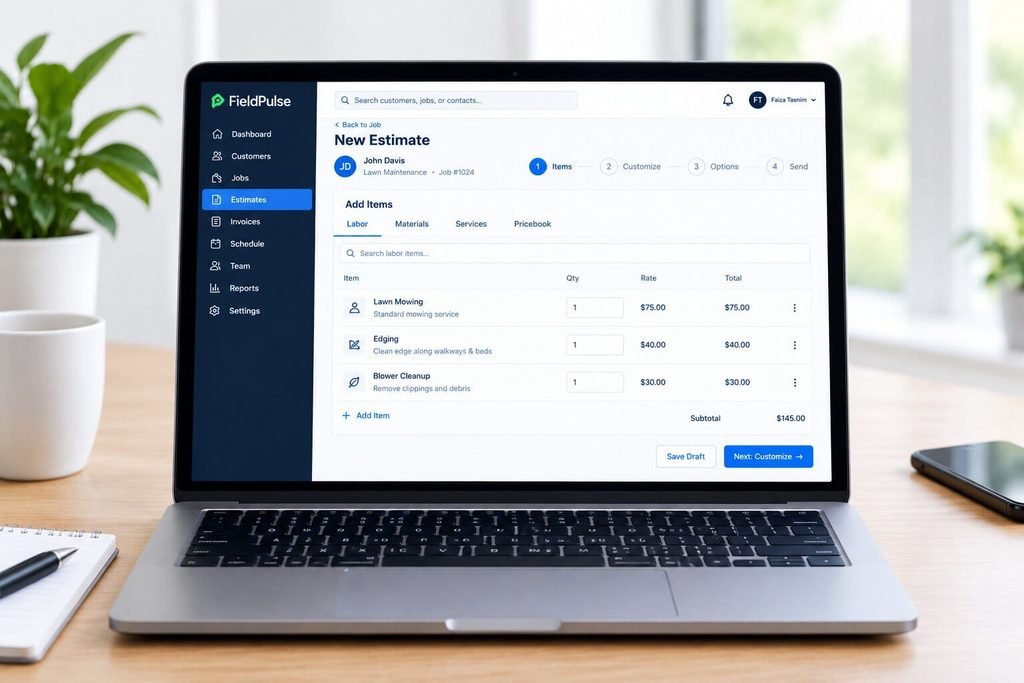
Add line items for labor, parts and services.
Per FieldPulse’s estimates page, these can be edited on the fly for each customer.
Apply pricing/pricebook
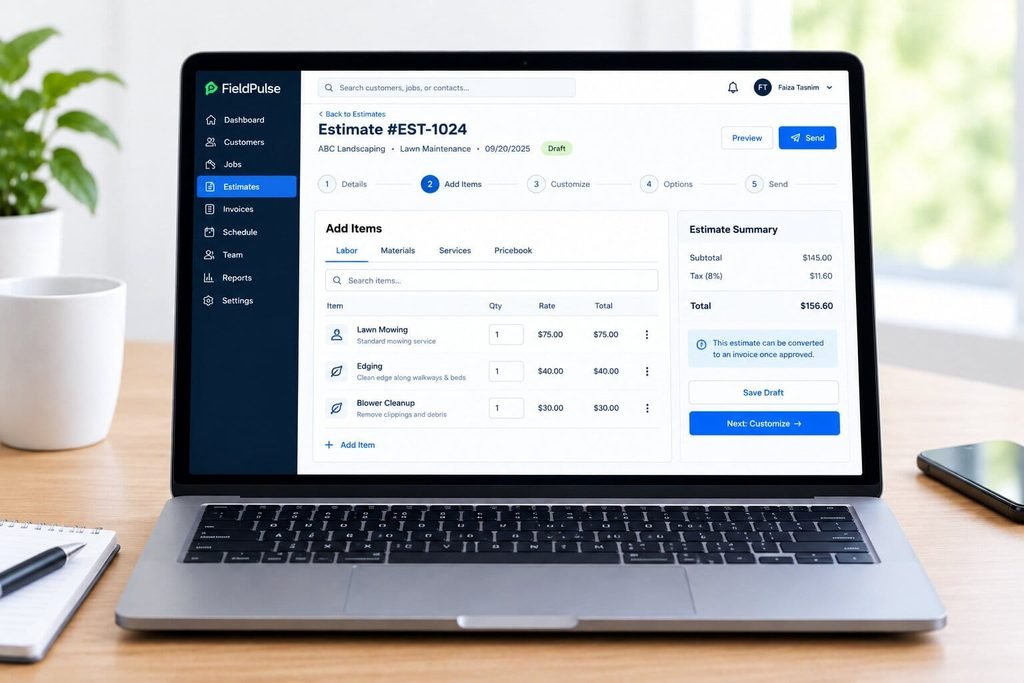
Select flat-rate jobs from your pricebook. Use Multi-Select to choose multiple at once.
Per the Pricebook help article, you can apply pricebook jobs to a new invoice, estimate, or variant proposal.
Customize
Edit descriptions, quantities, and notes per job.
Dynamic Proposals allow adding cover pages, About Us sections, photos, and reviews, per the help center.
Add options/upsells
Add estimate options for repair vs. replace, or Good-Better-Best.
Then, add optional add-ons the client can accept.
Send
Per FieldPulse, estimates are sent via email or SMS from the job site.
Speed is critical. See below.
Customer acceptance
Customers sign electronically. FieldPulse’s own screenshot shows a Sign and Accept panel on an estimate.
Move to next workflow
Approved work moves into a job on your schedule.
Confirm the estimate-job-invoice relationship in your demo.
Convert to invoice
With a single click, an approved estimate becomes an invoice. FieldPulse also mentions automated payment reminders and on-site card payments.
FieldPulse Estimating Features
Estimate creation
Build estimates using preset labor, material, and service pricing from the Pricebook. FieldPulse also allows editing estimates on the fly.
Pricebook
- Set prices once for services, materials, and labor. Everyone uses the same numbers.
- Per FieldPulse’s Pricebook page, pricing changes can be applied across all services, materials, and labor.
Labor/materials/services
- Combine all three on one estimate.
- Your labor should reflect your loaded cost, not just wages.
Templates/customization
- Dynamic Proposals allow custom colors, photos, and embedded reviews to style proposals.
- Mobile/desktop previews are included, per the help center.
Multiple options
- Per the Help Center, you can copy or delete an option by hovering over its title.
- This lets you duplicate a repair option as a replace option.
Good-Better-Best
- Per FieldPulse’s pricing guide, this feature lets customers compare three price tiers.
- It also tracks commissions once the customer selects an option.
Add-ons/upsells
- Per FieldPulse, add-ons draw from the pricebook and include itemized pricing.
- Keep add-ons simple and clear. Large bundles create analysis paralysis.
Mobile estimating
- Per the Pew Research Center, 91% of U.S. adults own a smartphone. Your customers want a text or link.
- Test the FieldPulse mobile app on your phones, in your service area.
Email/SMS
Send the estimate the moment you’re done walking through it.
Per Harvard Business Review, firms that responded within an hour were nearly seven times more likely to qualify a lead than those taking even an hour longer. This study covered online sales leads across industries, not just trades. Nevertheless, the speed-to-response principle applies.
Customer acceptance
Signature capture is part of Dynamic Proposals along with contract generation, per the help center.
Tracking
- Per FieldPulse, you can track conversion rates and view which invoices were viewed or paid.
- Use this metric weekly. It reflects your close rate.
Estimate-to-invoice
- Approvals turn into invoices with a single click.
- Per Capterra’s listing, reviewers cite easy quote conversion, but some note mobile tax limitations and occasional syncing issues.
Integrations
- Per the FieldPulse Help Center, QuickBooks Desktop (2023 and newer) and QuickBooks Online sync invoices, payments, customers, and items.
- For QuickBooks Online, you must first ask FieldPulse support to enable access, per the sync guide.
FieldPulse Estimating by Trade
FieldPulse covers many trades. Some are more well-documented than others.
HVAC
Repair vs. replace is the classic HVAC quote. FieldPulse’s own screenshots show a heat pump estimate with three options.
HVAC estimating in FieldPulse includes preset labor and material pricing, tiered Good-Better-Best proposals, and on-site estimate creation. Be sure to test this module if BLS notes residential HVAC techs often sell service contracts.
Plumbing
Water heater swaps and drain jobs are easy to add to a pricebook.
Build that labor cost into flat rates.
FieldPulse explicitly covers plumbing estimates using flat-rate pricing and customizable labor, materials, and services.
Electrical
FieldPulse shows a Good-Better-Best example for a new electric system. Panel upgrades follow the same pattern.
Update your electrical pricebook when your material or labor costs change.
Roofing
FieldPulse includes roofing on its quote form, but no dedicated roofing solution page in its navigation.
Per the same ABC data, softwood lumber and iron and steel both jumped more than 10% year over year. Roof decking and metal roofing absorb that cost. Ask about importing measurement reports before you commit.
Landscaping
As with roofing, landscaping appears on the quote form. FieldPuce’s Dynamic Proposals help article cites landscapers as a use case.
Recurring route work is a separate matter. For heavy recurring routes, see our Service Autopilot review.
Fencing
This is where Dimensional Pricebook excels.
Per the FieldPulse docs, it prices by unit of measure and customer dimensions for trades like fencing, flooring, drywall and glass. Your estimator inputs the size. Pricebook does the math.
Painting
The same dimension tool can price jobs by square footage. The docs show a room square footage example.
Surface prep, coats, and access are still your responsibility. Build them as separate line items.
Pest Control
FieldPulse has a dedicated pest-control solution with estimating, Pricebook, professional proposals, and one-click estimate-to-invoice conversion.
For recurring treatments and treatment records, verify fit carefully.
Real-World Workflows
These are illustrative scenarios, not client case studies.
HVAC example
An HVAC tech finishes a no-cool call. The 14-year-old unit is going south.
- On the phone, open a new estimate.
- Select the repair from the pricebook as Option 1.
- Add a mid-efficiency replacement as Option 2.
- Add a high-efficiency system as Option 3.
- Add a maintenance plan as an add-on.
- Send the estimate by text before leaving the premises.
Per Housecall Pro’s 2025 survey of 1,040 U.S. homeowners, over half expect flexible payment plans or financing. That’s a vendor survey, so take it as directional. Nevertheless, it advocates offering a financing path on large HVAC tickets.
Landscaping example
A landscaper walks a backyard project on Tuesday.
- Build the estimate with materials, labor and equipment lines.
- Use a Dynamic Proposal with photos and past work.
- Offer an optional lighting add-on.
- Send the same afternoon.
Per the same Housecall Pro survey, 68% of homeowners expect photo or video proof of completed work. Photos in the proposal establish that expectation up front.
What FieldPulse Estimating Does Well
Per G2 comparison data, FieldPulse’s support quality ranks well above Simpro. Another Contractor Software Hub review cites G2 ranking for ease of implementation.
Strengths I can support from documentation and reviews:
- A true flat-rate pricebook with web and mobile access.
- Repair, replace and Good-Better-Best options.
- Proposals with photos, reviews and e-signatures.
- One-click estimate-to-invoice.
- Dimension-based pricing for size-driven trades.
- Conversion and invoice tracking.
- QuickBooks sync for Online and Desktop.
FieldPulse Estimating Limitations & Trade-Offs
User-reported limitations
Per a Capterra reviewer, one team saw different totals on the edit screen, the online estimate and the PDF. This is one review and may be out of date, but it’s the strongest complaint to test.
Other reported gaps include basic reporting and limited inventory, per Field Service Guide. That site discloses affiliate commissions.
What We Tested
We’ve reviewed FieldPulse’s official pages, Help Center articles, pricing page, and public reviews.
We did not run a live FieldPulse account, so make no claims about speed, bugs, or your specific workflow.
What We Couldn’t Verify
- Whether Dynamic Proposals and the Dimensional Pricebook are included in your seats. FieldPulse’s pricing FAQ says full-access seats cover Pricebook, but older third-party pages called it a premium item.
- Your team’s actual offline estimating performance in poor coverage. FieldPulse documents offline proposal/estimate creation and syncing upon reconnecting.
- Canadian tax handling on estimates.
- Line item grouping. One review site says it is missing, yet FieldPulse’s pricebook article mentions default grouping visibility.
- Equipment history. A review site says it is lacking, while FieldPulse lists asset management.
- When sources conflict, trust your demo.
What buyers should verify
- QuickBooks Desktop limits. Per FieldPulse’s sync guide, item names over 31 characters fail to sync. Refunds do not sync. Negative line items are unsupported.
- Keep pricebook item names short and clean.
- Who fixes sync errors, and how fast.
FieldPulse vs Manual/Spreadsheet Estimating
According to the Intuit QuickBooks 2026 report, 51% of businesses with delinquent invoices report cash flow problems, compared to 36% of businesses without delinquent invoices.
What can a spreadsheet do that FieldPulse can’t?
- No software cost
- Complete control of calculations
- Handles few quotes per week
What can FieldPulse do that a spreadsheet can’t?
- Single price source for entire team
- Turn quotes into invoices without rekeying
- Keep track of where each estimate is in the sales process
- Collect payments directly on site
Let’s say you send out 20 estimates per month at an average value of $2,500 average and close 30%. That is 6 jobs, or $15,000. If improved follow up brings your close rate up to 35%, that’s 7 new jobs per month or $17,500 per month. Use these numbers as a starting point for your own calculations.
FieldPulse Estimating Alternatives
According to Jobber’s pricing page, optional line item upsells and enhanced visual quotes are available on their Grow plan, listed at $199 a month for one user on monthly no-commitment billing. Extra users cost $29 monthly per user. According to Housecall Pro’s pricing page, their sales proposal tool is available on their Max plan at $299 monthly, billed annually.
| Factor | FieldPulse | Jobber | Housecall Pro |
|---|---|---|---|
| Published price | No, custom quote | Yes | Yes |
| Good-Better-Best style options | Yes | Optional line items (Grow) | Proposal tool (Max) |
| Pricebook | Yes (Sales Suite) | Not listed on pricing page | Price book listed from Basic |
| Dimensional pricing | Yes | Not documented on pricing page | Not documented on pricing page |
| QuickBooks | Online and Desktop | QuickBooks Online | QuickBooks Online sync (Essentials) |
| Free trial | Confirm with sales | 14 days | 14 days |
| Best fit (our read) | Teams wanting depth and workflow | Simple, fast setup | Growing teams wanting an all-in-one |
According to ServiceMag, FieldPulse is considerably cheaper and faster to implement than ServiceTitan, though ServiceTitan offers deeper enterprise reporting. That is a third-party view.
For more options, see our guide to the best FieldPulse alternatives. Recurring-route businesses should also read our Service Autopilot review.
FieldPulse Estimating Pricing
According to the official FieldPulse pricing page, their pricing is seat-based. This means that you will need to purchase seats at the beginning of your contract term, with full access and field-only seats costing different amounts. You will also need to request a custom quote.
According to the same page, full access seats include scheduling, dispatching, customer management, invoicing, estimating, pricebook and reporting. Add-on products like the Engage phone system have separate costs.
There is still no number we can quote you on this page.
Other sites will quote numbers, but they contradict each other:
- Contractor Software Hub estimates ~$89 to $100 per user per month to start
- FieldCamp estimates ~$89 a month plus $30 per user
- Older sites list ~$49 to $249 tiers
Consider everything above to be unverified. Our FieldPulse pricing analysis only includes the figures we know to be accurate.
Ask your sales team these questions:
- Are Pricebook, Dynamic Proposals and Dimensional Pricebook included with my seats in writing?
- What is the contract length and auto-renewal policy?
- How are field-only seats priced?
- What are the onboarding and data import costs?
- What are the payment processing fees?
- What add-ons does a team like mine typically need?
Your total cost of ownership includes seats, add-ons, payment processing, onboarding and your time.
FieldPulse Estimating Decision Matrix
According to Pew Research, 91% of U.S. adults own a smartphone. As such, a mobile-first quoting experience is no longer optional.
Score each row on a scale from 1-5 during your demo.
| Your situation | FieldPulse leans yes if… | Look elsewhere if… |
|---|---|---|
| Team size | 3 to 30 techs | Solo, or well over 30 |
| Quoting style | Flat-rate, options, upsells | Blueprint takeoffs |
| Pricing units | Flat rate or size-driven | Complex formulas |
| Accounting | QuickBooks Online or Desktop | Other accounting tools |
| Budget clarity | Fine with a custom quote | Need a published price |
| Recurring routes | Light recurring work | Heavy route business |
| Coverage | Signal is reliable | Offline is critical (verify) |
Add up your score. Anything under 25 of 35 deserves a second look at alternatives.
What to Test Before Buying
Bring your five most common quotes to demo, build them live
- Build a Good-Better-Best quote from your pricebook
- Confirm the total matches on screen, online and in the PDF
- Send by text and email, check how it appears on a phone
- Have someone sign on a phone
- Convert to an invoice and take a deposit
- Sync to QuickBooks and look for errors
- Test dimension pricing if you sell by size
- Build the quote with airplane mode on
- Check tax handling for your state/province
- Who owns updates to the pricebook?
According to the FieldPulse Help Center, you can import an external pricebook. Ask to see the demo import of your actual price list.
Common Mistakes When Evaluating Estimating Software
According to the ABC analysis of BLS data, several material categories are up more than 10% year over year. The first mistake is trusting old prices.
Judging by the demo data, not your jobs
Ignoring how you’re going to keep the pricebook current
Not testing in QuickBooks
Trusting third-party price numbers
Buying features that won’t get trained
Forgetting the tech who quotes on a phone
Best Practices for Evaluating FieldPulse Estimating
According to the Journal of Consumer Research , adding a clearly inferior option can increase the likelihood customers choose the option that dominates it. The study is from 1982 and results vary. Be straight about your tiers.
- Start with your top 10 jobs, not all 500
- Name options clearly, avoid near-identical names
- Price tiers so that each is a meaningful choice
- Set a weekly pricebook review
- Track close rate for 60 days before and after
- Train techs to present, not just send
- Follow up the same day
Final Decision Snapshot
According to G2, FieldPulse averages 4.7 out of 5 from roughly 349 reviews.
| Question | Short answer |
|---|---|
| Does FieldPulse have estimating? | Yes |
| Best for | 3 to 30 tech service teams that quote repeat jobs |
| Standout strengths | Pricebook, options, proposals, dimension pricing |
| Biggest unknowns | Price, offline use, Canadian tax, sync errors |
| Not ideal for | Solo operators, blueprint bids, heavy recurring routes |
| Next step | Demo with your own five quotes |
Data last verified September 21, 2026. Software prices and features change often, so confirm with the vendor.
FieldPulse Estimating FAQ
Does FieldPulse have estimating?
Yes. FieldPulse includes estimating with a flat-rate pricebook, multiple options, e-signature and one-click conversion to invoices. According to FieldPulse, you can send estimates by email or SMS.
How much does FieldPulse estimating cost?
FieldPulse does not publish a price. It uses seat-based custom quotes, per its pricing page. Confirm in writing that proposals and dimension pricing are included.
Does FieldPulse support Good-Better-Best?
Yes. You can add estimate options for Good-Better-Best or repair vs replace, per the Help Center. Pricebook also builds tiered variant proposals.
Can customers sign FieldPulse estimates online?
Yes. Dynamic Proposals include electronic signatures and contracts, per the Help Center.
Can I create estimates on my phone?
Yes. FieldPulse says you can build and send estimates from the mobile app. Test offline behavior yourself, since sources differ on details.
Does FieldPulse sync estimates with QuickBooks?
Yes. FieldPulse syncs with QuickBooks Online and Desktop. According to its QuickBooks Desktop guide, the Desktop connector is Windows only and has item name limits.
Is FieldPulse good for HVAC estimating?
It is a reasonable fit for residential service and replacement quotes. According to an independent review on Softabase, service agreement depth trails tools like ServiceTitan and FieldEdge. Test your maintenance agreements.
Can FieldPulse price by square foot?
Yes, for supported trades. The Dimensional Pricebook prices by unit of measure and customer dimensions, per FieldPulse docs.
Is FieldPulse better than Jobber or Housecall Pro for estimating?
It depends on your needs. FieldPulse offers pricebook depth and dimension pricing. Jobber and Housecall Pro publish prices and set up quickly. See our alternatives guide.
Is FieldPulse a fit for small teams or solo operators?
Sources disagree. According to ServiceMag, it fits shops with 5 or more technicians. Solo operators may prefer simpler tools. Test before you commit.