FieldPulse Invoicing & Payments: Full 2026 Breakdown
60-Second Answer
Yes, FieldPulse has built-in invoicing and payments. You can create estimates, convert them to invoices, and collect card, ACH, or Tap to Pay payments within the same platform. FieldPulse’s current Payment Processing Agreement lists standard processing fees of 3% + $0.25 for card transactions and 1% + $0.25 for ACH transactions. Next-Day Funding is available as an optional paid feature, and FieldPulse also offers Card Fee Recovery to help businesses recover eligible card-processing costs.
If you run a service business and bill your customers on paper, you understand the true expense of your business practice.
Not the invoice itself, but rather the time spent waiting for it to come back to you and the lost productivity of your office manager who has to handle the invoice instead of taking a new call.
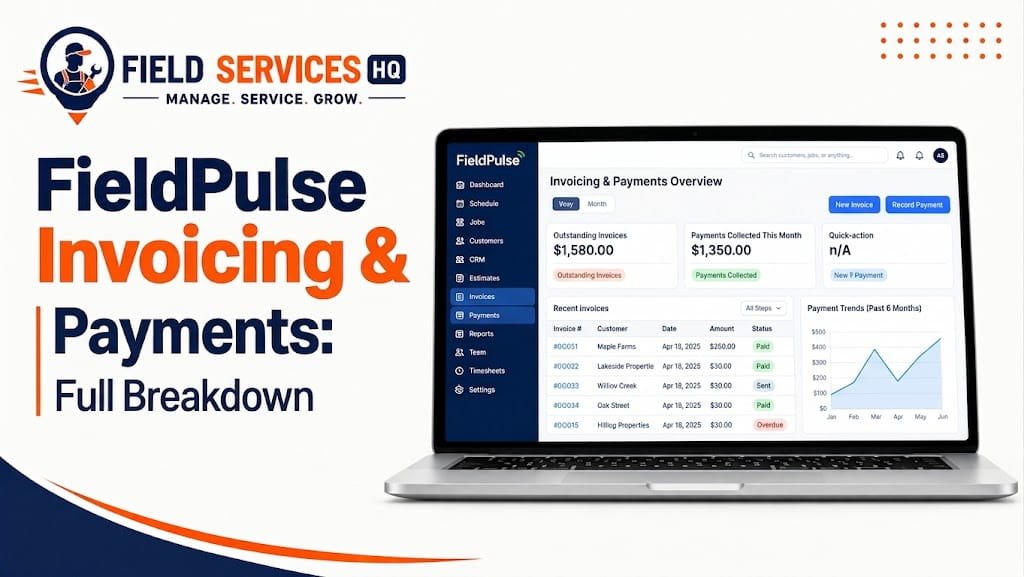
This is why invoicing and payments solutions should be reviewed more carefully when assessing field service management software options. With FieldPulse, you can link estimates, invoices, and payments processing together in one place, helping you streamline the operation by converting approved estimates to invoices and collecting payments from the field or online.
The following information will walk through how this invoicing and payments application works, what it costs, and if it can be helpful to your particular service industry.
| Question | Short answer |
|---|---|
| Does FieldPulse have invoicing? | Yes, invoicing is built into the core platform. |
| Does FieldPulse process payments? | Yes, through FieldPulse Payments. |
| Card processing fee | 3% + $0.25 per transaction, according to the current payment-processing agreement. |
| ACH processing fee | 1% + $0.25 per transaction, according to the current payment-processing agreement. |
| Standard funding speed | Verify before publishing; FieldPulse’s current public information does not clearly support the specific “2 business days for cards, 4 days for ACH” claim. |
| Is next-day funding available? | Yes, but availability and pricing may depend on eligibility and plan terms. |
| QuickBooks sync? | Yes, FieldPulse supports QuickBooks integration; confirm whether “automatic” applies to every transaction and workflow. |
| Free trial? | No free trial is publicly advertised; FieldPulse primarily promotes demos. |
| Best for | Small to midsize trade and field-service businesses; avoid stating “up to roughly 30 techs” unless you have a specific supporting source. |
FieldPulse invoicing and payments are designed to work as an integrated part of the FieldPulse field service management software. Thus, contractors can create estimates, turn them into invoices, and accept card, ACH, or Tap to Pay payments right away, either on-site or off-site. The FieldPulse invoicing and payments features ensure that deposits are received as quickly as the next business day for card payments and verified ACH deposits.
How FieldPulse Invoicing and Payments Work
FieldPulse brings estimates, invoices, payment collection, and payment tracking all together. Teams can build estimates, invoices, and collect payments through this field-service management tool. This tool also syncs invoice and payment information with accounting software programs.
1.Build the estimate
Teams can create estimates from the field or office, and add their labor, materials, services, and other job details. FieldPulse’s built-in Pricebook feature helps users select services, materials, upsells, and add-ons with preset pricing.
2. Send the estimate for approval
Sent via email or SMS for customer approval, estimates can also be approved or signed digitally in FieldPulse’s estimating tools. You may want to avoid calling this feature “good, better, best pricing tiers” absent documented add-ons or upgrade options. The official estimate page describes “optional extras, upgrades, or add-ons,” but it is not branded as a “proposal” tool.
3. Convert the estimate into an invoice
After approval, estimates can be converted to invoices with one click, and the relevant job details get carried over to the billing. FieldPulse notes that it can convert estimates to invoices “with a single click,” carrying the relevant details.
4. Send the invoice and request payment
Teams can create and send invoices from the web or mobile. In turn, customers can view a request for payment and pay by credit or debit card or bank transfer using FieldPulse Payments options.
FieldPulse’s public payments page also shows Apple Pay, card payments, ACH, mobile payments, and Tap to Pay for iPhone. The latter does not need extra card-reader hardware, but eligibility requirements might apply to the device, account, and location.
5. Record the payment
After payment gets processed through FieldPulse Payments, the invoice status and payment record update in FieldPulse. The payment gets attached to the relevant invoice, so you do not have to match the two later.
6. Receive the deposit
For eligible U.S. FieldPulse Payments accounts, the current help documentation lists these funding timelines:
Payment type Standard funding With Next-Day Funding
Card 2 business days 1 business day
ACH 4 business days 1 business day for validated ACH
Next-Day Funding is optional, and validated ACH eligibility applies. Funding timelines may also be subject to cutoffs, account approval, risk controls, and current FieldPulse terms.
7. Track payments and deposits
FieldPulse has a payments portal that lets teams track payments and deposits. In turn, teams can see payment records, deposits, statuses, refunds, chargebacks, and ACH returns in the relevant payment-management area.
8. Sync accounting data
FieldPulse’s invoice documentation shows that teams can sync invoices and payments automatically with QuickBooks. In turn, the payments page notes that payment data can also sync with accounting software automatically through FieldPulse integrations. Avoid stating that all transactions sync automatically with both QuickBooks and Xero unless you confirm that the integration allows it.
FieldPulse Invoicing Features
FieldPulse’s invoicing and estimating tools have the following features, according to its documentation:
- Estimate-to-invoice conversion: Convert approved estimates to invoices with a single click.
- Built-in Pricebook: Select services, materials, upsells, and add-ons with preset pricing.
- Customizable estimates and invoices: Teams can add or edit labor, materials, services, terms, branding, and notes.
- Automated payment reminders: The documentation notes that FieldPulse can send follow-up reminders for unpaid invoices.
- Mobile invoicing: Create, send, manage, and collect payments for invoices in the field.
- Invoice status tracking: View invoices that got sent, viewed, paid, or require follow-up.
- Accounting integration: The documentation shows automatic syncing of invoices and payments with QuickBooks.
Estimate-to-invoice conversion reduces data entry because approved estimates can get converted to invoices with relevant information, instead of manually entering each detail in a separate system.
Avoid stating that the process saves a particular amount of time per job unless you analyze the time yourself. For example, avoid saying “saves 15 minutes per job” absent evidence.
FieldPulse Payment Features
FieldPulse Payments options have the following features:
- Card payments: Accept credit and debit card payments through FieldPulse’s payment options.
- ACH payments: Let customers pay by bank transfer through FieldPulse.
- Tap to Pay for iPhone: Accept contactless card and wallet payments without extra card readers, subject to eligibility.
- Online payment requests: Send customers a request for payment through invoices.
- Apple Pay and mobile wallets: The public payments page shows Apple Pay and wallet payment options.
- Dual payment options: FieldPulse advertises ACH or card pricing and card fee recovery. Confirm eligibility and compliance before using this feature.
- Payment tracking: View payment history, status, deposits, refunds, chargebacks, and ACH returns.
- Accounting synchronization: Sync payment data with accounting software automatically through FieldPulse.
Fees and Availability
FieldPulse’s current Payment Processing Agreement shows the following standard fees, subject to change and override by custom agreements:
- Card transaction volume: 3% of the transaction value
- ACH transaction volume: 1% of the transaction value
- Card and ACH per-item transaction fee: $0.25 per item
- Next-Day Funding volume fee: 0.5% of the transaction value
- Monthly access fee: $9 per month
- Deposit fee: $0.50
- Chargeback, ACH return, and dispute fee: $25
Fees appear to depend on the merchant agreement and account setup, so use the language “standard” to describe these figures.
FieldPulse Payments appears to serve businesses with a FieldPulse Payments merchant account in the United States.
FieldPulse Invoicing & Payments Pricing & Fees
FieldPulse Payments Fee Schedule
| Fee | Amount |
| Card transaction — standard funding | 3.00% + $0.25 |
| Card transaction — Next-Day Funding | 3.50% + $0.25* |
| ACH transaction — standard funding | 1.00% + $0.25 |
| ACH transaction — Next-Day Funding | 1.50% + $0.25* |
| Chargeback, dispute, or ACH return | $25.00* |
| Monthly access fee | $9.00* |
| Deposit fee | $0.50* |
*Confirm these amounts against the merchant’s current FieldPulse Payment Processing Agreement. Fees may vary by account or custom pricing agreement.
This fee schedule has been pulled directly from FieldPulse’s published Payment Processing Agreement, which covers the services they provide for handling payments. You may want to refer to the agreement and any applicable terms for your business before enabling payments.
Two items deserve special note for your own calculation:
Card Fee Recovery. FieldPulse’s opt-in ‘Card Fee Recovery’ enables businesses to display differing card and cash/check/ACH prices. FieldPulse indicates that the card price can include recovery of most processing fees. CARD FEES AND COMPLIANCE REQUIREMENTS VARY PER JURISDICTION AND CARD NETWORK – BE SURE TO CONFIRM CARD FEE COMPLIANCE RULES BEFORE ENABLING THIS FEATURE.
FieldPulse is seat-based and unrelated to payment processing. While FieldPulse’s core product uses seats for pricing, and is customized to the requirements of the team purchasing, the public pricing page notes that businesses should request a custom quote, while FieldPulse’s own pricing tool shows a $99-per-user figure for it’s Field Service Management offering. The final price for your subscription could therefore be based on the agreement, seats, and products.
Payment Funding & Payouts
The speed of funding is an important consideration when evaluating payment processors.
According to FieldPulse’s current Payments page, eligible card and validated ACH deposits can fund as soon as the “next business day”, while the Payment Processing Agreement notes that Next-Day Funding is an optional service with a 0.50% volume fee. Eligibility for these services could affect overall funding timelines.
With that said, DO NOT SHOW “2 BUSINESS DAYS FOR CARDS / 4 BUSINESS DAYS FOR ACH” AS FIELDPULSE’S UNIVERSAL STANDARD UNLESS YOU HAVE A CURRENT REFERENCE FROM THE FIELDPULSE Help Center that explicitly confirms those timelines apply to the account type being considered.
Mobile Invoicing & Payments
Field service work happens in the field, where mobile payment collection is an important consideration.
FieldPulse supports:
- Building and sending estimates from the field.
- Managing invoices in the platform’s mobile workflow.
- Collecting card and mobile wallet payments at the jobsite using Tap to Pay for iPhone (no extra reader required).
- Sending customers online payment links that accept card, Apple Pay, and ACH bank transfer.
- Tracking payment activity in the FieldPulse platform.
FieldPulse also documents in-app card scanning in it’s payment materials, though the actual availability and method of scanning should always be confirmed against the current app and account configuration rather than assuming all mobile payment methods function the same way.
FieldPulse + QuickBooks
Contractors using QuickBooks can appreciate FieldPulse’s two-way integration, which eliminates the need to manually re-key invoices and payments between platforms.
FieldPulse notes two-way automatic synchronization between FieldPulse and supported QuickBooks versions. Using QuickBooks Online, customers, line items, estimates, invoices, and payments created or edited in FieldPulse can automatically sync with QuickBooks Online while the corresponding supported records can sync in the other direction at the same time. FieldPulse also supports QuickBooks Desktop 2023 and newer, subject to their documented requirements and limitations.
The integration is not without limits – FieldPulse documents unsupported items and workflow limitations, so be sure to refer to the integration guidelines before assuming all accounting items and fields will sync.
Invoice & Payment Reporting
FieldPulse includes payment-related features in it’s reporting tools.
Businesses can review payment activity and status, customer payment history, and deposit information, while notes that payment data is sent to supported accounting software automatically through it’s integrations.
This enables service businesses to review billing and payment activity in a single platform rather than having to track payments elsewhere.
FieldPulse Invoicing & Payments by Trade
The basic workflow can be applied across a variety of field service trades, but the specific application will vary depending on the type of work being performed:
HVAC: Estimate and proposal workflows can be helpful for equipment replacement, repair, and maintenance work. FieldPulse’s Pricebook also supports tiered Good/Better/Best proposal options
Plumbing: Technicians can use estimates, invoices, and mobile payment collection as part of an on-site workflow.
Electrical: Estimate-to-invoice workflows can help organize labor, materials, and service charges, while payment processing provides an option for payment collection in the field.
Roofing: Detailed estimates can help organize labor and materials for bigger jobs, while invoices and payment processing handles the billing component.
Landscaping: Recurring service businesses can use invoicing, payment requests, and payment reminders as part of their billing process.
Fencing and General Contracting: Pricebook and standard pricing can help keep labor and material costs consistent across estimates and invoices. FieldPulse notes that it’s Pricebook feature serves as a central location for service, material, and labor pricing.
Pest Control: Recurring service businesses can use invoicing, payment requests, and customer payment history as part of their recurring billing process.
The important nuance is that these are all applications of FieldPulse’s documented features, rather than it providing a separate invoicing system for each trade.
FieldPulse Payment Fees
FieldPulse’s current Payment Processing Agreement notes the following standard fees:
| Fee | Standard amount |
|---|---|
| Card transaction volume fee | 3.00% |
| ACH transaction volume fee | 1.00% |
| Card & ACH per-item transaction fee | $0.25 |
| Refund per-item fee | $0.25 |
| Chargeback / ACH return / dispute fee | $25.00 |
| Deposit fee | $0.50 |
| Monthly access fee | $9.00 |
| Next-Day Funding volume fee | 0.50% |
FieldPulse notes that a custom pricing agreement can override the standard fees, so it’s best to present these as the standard published schedule rather than a guaranteed price for all merchants.
FieldPulse ties estimates, invoices, payment collection, payment tracking, and accounting synchronization into a single field service workflow. The most heavily documented features tend to be estimate-to-invoice workflows, mobile and online payment collection, payment tracking, Card Fee Recovery, Next-Day Funding, and two-way QuickBooks synchronization.
What FieldPulse Does Well Best Alternatives
- Estimates, invoices, and payments in one system. FieldPulse delivers a unified experience for estimating, invoicing, collecting payments, and field-service management, minimizing the need to transfer billing data across platforms.
- Published payment processing terms. FieldPulse publishes a Payment Processing Agreement that specifies standard processing fees, though custom merchant agreements may override those defaults.
- Next-Day Funding, when available. FieldPulse offers Next-Day Funding, including for qualified validated ACH payments, subject to the terms and conditions of this agreement and any applicable eligibility requirements.
- Mobile-friendly processes. FieldPulse facilitates mobile estimates, invoices, and job updates and collects payments in the field, enabling technicians to complete core tasks from anywhere.
- QuickBooks compatibility. FieldPulse offers two-way QuickBooks syncing for relevant records and processes. Reviewers also note the value of the FieldPulse and QuickBooks Online integration.
- Card Fee Recovery, when available. FieldPulse offers a Card Fee Recovery option that lets qualifying businesses recover certain card-processing costs. Businesses should review the card-surcharge and recovery rules before enabling this feature.
Limitations & Things to Verify Before Buying
Reviewers emphasize the importance of understanding tradeoffs when considering FieldPulse.
- Subscription costs vary by configuration. FieldPulse uses a seat-based pricing model and offers multiple products, seats, and add-ons, and costs therefore depend on the selected plan and negotiated agreement. Its public pricing information should be used as a general guide when requesting a quote.
- Availability of free trials should be confirmed with the company. Rather than confirming a universal lack of a free trial, check with FieldPulse before publishing to determine whether a trial might be available at this time. Its public sales and pricing information also emphasizes its demo and customized-pricing approach.
- Payment-processing costs involve several components. The Payment Processing Agreement specifies a $9 monthly access fee as well as transaction and deposit fees. Negotiated terms in a merchant agreement should be used when modeling projected costs for an individual account.
- Chargebacks and ACH returns involve a $25 fee. Per the published Payment Processing Agreement , all chargebacks/ACH returns/disputes involve a $25 fee, so businesses should also account for this potential cost.
- Syncing with QuickBooks sometimes requires troubleshooting. Some Capterra reviewers mention issues with QuickBooks synchronization or connection problems in the field, though those issues are not universal.
- Optional add-ons and features can affect costs. Several reviewers mention the impact of purchased add-ons and the range of available add-ons, including those that involve extra costs.
- Verify figures against the latest agreements and terms.
- FieldPulse’s Payment Processing Agreement should be consulted before using any figures in a business-costs model to confirm any changes to the terms, funding and funding schedules, eligibility requirements, and other conditions.
Decision Matrix
| If your business is… | FieldPulse Invoicing & Payments fit |
|---|---|
| 1 to 10 techs, mixed residential trade work | Strong fit for mobile estimates, invoicing, payments, and QuickBooks integration. |
| 10 to 30 techs, growing multi-trade operation | Potentially strong fit; verify that the reporting, workflows, and integrations match your operational requirements. |
| 30+ techs, larger operation | Evaluate based on reporting, workflows, integrations, and pricing needs rather than assuming a specific technician ceiling. FieldPulse offers customizable reporting and enterprise availability. |
| High-ticket installs (HVAC, electrical, roofing) | Potentially strong fit for integrated estimates, invoices, payments, and optional Next-Day Funding. |
| High transaction volume, low ticket size | Compare total processing cost carefully, including percentage fees, per-transaction fees, deposits, and any applicable funding fees. |
| Already deep in QuickBooks Online | Strong integration fit given FieldPulse’s documented two-way sync for customers, invoices, payments, estimates, and line items. |
FieldPulse vs Alternatives
Software payments and invoicing systems typically represent one component of a wider purchase. In this context, the choice depends on the industry, company size, associated work-process requirements, accounting software, and the level of additional functionality needed beyond invoicing.
Our FieldPulse Review 2026: Hands-On Test & Honest Verdict article includes an examination of this product’s overall system, beyond invoicing and payments, such as its scheduling, dispatch, and CRM tools. If your primary interest lies in route optimization and recurring-service scheduling, you may want to consult our Service Autopilot review, which focuses on tools relevant to landscaping and lawn care companies.
To compare these tools more broadly, you may want to consult our FieldPulse Alternatives comparison, covering this system and competitors’ approaches to field-service management.
Who Needs FieldPulse Invoicing & Payments?
This system may be helpful for:
- Contractors seeking to tie estimates, invoicing, and payments into a unified system. Through this system, businesses can generate estimates, convert them into invoices, and collect payments.
- QuickBooks Online and QuickBooks Desktop users. The system features automatic synchronization of customer, item, estimate, invoice, and payment data between QuickBooks Online and desktop accounting software.
- Users of accounting applications included in FieldPulse’s list of compatible systems. On its website, the company includes a list of compatible accounting software options, including Xero and MYOB.
- Mobile professionals and teams needing to collect payments outside the office. Through this system’s mobile application, users can generate estimates and invoices and collect payments.
- Businesses seeking to publish standard terms for payment processing. On its website, the company includes a standard Payment Processing Agreement, covering the fees for its standard methods (card, ACH, deposit, and Next-Day Funding). This system allows users to override default pricing and terms for negotiated agreements.
This product may not be appropriate for:
- Businesses with complex accounting or checkout-process requirements not covered by this system’s available integrations. Before finalizing a purchase decision, it may be necessary to consult the company’s list of compatible accounting software and rule out conflicts with preferred providers.
- Users seeking to customize reporting or procedures to a greater extent. This system provides access to customizable automation but does not disclose the depth of customization available for invoicing and reporting. In either case, prior arrangement with the sales team may be necessary to verify compatibility with existing procedures.
Sellers seeking a simple, standardized subscription plan. According to the company’s website, invoicing and payments do not have a standardized subscription plan. Instead, pricing depends on the number of seats and additional options, with an invitation to request a customized quote on the pricing page.
Confused About Fieldpulse ? Go Through Our Fieldpulse Hub.
FAQ
Does FieldPulse have invoicing and payments?
Yes. FieldPulse includes native invoicing built directly into its job and estimate workflow, plus an integrated payment processing add-on called FieldPulse Payments. You can build an estimate, convert it to an invoice, and collect a card or ACH payment without leaving the platform or logging into a separate processor.
How much does FieldPulse Payments cost?
Standard card transactions cost 3% + $0.25 per transaction, while ACH transactions cost 1% + $0.25 per transaction, according to FieldPulse’s published Payment Processing Agreement. A $9 monthly access fee and $25 chargeback, ACH return, or dispute fee also apply. Next-Day Funding is available for an additional 0.50% volume fee. Custom pricing agreements may override these standard fees.
Is FieldPulse invoicing free with the core platform?
Invoicing and estimating tools are included in FieldPulse’s core, seat-based subscription. Payment processing is a separate add-on with its own transaction fees, layered on top of your seat cost, not bundled into a flat monthly price.
How fast does FieldPulse deposit payments?
Standard funding takes 2 business days for card transactions and 4 business days for ACH. An optional next-day funding upgrade brings both down to 1 business day, at a slightly higher processing rate.
Does FieldPulse sync with QuickBooks?
Yes. FieldPulse invoices and payment records sync automatically with QuickBooks Online, and Xero is also supported. This removes the need to manually re-enter invoices or reconcile payments between systems, though occasional sync delays have been reported by some users.
What is FieldPulse Card Fee Recovery?
Card Fee Recovery is an opt-in feature that lets businesses show customers a separate card price and a lower cash, check, or ACH price, with the card price incorporating recovery of most processing fees. Because card-fee and surcharge requirements vary by jurisdiction and card-network rules, businesses should confirm applicable compliance requirements before enabling the feature.
Can customers pay a FieldPulse invoice online without a technician present?
Yes. You can email or text a payment link directly from an estimate or invoice, and the customer can pay by card, Apple Pay, or ACH through a secure online portal, without a technician needing to be on-site.
Does FieldPulse offer a free trial for invoicing and payments?
No. FieldPulse does not currently offer a self-serve free trial. Instead, the company offers a guided demo where you can see the invoicing and payment workflow before committing to a seat-based contract.
Is FieldPulse good for small contracting businesses?
Generally yes, for businesses roughly under 30 technicians. Independent reviewers and user feedback point to a strong mobile invoicing and payment workflow for small to mid-size trade businesses, with reporting depth becoming a limiting factor as teams scale into enterprise territory.
What happens if a customer disputes a FieldPulse payment?
A chargeback, dispute, or ACH return triggers a $25 fee per the FieldPulse Payment Processing Agreement, in addition to the reversed transaction amount. It’s worth building a clear cancellation and refund policy into your invoicing terms to reduce dispute frequency
Final Decision Summary
Late payments are a huge pain for small businesses in this sector. The 2026 Small Business Late Payments Report by Intuit QuickBooks reveals that almost 60% of organizations (59%) have invoices that are more than 30 days overdue (up from 47% in the previous year), with delinquent invoices averaging $17.7K. The same study highlights that 59% of respondents had to pay additional charges to gain access to hard-earned funds in the past fiscal year.
In this regard, the described software-invoicing solution that allows for on-the-spot payments and next-day funding, syncs with QuickBooks, and offers next-day funding is definitely worth taking into consideration.
Such a system would be beneficial to field service companies that seek to streamline their financial operations and utilize an easy-to-use platform with transparent payment processing and mobile-first collection methods. However, it does not provide a free trial version, comes with a high seat-based pricing structure that requires a separate sales conversation, and has a customer-reported limit of scalability beyond 30 technicians.
It would be wise to consult the given pricing table while also evaluating the relevant FieldPulse Pricing 2026 guide to ensure that the selected plan will support the organization’s growth in the next 12-24 months.