FieldPulse CRM: Full Breakdown for Contractors (2026)
By Ryan Mitchell | Field service management and technology expert | Last reviewed: September 2026
Is FieldPulse a CRM?
Yes, technically, but it’s a field service CRM — meaning it’s embedded in a broader FSM (field service management) software.
According to FieldPulse’s help center, the FieldPulse platform “includes a basic CRM to store notes, jobs, estimates, invoices, and files related to each customer profile.”
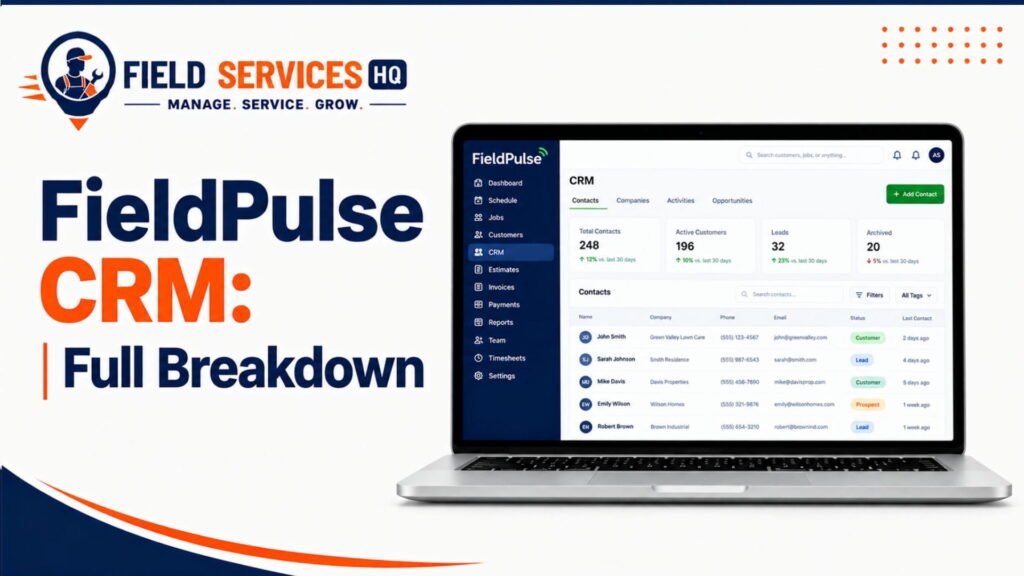
So, that answers the question “does FieldPulse have CRM” with a yes. But is it good enough for you?
This guide will help you figure it out. We’ll break down the pros and cons of FieldPulse CRM and help you understand if the tool could be a good fit for your business.
What This Guide Covers
This guide details how FieldPulse CRM works across the entire customer lifecycle, including field service and residential sales. We’ll review features, use cases, fit, limitations, and pricing.
I’ll also compare this product to spreadsheets and standalone CRM products, and finish with a decision matrix and FAQ. Note that FieldPulse does not have published pricing – I will identify any mention of cost as a third party estimate.
CRM Capability Snapshot
Below is a short summary table of FieldPulse’s capabilities
According to Capterra’s FieldPulse profile, the product covers scheduling, dispatch, work orders, estimates, invoices, and CRM for customer records. It also lists lead management and advanced reporting.
| CRM Area | What FieldPulse Offers | Depth |
|---|---|---|
| Lead management | Statuses and custom pipeline stages | Basic to moderate |
| Customer/contact management | Profiles, multiple contacts, multiple locations | Strong for field work |
| Customer history | Jobs, estimates, invoices, payments, files | Strong |
| Estimates and sales | Estimate workflows and status triggers | Moderate |
| Communication | Texts, emails, templates, notifications | Moderate |
| Customer portal | Job status, contact edits, service requests | Moderate |
| Custom fields | Field types, role visibility | Strong |
| Automation | Status-based messages, reminders | Basic to moderate |
| Reporting | Customer reports by status, source, invoice total | Basic to moderate |
| Integrations | QuickBooks, Xero, Zapier, Mailchimp, more | Varies by tool |
| Mobile access | Technician mobile app | Strong (offline mode reports vary) |
Who Is FieldPulse CRM For?
FieldPulse CRM is tailored for companies where the customer record should be tied directly to the truck. It is not intended for a strictly sales-focused office environment.
According to Capterra, 97% of FieldPulse reviewers work for a small business. The construction industry dominates with 49% of reviewers.
Ideal Business Types
- HVAC and plumbing service companies
- Electrical contractors
- Garage door, septic, and glass repair shops
- Multi-trade home service businesses
- Commercial service teams with recurring sites
Team and Business Size
The third-party reviews do not entirely agree on the ideal team size, as is expected.
- According to FieldCamp,, the ideal team size ranges from 2 to 15 technicians.
- According to ServiceMag, the software is suited for shops that employ between 5 and 20 technicians.
Therefore, my understanding is that the ideal size should be from 3 to 20 technicians.
Common CRM Requirements It Meets
- Single customer record across all tasks, estimates, and invoices
- Notes accessible to all technicians
- Tracks the source of each lead
- Follows up after estimates and jobs
Field and Office Teams
There are three main types of users in FieldPulse. The FieldPulse user roles guide confirms that there are three user roles: Administrator, Team Manager, and Service Agent.
Service agents are the technicians on the FieldPulse CRM system, and administrators can customize their access to data.
Who is FieldPulse CRM Not For?
I’m not a fan of the next section’s name, to be brutally honest. However, it’s an important one – businesses seeking to save money.
Businesses Seeking An Advanced Standalone CRM
In FieldCamp’s assessment, FieldPulse isn’t a true CRM in the way that HubSpot is. The reviewer also mentions a lack of automated customer segmentation and behavior triggered follow-ups as negatives.
If those are dealbreakers, consider budgeting for an add-on CRM or a switch.
Complex Sales Pipelines
Long B2B sales cycles require pipelines, forecasting, and multiple stakeholders per deal.
FieldPulse pipeline stages are customizable, per the electrician CRM page. According to the same source, you can define your own pipeline statusses. While that’s great flexibility, it’s not a forecasting tool.
Heavy Marketing Automation
Drip campaigns, lead scoring, and multi-step nurturing are all part of this category.
FieldPulse lists MailChimp and NiceJob as integrations, per Capterra. While that’s helpful, you would manage those campaigns in those tools.
Enterprise Level CRM
Multi-facility companies usually require intensive permission structures, data warehouses, and custom object modeling capabilities.
According to Capterra, only 1% of FieldPulse reviewers are enterprise level users. That speaks to this product’s true scope.
How FieldPulse CRM Works: Customer Lifecycle
A good CRM system should follow the customer from initial lead to repeat sale. In FieldPulse, that means linking everything to a customer profile.
Per the help center, “A customer profile is required before creating a job, estimate, or invoice”. In effect, that means you couldn’t create a customer profile without first establishing a lead. Here’s how the process works:
- Lead: A new opportunity is captured, with the lead source identified.
- Contact: Names, numbers, and titles are added to the profile.
- Customer: Status changes from Lead/Opportunity to Current Customer.
- Estimate: The Scope of Work is priced and sent to the customer.
- Approval: The customer approves the estimate (or it is designated Lost).
- Job: The approved Scope of Work is converted into a scheduled job.
- Service: The technician performs the field service work.
- Invoice: The invoice is issued against the same profile.
- Customer history: All notes, jobs, and payments are retained on the profile.
- Repeat service: Reminders and follow-up notes alert the customer to return.
The documentation mentions four status categories: current customer, lead, opportunity, and lost customer.
FieldPulse CRM Features
Every feature described below is documented on a public resource or mentioned by a named third party.
Customer & Contact Management
According to the electrician CRM page, customer profiles include contact information, service addresses, billing information, account type, and multiple contact entries.
This is ideal for property management use cases, where a single business may include multiple contacts.
Lead Management
According to the same source, customers can be tagged as Lead, Opportunity, Current Customer, or Lost. The documentation also mentions tracking lead sources: Referral, Online Ads, Truck Wrap, and Repeat Business.
I think that’s a great illustration of the tool’s marketing value – being able to analyze which channels produce the best leads.
Customer History
According to FieldPulse, the CRM application stores customer details, communications, job history, and payment information in one place.
Office staff can access and update the customer history, but so can technicians.
Estimates & Sales Workflow
According to the estimate workflow documentation, you receive automatic email and SMS alerts when an estimate status is updated.
You can follow up on estimates that are Open or Lost, and request reviews of completed invoices.
Customer Communication
FieldPulse mentions that the software includes a central communication repository, with texting and email capabilities. The system also sends “I’m on my way” notifications based on the job status.
One major caveat from FieldCamp: you cannot view calls, texts, or emails in a threaded conversation. This is potentially an issue, depending on your texting provider.
Customer Portal
According to the customer portal documentation, your clients can view contact information, update their details, and submit service requests. You can send a password-protected portal to your customers.
These permissions work on an account level, not a per-customer basis.
Custom Fields
Documentation describes how to create custom fields for the customer record. You can organize those custom fields in a logical order, and set visibility by role.
Some examples for use in trades include:
- Gate code
- Equipment Brand
- Pet on site
- Preferred contact window
Permissions & Data Visibility
Administrators control user permissions at the role level. According to the user roles documentation, “Permissions can be toggled on and off as needed”.
On Capterra, some reviewers mention that permission structures were too rigid or poorly specified.
Automation
According to the documentation, you can set up recurring service reminders and post-job follow-up notes. According to FieldCamp, the automation options are light compared to behavior-triggered tools.
Reporting
According to the customer reports documentation, you can create reports on customers by pipeline, lead source, and invoice value. These are all pretty standard marketing and sales reports.
Integrations
According to Capterra, the software integrates with QuickBooks Online, Zapier, Xero, Google Calendar, NiceJob, MailChimp, CompanyCam, and QuickBooks Desktop. According to ServiceMag, an API is available on the Enterprise plan.
Why Customer Data Matters: The Numbers
Four numbers. Each one points at the same idea. Slow follow-up, forgotten customers, messy data, and unmeasured ROI all cost money.
Real-World CRM Scenarios
These are scenarios based on information included in the documents provided. They are not based on any particular client’s experience.
As reported by Venture Harbour, summarizing a 2011 Harvard Business Review audit, “37% responded to a website lead within an hour, and 23% never responded at all.”
While this is several years old, the trend is likely to continue, as prospects will always favor speed.
New Lead Requests an Estimate
An office creates an office creates a customer profile with the website lead
They make the status “lead” and send an estimate. The estimate is then converted to an opportunity. If the lead does not respond, use the estimate status notification to send a reminder. Since “no” is only sometimes final, a later attempt may succeed.
Existing Customer Asks for Another Service
The office opens the existing customer profile and adds a new job.
Note that there is no need to re-enter information from the previous interaction. This is the main advantage of using a CRM.
Office Seeks Past Service Info on a Prospect
The office looks up the prospect and reviews any existing jobs, estimates, invoices, or other information. According to FieldPulse documentation, the job history includes due dates and follow-up notes. The FieldCamp guide says that jobs have timelines and follow-up tasks.
Tech Seeks Past Customer Info
The technician opens the job on their mobile device. The customer notes, address, and other information is included in the job record. According to Capterra, the mobile application’s ability to work offline is a unique feature. According to the FieldCamp guide, the offline mode may be unstable. A smartphone or tablet should be tested in a basement or rural area before relying on it.
Customer Has Multiple Sites
According to the FieldPulse guide on multiple locations, a single customer may have multiple addresses. One contact can be assigned to each with a few clicks. Changing the job location will also change the contact information. This will help franchisees and property managers, who often have multiple units under one roof but with separate owners.
Estimate Is Converted to a Job
The estimate is approved and turned into a job. According to the FieldPulse documentation, estimates can be approved and turned into an invoice with a single click. The conversion process should be standardized and confirmed by the user.
Customer Returns Several Months Later
The office looks up the customer by name or address. All past interactions will appear in the history. This can be combined with a maintenance reminder, as the FieldPulse guide suggests that reminders on recurring maintenance can be automated.
CRM and FSM Connection Explained
This is the one area where these reviews are misleading. The FieldPulse CRM is not a separate product. It is integrated directly into the FSM software.
As noted by Capterra, FieldPulse includes scheduling and dispatching, estimates and invoicing, and CRM features like email and contact management.
| Step | What Connects |
|---|---|
| CRM | Customer, contacts, locations, lead source |
| Estimate | Priced from the customer profile |
| Job | Created from the same record |
| Scheduling | Job assigned by date and team |
| Dispatch | Tech sees job details on mobile |
| Service | Notes, photos, forms captured |
| Invoice | Linked to customer and job |
| Customer history | Everything stays on one timeline |
In my experience this is where small shops will beat the field. The largest cost isn’t software. It’s the re-typing of the same customer three different times.
According to the FieldPulse workflow guide the platform recommends tracking lead sources and what activities occur on initial contact. Valid advice. Write your own lead definitions and conditions before configuration.
FieldPulse CRM by Trade
According to the U.S. Bureau of Labor Statistics, HVAC technicians held 440,900 jobs in 2025. BLS projects job growth of 11% from 2025 to 2035.
According to Constructions Dive citing BLS, electrician jobs are projected to grow 9% through 2035. Plumbers, pipefitters, and steamfitters are projected to grow 7%.
Growing jobs lead to growing customer bases. Here’s how the FieldPulse CRM addresses industry needs.
HVAC
- Store equipment brand along with the install date (custom fields)
- Maintenance agreements and reminders in the CRM
- Track service history for out of warranty claims
- Look out for lead spikes during seasonal rush
Plumbing
- Track emergency phone numbers (water heaters, shutoff locations, etc.) in custom fields
- Estimate log for repipes and remodeling budgeting
- Follow-up automation for after-hour leads
Electrical
- Store panel info and inspection notes in custom fields
- Estimate tracker for electrical system upgrades and installations
- Track permittance and inspection status in custom fields
Roofing
- Inspection to estimate to materials and replacement tracking
- Customize your pipeline stages for insurance claims
- Note material choices and track photos
- Roofing involves more sales than some other trades. If canvassing and long sales cycles are a part of your process, test the pipeline thoroughly.
Landscaping
- Recurring service customer tracking
- Gate notes and pet considerations in notes
- Upsell reminders for seasonal changes
- See if your route planning and technician needs match a demo installation
Fencing
- Measurement and material choices in custom fields.
- Estimate follow up tracking
- Multi-property tracking for builders and property managers
Painting
- Color codes and surface descriptions
- Estimate approval tracking
- Time tracking related to customer project timeline
Pest Control
- Recurring service tracking including treatment notes
- Reminder notifications for return visits
- Property history notes for recurring insects
For Roofing, Landscaping, Fencing, Painting, and Pest Control, I wasn’t able to locate trade specific statistics from the BLS in this research. These are indications for possible workflows rather than statistical necessity.
FieldPulse CRM Strengths
According to Nucleus Research, 51% of the modern CRM ROI is time saving and process improvements.
That fits with our experience talking to field service managers in the marketplace. And it’s all in the time saved.
CRM + FSM Combined
- No re-typing of information between systems (CRM and FSM)
- One place to log in, if using both products
Customer/Service History
- Jobs, Estimates, Invoices, and Payments attached to the customer record
- Quicker answer on the phone
- More informed field technician
CRM-to-Job Workflow
The suggested workflow for FieldPulse starts with the customer information. Then estimate, then job, then invoice. Keeping these in sequential order maintains good data hygiene.
Office-to-Field Information Flow
According to Capterra, reviewers describe scheduling and dispatch as streamlined. Team communication tools keep office staff and technicians aligned.
Customization
According to FSM Advisor, FieldPulse is recommended at 82/100 and is the most customizable option in its comparison for contractors who want to shape their own workflows.
Customization requires a cost. We’ll address that next.
FieldPulse CRM Limitations & Trade-offs
according to FieldCamp review of 5 field service management systems, the CRM is “more of a customer database than an intelligent CRM.” While that assessment is subjective, it does touch on important trade-offs.
CRM Specifics
- Customer Segmentation (filters, tags, statuses): Available
- Behavior-based follow up, reminder automation: Available
- Pipeline customization: Available
- Dedicated Sales CRM offerings may have more depth
Marketing Automation
- Marketing automation is available via Mailchimp or NiceJob integrations
- Campaign building is largely external to FieldPulse
- According to Tooled Up Pro, Housecall Pro and Jobber have stronger built-in marketing features
Reporting
- Customer Reports: Available
- Technicians reports: Available
- According to FieldCamp, reporting is not deep enough for technician-level profitability
Integrations
- According to Capterra reviews, accounting links are mentioned most often.
- According to FieldCamp review, the quality and availability of integrations varies.
- Try your essential tools during the demo.
Cost/Complexity
The FieldPulse uses a seat-based cost structure, and will provide a custom quote based on your needs.
| Source | Reported Estimate |
|---|---|
| ServiceMag | $40 to $75 per tech per month before add-ons |
| FieldCamp | Remove — I could not verify this FieldPulse estimate from the current FieldCamp source |
| Tooled Up Pro | About $99 to $399 per month by team size |
| FSM Advisor | About $65 to $115 per user per month |
Treat these as ranges, not quotes. Get a written quote.
Add-ons raise cost. According to ServiceAgent, FieldPulse charges extra for VoIP, AI dispatching, and fleet tracking. Fleet tracking is commonly reported around $30 per vehicle per month.
According to ServiceMag, there is no free trial. The company offers a demo instead.
For a full price breakdown, read our FieldPulse pricing guide for 2026.
Workflow Limitations
- Custom workflows take time to design
- According to Tooled Up Pro, for a solo operator with simple service calls, custom workflows can add complexity without benefit
- Permissions can feel restrictive, per Capterra reviewers
FieldPulse vs. Spreadsheet / Contact Management
According to Raymond Panko of the University of Hawaii, field audits covering 367 operational spreadsheets found errors in 24% overall. More recent audits using more rigorous methods found errors in 86% to 91% of reviewed spreadsheets.
Those are business spreadsheets, not field service ones. Still, ask yourself how often your customer sheet is wrong.
| Area | Spreadsheet / Contacts App | FieldPulse CRM |
|---|---|---|
| Customer records | Manual rows | Structured profiles |
| Service history | Scattered notes | Linked jobs and invoices |
| Lead tracking | Color codes | Statuses and pipeline stages |
| Estimates | Separate documents | Built into the platform |
| Communication | Personal phones | Templates and logs |
| Job connection | None | Same record |
| Scheduling connection | None | Same platform |
| Automation | Almost none | Status-based messages |
| Scalability | Breaks past a few users | Built for teams |
The catch: a spreadsheet costs nothing. FieldPulse costs real money. If you have two customers a week, stay simple.
FieldPulse vs. Dedicated CRM
According to Nucleus Research, average CRM ROI declined 37% over the past decade, from $4.90 to $3.10 per dollar spent, as organizations faced a more complex technology landscape. Complexity can reduce realized value when teams struggle to adopt and use CRM capabilities effectively.
That is a warning. A bigger CRM is not automatically a better CRM.
| Area | FieldPulse CRM | Dedicated CRM (e.g., HubSpot) |
|---|---|---|
| CRM depth | Basic to moderate | Deep |
| Sales pipeline | Custom stages | Advanced pipelines |
| Marketing automation | Via integrations | Built-in |
| Customer history | Strong for jobs | Strong for sales touchpoints |
| FSM integration | Native | Needs integration |
| Scheduling/dispatch | Native | None |
| Field operations | Mobile app for techs | Not built for the field |
| Reporting | Basic to moderate | Advanced |
| Integrations | Curated list | Very broad |
My rule says that if the functions of the program are focused on the job, then you should start the analysis with FSM. If the primary function is related to marketing, start your search with the CRM.
If you are not sure which solution is the best, read about the top Field Pulse alternatives to get more information about different software. We also prepared a Service Autopilot review because this tool is useful for recurring job-based works.
FieldPulse CRM Decision Matrix
The SBA Office of Advocacy has counted 36,207,130 small businesses in the U.S.
In Canada, ISED Canada counted 1,099,521 employer businesses. Employer businesses are single persons or groups of people. They own around 48.5% of all the employer businesses of Canada. One out of four industries is in the construction field.
The advantage you have is the success from your client service. You can use this matrix below.
| Your Priority | FieldPulse CRM Fit |
|---|---|
| CRM + FSM in one system | Strong |
| Customer history tied to jobs | Strong |
| Scheduling connection | Strong |
| Growing field-service operations | Good fit for small to mid-sized teams |
| Simple contact management | Good, but may be more than you need |
| Advanced CRM capabilities | Limited |
| Marketing automation | Limited to moderate, often requires integrations |
Is FieldPulse CRM Right for Your Business?
Score yourself with this quiz.
Consider FieldPulse CRM if…
- You’re using spreadsheets or paper
- Your staff size is 3-20 technicians
- Your jobs and customers need to be connected
- You need customizable fields and roles
- You’re comfortable with quote-based buying
Consider something else if…
- You need serious marketing automation
- Your sales cycles are long and complicated
- You need published pricing and a free trial
- You’re single-operator with simple jobs
- You need enterprise-level control over CRM
Demo inspection list (questions to ask)
- Show me a customer with three properties and two contacts
- Show me the communications history
- What are my costs, including add-ons?
- How does it work when you’re not connected to the Internet?
- How do you handle GST/HST or state sales tax?
- How do I import my customer database?
On question 5: On January 2025 FieldPulse release notes, they announced an Override Tax feature that lets you set tax rates on estimates/invoices to whatever you want (instead of letting QuickBooks Online calculate it). Canadian dealers should still inquire about per-province tax.
Final Decision Snapshot
- Best fit: Small to mid-sized field service teams.
- Primary benefits: CRM, jobs, scheduling, and invoicing in one platform.
- Primary drawbacks: Light on CRM features, deals are quote only, and no free trials
- Alternatives to consider: High-end marketing, nuanced sales, or those seeking a free trial.
Read the FieldPulse review for 2026 to read our FieldPulse field service software analysis and see how we arrived at these conclusions.
Confused About Fieldpulse ? Go Through Our Fieldpulse Hub.
FAQs
Is FieldPulse a CRM?
Yes. FieldPulse includes a built-in CRM inside its field service platform. According to the FieldPulse help center, it stores customer profiles, notes, jobs, estimates, invoices, and files. It is a service-focused CRM, not a standalone sales CRM.
What CRM features does FieldPulse have?
FieldPulse CRM covers customer profiles, multiple contacts and locations, lead statuses, custom pipeline stages, and lead sources. It also offers communication templates, a customer portal, custom fields, and customer reports. According to Capterra, it also includes lead management and advanced reporting tools.
Can FieldPulse manage leads?
Yes, at a basic to moderate level. According to FieldPulse, you can mark customers as Lead, Opportunity, Current Customer, or Lost. You can also create custom pipeline stages and track lead sources. It lacks advanced lead scoring.
Does FieldPulse keep customer history?
Yes. According to FieldPulse, it stores communication history, job information, and payment records in one platform. Office staff and technicians can see past work. This helps with callbacks, warranty questions, and repeat service.
Can FieldPulse replace a CRM?
It can for many small field service businesses. If your CRM needs are customer records, history, and follow-ups, it may be enough. If you need marketing automation or deep segmentation, a dedicated CRM is a better fit. According to FieldCamp, it is not a true CRM like HubSpot.
Is FieldPulse good for small businesses?
Generally yes. According to Capterra, 97% of reviewers are from small businesses. Solo operators with simple jobs may find it more than they need. According to ServiceMag, shops with 5 or more technicians are the best fit.
Does FieldPulse connect CRM with scheduling?
Yes. The CRM, scheduling, dispatch, estimates, and invoicing share one platform. According to Capterra, these are all core features. That means a customer profile can lead directly to a scheduled job.
Can FieldPulse handle repeat customers?
Yes. Every job, estimate, and invoice attaches to one profile. According to FieldPulse, you can automate maintenance reminders and post-job follow-ups. For customers with several properties, the multi-location guide explains how to attach contacts to each address.
FieldPulse vs. dedicated CRM: which is better?
It depends on your business. FieldPulse is better when jobs, scheduling, and invoicing drive your work. A dedicated CRM is better when marketing automation and deep sales tracking drive it. Many shops start with FSM and add a marketing tool later through Zapier or Mailchimp.
Can FieldPulse replace spreadsheets?
Yes, for customer records, service history, and estimates. According to Raymond Panko’s research, recent field audits found errors in at least 86% of spreadsheets audited. Moving to structured records reduces manual entry, but you still need clean data and a good import.