FieldPulse Scheduling & Dispatch: Full Breakdown (2026)
By Ryan Mitchell, field service management and technology expert with 11+ years in the industry. Last updated September 2026.
Yes, FieldPulse has built-in scheduling and dispatch.
You get a drag-and-drop calendar, live GPS tracking, conflict alerts, customer arrival updates, and a tech mobile app. It fits HVAC, plumbing, and electrical teams of roughly 5 to 100 people.
WATCH FOR: FieldPulse describes its routing as nearest-tech dispatch. Test multi-stop route planning in a demo before you sign.
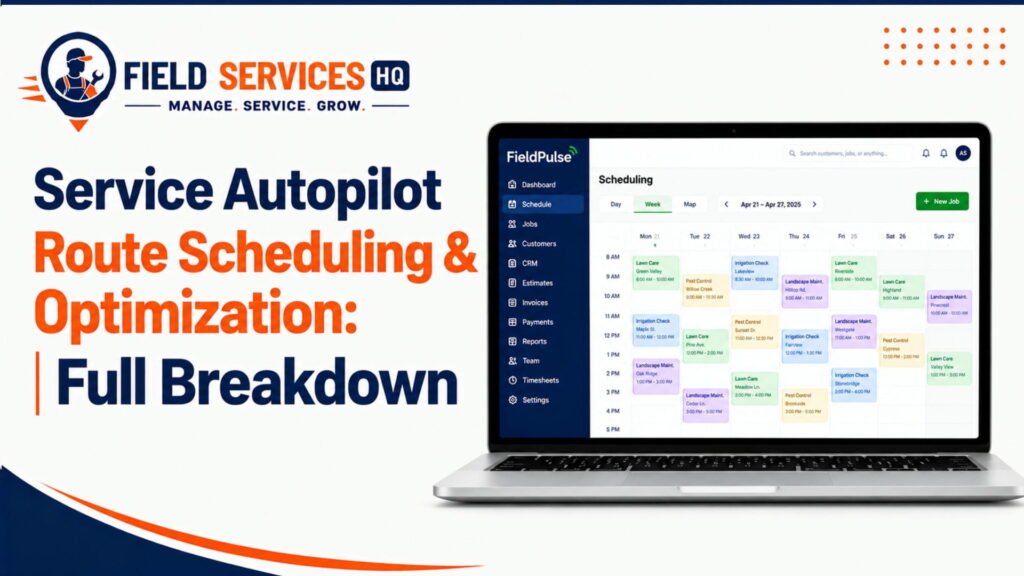
Here is what you get:
- Visual calendar where jobs are dragged to technicians
- Live map of where each van is located
- Alerts for conflicting jobs
- Automatically update technicians and customers
According to Salesforce’s field service research, 47% of technician appointments are no-shows or do not go as planned. They also report scheduling and optimizing field service resources as their primary inefficiency. This is what our software solves.
Scheduling & Dispatch at a Glance
Here is the feature snapshot for the fieldpulse scheduling & dispatch module, based on FieldPulse’s own product pages and help docs.
| Capability | Included? | What to know |
|---|---|---|
| Drag-and-drop calendar | Yes | Assign and reassign jobs visually |
| Dispatch board with job statuses | Yes | New Job, On The Way, In Progress, Pending, Completed, Canceled |
| Live GPS technician tracking | Yes | Fleet tracking is reportedly priced per vehicle |
| Conflict alerts | Yes | Flags overlaps and overbookings |
| Availability suggestions | Yes | “Find Availability” suggests times and tech combinations |
| Customer arrival updates | Yes | Location and ETA updates |
| Technician mobile app | Yes | Schedules, notes, photos, status changes |
| 24/7 AI call answering | Add-on | Operator AI books jobs into the calendar |
| Automated multi-stop route optimization | Unclear | FieldPulse frames it as nearest-tech dispatch |
| Published pricing | No | Quote-based |
According to Contractor ToolStack’s May 2026 review, FieldPulse holds a 4.6 rating on Capterra and 4.8 on G2. Ratings show user satisfaction. They do not prove the dispatch board fits your workflow.
If you want the full product picture, read our FieldPulse Review 2026: Hands-On Test & Honest Verdict.
Who Is FieldPulse Scheduling & Dispatch For?
FieldPulse scheduling and dispatch caters to service businesses that outgrew texts and whiteboards. The company’s own dispatch guide states it serves companies of 5-100 people or franchise locations.
Best Fit Profiles:
- HVAC, plumbing, and electrical shops with 5-50 techs
- Companies with an office person handling dispatch
- Shops handling service calls and multi-day jobs
- Scheduling, invoicing, and CRM in one system
Per the U.S. Bureau of Labor Statistics (BLS), 68% of HVAC technicians work for plumbing, heating, and air-conditioning contractors. These are the multi-van shops FieldPulse aims to serve.
As reported by the SBA Office of Advocacy, the U.S. has 36.2 million small businesses, which employ 45.9% of private-sector workers. The majority of your competition likely falls into this category, making speed and organization essential.
Who Is It Not For?
FieldPulse scheduling and dispatch has an equally lengthy list of who it is not for.
Avoid it, or try it on a free trial, if you are:
- Solo operator or a 1-2 person shop
- Need a free trial before investing
- Require heavy multi-stop route planning
- A recurring-route business (lawn care, pest control)
As of April 2026, per Contractor ToolStack, FieldPulse does not offer a free trial. The same review notes smaller solo operators under $300K in revenue often find cheaper tools. According to the SBA Office of Advocacy’s 2024 frequently asked questions (FAQ), 81.9% of U.S. small businesses have no employees. If this applies to you, you likely do not need a dispatch board.
How FieldPulse Scheduling & Dispatch Works
Let’s walk through an example of how FieldPulse scheduling and dispatch work.
A customer calls, schedules online, or Operator AI (more on that below) answers. You create the job and select a service type. Then, you use Find Availability to choose a slot. You can select one or more techs, then they get an alert in the app. They touch “On The Way,” and the customer gets updates. The tech performs the work, taking logs and photos, then closes the job out, which populates reports.
The help documentation describes step 3 (“Time and User Suggestions”) in detail. FieldPulse recommends based on your scheduling preferences and combinations of available users. You can accept the recommendation or manually select a time.
Per Salesforce, technicians estimate 17 minutes to book an appointment, 14 to reschedule, and 12 to cancel — all manual processes. Software should streamline these.
FieldPulse Scheduling Features
Let’s examine the scheduling side of the software more closely.
Drag-and-Drop Calendar

You can assign jobs by dragging them to a technician’s row. To change a job, simply drag it to a new spot. Per FieldPulse, scheduling updates appear in real time to technicians.
Find Availability
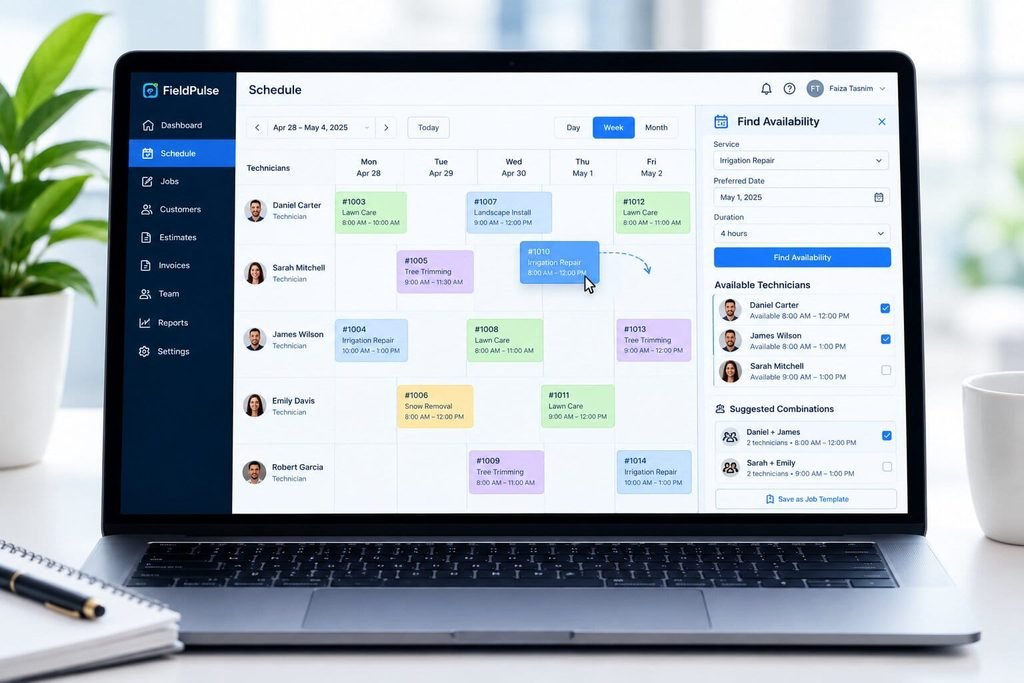
This tool suggests availability when setting up a job. It can suggest specific technicians and combinations, which you can save as job templates.
Multi-Team Views, Filters

You can view schedules by team, service type, or priority. Additionally, you can filter by technician, role, or job status. Teams (Install, Repair, Sales) get their own tabs.
Conflict Alerts

When conflicts arise, the software lets you know — before the customer discovers it.
Recurring Jobs, Multi-Tech Jobs
Per GetApp reviews, users like FieldPulse for recurring and single jobs. Several reviewers mentioned the ability to assign multiple technicians, although some requested more flexibility in arrival windows.
Per Salesforce, 38% of technicians cited frequently disrupted schedules. Disruptions occur due to customer misunderstandings, missing parts, and travel time. Good software brings problems to your attention — it cannot solve poor intake procedures.
FieldPulse Dispatch Features
While scheduling sets up the jobs, dispatch handles execution. What does FieldPulse offer?
Live Technician Map
You can see where your technicians are — and send the nearest available one to an urgent job. FieldPulse notes its dispatch map shows the van’s location and speed.
Nearest-Tech Dispatch
FieldPulse calls this “smart route optimization.” In its own documentation, FieldPulse describes it as nearest-tech dispatch.
Status Updates, Customer ETA
Jobs have status updates, and customers can view information like the technician’s ETA.
Per Salesforce’s field service guide , 71% of customers expect real-time communication, so status updates are no longer a nicety — they are an expectation.
Technician Mobile App
Technicians receive mobile push notifications for new or updated jobs. They can view their schedule and jobs, and take photos and notes. Per Capterra, the application works offline.
Operator AI (Add-On)
As the name suggests, Operator AI is an add-on. It handles after-hours, declined, or busy calls, booking jobs directly into the FieldPulse schedule. Technicians receive SMS or email alerts. Per reviews, the AI features come at an additional cost.
Dispatch Reporting
FieldPulse has reports on scheduling efficiency, utilization, and other metrics. One sample report shows the average time traveled per technician.
FieldPulse Scheduling & Dispatch Use Cases
These scenarios are not client case studies — rather, they represent common situations I have encountered while researching dispatch boards.
Scenario 1: The 6 PM Emergency
A homeowner calls about a broken pipe. Your dispatcher opens the map and sees the closest technician. She moves a job from his afternoon schedule to the new call.
That is the value proposition of location tracking: instead of asking “where are you?” your dispatchers get real-time positions.
Scenario 2: The Sick Call
A technician calls out at 6:45 AM. You have eight jobs assigned to him. Filter by team, then role, and drag suitable jobs to available technicians. Consider skill sets first: no apprentice on a panel change.
Scenario 3: The Two-Tech Install
Your customer wants a water heater installed — but it requires two technicians. Fortunately, FieldPulse allows multi-technician assignment. Conflict alerts ensure neither gets double-booked.
Scenario 4: The Sunday Night AC Call
A customer calls at 9 PM, but no one answers. Operator AI (the phone-answering AI) takes the call, asks qualifying questions, then books a morning appointment. Wake up to a scheduled morning job — not a voicemail.
Per Harvard Business Review’s analysis of 2,241 U.S. companies, the average response time to a website lead was 42 hours as of 2025. Firms that responded in under an hour were nearly seven times more likely to qualify the lead. The study analyzed all industries, but the principle applies to trade firms as well.
FieldPulse by Industry
FieldPulse has solution-specific pages for HVAC, electrical, plumbing, garage doors, locksmiths, appliance repair, septic, and commercial equipment. Fire and security, glass, and A/V installation also have pages. Let’s examine the trades.
HVAC
Service calls, tune-ups, and installations all get slotted on one calendar. The peak season adds pressure to the dispatch team.
For HVAC, the BLS projects 11% growth from 2025-2035. There will be 40,600 job openings yearly, and the median pay was $61,010 as of May 2025. Every technician-hour is costly and difficult to replace.
Plumbing
Plumbing gets flooded with emergency calls, where live location and quick rescheduling matter most.
The BLS projects 7% growth for plumbers from 2025-2035, with a median salary of $63,800 as of May 2025.
Electrical
Electrical work involves service calls, panel upgrades, and inspections. FieldPulse’s multi-technician assignments and job stages apply here as well.
Electrician employment is projected to increase 9% from 2025-2035, per the BLS. The median pay was $63,190 as of May 2025.
Other Trades
Garage door, appliance repair, and septic service have the same service-call profiles as other trades. Landscaping, pest control, roofing, painting, and fencing have no FieldPulse solution pages. The first three are seasonal; the latter two are project-based. Review the “Projects” section before buying.
FieldPulse Scheduling & Dispatch Strengths
Let’s examine the strengths of this software.
Visual Scheduling
GetApp reviewers mention wanting multiple views and dispatch options to avoid double-booking. Google Calendar sync is another plus, per GetApp reviewers.
Fast Tech Adoption
Per Capterra reviewers, technicians and new employees pick up the software quickly. It helps if your staff has some tech fluency.
End-to-End Experience
FieldPulse covers scheduling, invoicing, and CRM — in one interface. You avoid the hassle of separate software.
Access to Support
Capterra reviewers found the support team generally responsive.
As mentioned above, GetApp’s 2026 review notes that all 24 users who provided detailed feedback on the scheduling feature found it important or highly important. That is a tiny sample size, but it suggests that scheduling drives purchases. Most Capterra reviewers noted owners and administrators took longer to learn FieldPulse than technicians did.
FieldPulse Limitations
No dispatch board is without limits. Here are the potential deal-breakers I would ask about before purchasing.
- Routing
FieldPulse describes route optimization as “nearest technician dispatch.” If your technicians make five stops per day across a wide area, request a demo of this particular workflow.
- Arrival Windows
GetApp reviewers suggested more flexibility on arrival windows. See if your booking preferences match FieldPulse’s.
- Add-Ons
Per FieldCamp’s 2026 review, FieldPulse’s base plans start at approximately $89 a month plus $30 per user — but it is a competitor, so double-check the math. The same review notes fleet tracking costs about $30 per vehicle per month. One Capterra reviewer said they spent over $1,000 on add-ons.
- Price Transparency
FieldPulse does not publish price lists. Per third-party vendors, monthly rates range from approximately $99 to $399 or more. See our FieldPulse Pricing 2026 guide for specifics.
- Per-User Costs
Per Contractor ToolStack’s analysis, a 15-person HVAC shop would pay approximately $1,350 per month before add-ons at the published per-user rate. Ask for a written estimate at your staff size.
- Edge Cases
Some Capterra reviewers found support for complex issues to be inconsistent and buggy. Ask for references among similar-sized shops.
FieldPulse vs. Whiteboard & Spreadsheet Scheduling
Many shops start with a whiteboard, Google Sheet, or group text. It works until it doesn’t.
Aquant’s benchmark draws mostly on industrial and equipment service organizations. Residential trades may differ. The direction still holds: failed visits are expensive.
| Factor | Whiteboard / Spreadsheet | FieldPulse |
|---|---|---|
| Cost | Free or near free | Paid, quote-based |
| Real-time tech updates | Calls and texts | Automatic sync |
| Location visibility | Ask by phone | Live GPS map |
| Conflict detection | Human eyes | Built-in alerts |
| Customer ETA updates | Manual | Automated |
| Reporting | Manual tally | Built-in reports |
| Best for | 1 to 3 techs | 5+ techs |
The dispatcher wage is extracted from the BLS Occupational Employment and Wage Statistics for May 2023. Software will not replace a competent dispatcher, but it can augment their talents.
A few ideas: Count your own numbers for two weeks before purchasing
- Missed appointments per week
- Rescheduled jobs per week
- Minutes spent on schedule changes
- Callbacks from mis-assigned jobs
FieldPulse Scheduling & Dispatch Decision Matrix
Use this to score yourself. Answer each row honestly.
| Your situation | FieldPulse likely fits | Look elsewhere |
|---|---|---|
| Team size | 5 to 100 techs | 1 to 2 techs |
| Trade | HVAC, plumbing, electrical, similar | Recurring lawn or pest routes |
| Dispatch style | Board plus map, human dispatcher | Automated multi-stop routing |
| After-hours calls | Willing to add Operator AI | Need fully bundled call answering |
| Budget clarity | Comfortable requesting a quote | Need public pricing |
| Trial needs | Demo is enough | Need a free trial |
Count the number of checks in the left column. Four or more? Then FieldPulse should be on your short list. Three or fewer? Compare it with at least two other tools. According to the 2026 industry benchmark by Aquant, the first-time fix benchmark is 77%, with top performers at 88% and bottom performers at 60%. Choose one metric and track it before and after implementing any software change.
FieldPulse vs. Other FSM Software
Here is how the scheduling and dispatch approach compares. Most of these descriptions come from vendor and review content, so treat them as starting points.
| Tool | Scheduling & dispatch approach (as reported) | Watch for |
|---|---|---|
| FieldPulse | Combined schedule and dispatch view, live GPS, nearest-tech dispatch | Quote-based pricing, add-ons |
| Jobber | Drag-and-drop calendar with route optimization | Can feel limited at 20+ techs |
| Housecall Pro | Real-time dispatching and live GPS | Some users report limited customization |
| ServiceTitan | Configurable dispatch boards, map-based route optimization | Higher cost, harder setup |
According to Tooled Up Pro’s 2026 pricing guide, a 7 to 10 person FieldPulse crew plans to cost around $199 a month by contractor-reported data. Jobber’s 5-user plan runs $99 per month. Align features to processes, not the other way around.
For a complete shortlist, see Best FieldPulse Alternatives: 7 Field Service Software Options Compared (2026).
Is FieldPulse Scheduling & Dispatch Ideal For Your Company?
When considering field service software, there are three primary concerns. Will it integrate with how your office currently dispatches? Will your technicians adopt the new software? Can you really afford the full cost of implementation?
Consider these five questions first
- Does your company have 5 or more technicians working in the field on a daily basis?
- Is someone at your office spending hours per week managing their schedule?
- Do your customers call asking where your technician is?
- Are you missing customer callbacks because they are left on hold until the next day?
- Can your office be up and running for a few weeks with a learning curve?
At least three yes answers to the above means you likely need FieldPulse. According to Salesforce, 66% of technicians and tradespeople say they feel burned out at least once per month, and disorganized schedules are a huge contributor. The right software will not cure all, but it will remove at least one stressor from your technicians’ lives.
Final Decision Snapshot
Pick FieldPulse IF:
- you have between 5 and 100 technicians providing HVAC, plumbing, or electrical services
- you want an all-in-one scheduling tool that includes GPS tracking and invoicing
- a meeting and demo plus a quote is acceptable to you
Pass or test FieldPulse IF:
- you have less than two people working in the field
- your technicians require multi-stop routing
- your customers need transparent pricing and you want a free trial
According to the BLS, there will only be 40,600 new HVAC jobs yearly. There are plenty of qualified technicians, but not enough to staff everyone’s open positions. Take care of your assets by reducing non-essential strain on their schedules.
Confused About Fieldpulse ? Go Through Our Fieldpulse Hub.
FAQs
Does FieldPulse have scheduling and dispatch?
Yes. FieldPulse includes a drag-and-drop scheduler, dispatch board, live GPS tracking, conflict alerts, and a technician mobile app. It also offers customer arrival updates.
Operator AI, a 24/7 call-answering add-on, books jobs into the same calendar.
Is FieldPulse good for small businesses?
It is good for small teams of about 5 or more techs. Solo operators often find it costly for their needs.
According to Contractor ToolStack, shops under $300K in revenue with 1 to 2 people may do better on cheaper tools.
Does FieldPulse have GPS tracking?
Yes. FieldPulse shows technician locations in real time on a dispatch map. Customers can also get location and arrival updates.
User reports say fleet tracking is billed per vehicle, so confirm the cost in your quote.
Does FieldPulse have route optimization?
Partly. FieldPulse calls its feature “smart route optimization,” but defines it as dispatching the nearest available technician.
That is proximity dispatch. If you need automated multi-stop routing, test it in a demo first.
Can FieldPulse book jobs after hours?
Yes, with the Operator AI add-on. It answers after-hours, declined, or overloaded calls and books jobs into your FieldPulse calendar.
According to Harvard Business Review, firms responding within an hour were nearly seven times more likely to qualify a lead.
How much does FieldPulse scheduling and dispatch cost?
FieldPulse does not publish prices. Third-party estimates range from about $99 to $399 or more per month, before add-ons.
Get a written quote. See our FieldPulse Pricing 2026 breakdown for detail.
Does FieldPulse sync with Google Calendar?
GetApp reviewers say yes, and they praise the Google Calendar integration. Confirm setup details with FieldPulse support.
Does the FieldPulse app work offline?
The mobile app includes offline access. Test it in a low-signal area you actually work in.
Is FieldPulse available in Canada?
Yes, FieldPulse is available in Canada. The platform fully supports Canadian field service businesses, particularly in trade sectors like HVAC, electrical, and plumbing.
FieldPulse or Jobber for scheduling and dispatch?
It depends on your size. Jobber’s calendar with route optimization is often praised for small teams. FieldPulse suits teams wanting a dispatch board with GPS and custom workflows.
Compare both in demos. Our alternatives guide lays out the tradeoffs.