FieldPulse for Electrical: Is It the Right Fit?
Quick Answer
FieldPulse is generally a strong fit for small and mid-sized electrical contractors that manage field technicians and want scheduling, dispatching, estimates, invoicing, CRM, payments, and reporting in one system. It may be less suitable for solo electricians seeking the lowest-cost option or larger commercial and industrial contractors that require highly specialized project accounting, payroll, or enterprise workflows.
| Good fit? | Yes, for small and mid-sized electrical contractors managing field service, repair, maintenance, and installation work. |
| How it helps | It connects scheduling, dispatching, estimates, invoicing, payments, customer management, and reporting in one platform. |
| Helps most with | Service calls, repairs, maintenance agreements, estimates, invoicing, and managing technician workloads. |
| Best suited size | Small and mid-sized electrical businesses, including teams that need to coordinate multiple field technicians. |
| Potential limitations | Solo operators seeking the lowest-cost solution and larger commercial |
Electrical contractors are rarely in the business of making a killing. A slip on the job site and a week’s profit is gone. That’s why the right software to manage your scheduling, estimates, and invoices plays as big a role as the tools in your belt.

FieldPulse is a field service management software company based out of Dallas, Texas, that launched in 2015. They target residential and commercial service companies that perform electrical, HVAC, plumbing, appliance repair, and AV installation services. The platform enables users to schedule jobs, create estimates, invoice clients, manage customers, jobs, and payments, and access reports.
The guide below will help you decide whether FieldPulse is suitable for your electrical business, highlight the software’s shortcomings, and advise on the criteria to consider before choosing a field service management platform.
The right question to ask yourself when determining whether FieldPulse will be a good fit for your electrical contracting business depends on your size, the nature of your projects, and the level of customization you need in your scheduling software. We’ll take a closer look at each factor.
Is FieldPulse Worth It for Electrical Contractors?
The truth is that there is no best field service software for electrical contractors. Every business has unique needs and priorities, and the tool should be chosen according to the company’s industry, size, and unique workflows.
FieldPulse is a field service management software designed for small and medium-sized enterprises. The company bills itself as a field service management software for organizations with five to two hundred employees, with an emphasis on connecting office and field operations, covering scheduling, estimating, invoicing, and more.
Why FieldPulse Should Be on Your Short List
FieldPulse could be a good fit for an electrical contractor because the tool allows them to
- combine scheduling, estimating, invoicing, and customer management,
- centralize customer and job information,
- simplify the technician’s mobile workflow,
- get access to estimating, job, and field-service management tools,
- integrate with QuickBooks software, and
- use AI for call management and job dispatching.
Before finalizing the choice, it is worth double-checking if the target plan and edition include features such as Pricebook, Good – Better – Best, offline mode, payment options, advanced reporting, and automation tools.
How Can It Help You
Scheduling and dispatching

FieldPulse could be helpful in providing an overview of the open jobs and technician’s schedules, and during the demo, it will be important to check if the available dispatching and routing options support the company’s unique scheduling needs and priorities.
Read our complete breakdown of Fieldpluse Scheduling & Dispatch here.
Electrical service calls
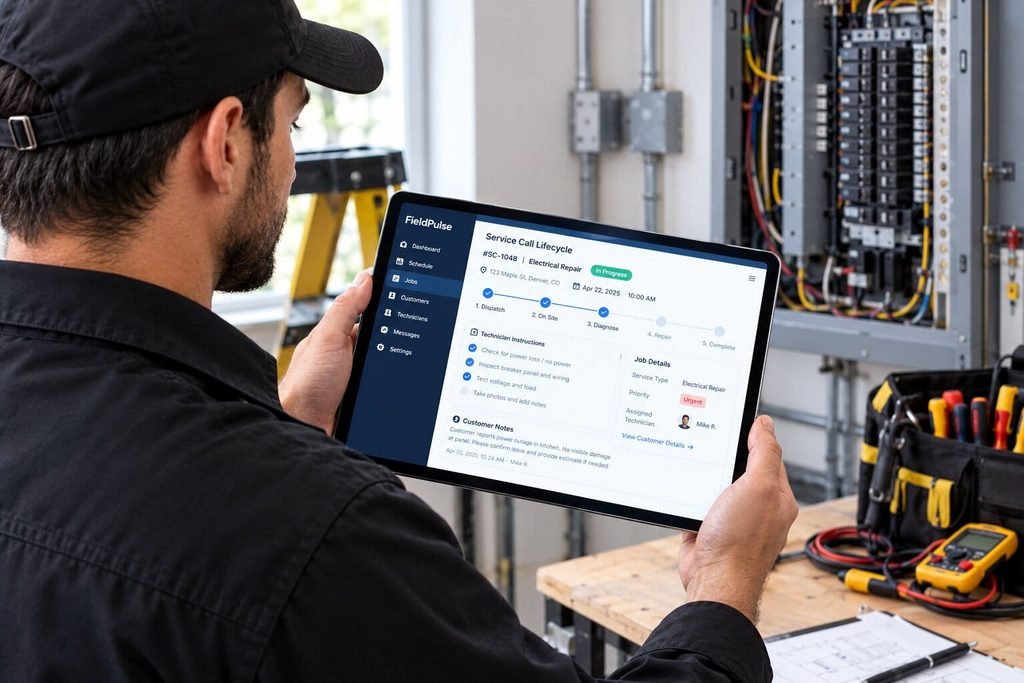
Technicians could use the platform to track customer information, job details, and previous notes or estimates. In theory, it should reduce the need for phone calls to the office to get the required job or customer details, but the ideal option will be to try a few sample tasks on the mobile version.
Estimates and job management
The software allows creating estimates and managing the jobs in one place, but it is worth clarifying if the required options for estimate creation (itemized, predefined, Good – Better – Best, multiple options, approvals) are available as standard features or as an add-on, and if the Pricebook functionality fits the business needs.
Read the full Fieldpulse estimate guide here.
Customer management
The system allows managing customer data, addresses, jobs, invoices, and estimates, but it will be critical to determine which information is available via QuickBooks integration and if the system supports the required accounting functions.
Technician’s mobile workflow
By default, the tool allows technicians to access the jobs from the mobile application, but the company should ask FieldPulse support if the required features (photos, signatures, time-tracking, parts and inventory tracking, payments, offline mode) can be found in the target plan and if it is supported in the local area.
Invoicing and payments
The invoicing options allow generating invoices and receiving payments, but the firm should clarify if the accepted payments can be integrated into the accounting system (QuickBooks), if the approved estimate can be used for invoicing, and if the method and currency are supported.
Read the full Fieldpulse invoicing guide here.
Reporting and business management
The software provides reporting and management features for field-service companies, but the contractors should confirm if the tool allows generating the required reports on labor, materials, job cost, technician productivity, overhead, and custom metrics.
Doesn’t Fit by Company Size?
Solo electricians
If the company is a solo electrician, it might be worth double-checking if the tool is not overkill, and a simpler solution that provides basic scheduling, invoicing, and payment options is available at a lower price.
Small electrical contractors
The choice of FieldPulse is justified if shared scheduling, dispatching, estimates, invoicing, customer management, and QuickBooks integration are needed, but the company should review the overall cost and the required setup time and resources.
Growing electrical companies
As the organization grows and starts to manage more technicians and jobs, budget, staffing, and operations become increasingly important, and the tools such as estimating and job-costing workflows, technician’s permissions, standard operating procedures, and mobile applications become more relevant. It will be worth considering the tool during the review of daily processes and pain points, with the emphasis on the recurring calls or the need for technician-specific, multi-visit jobs.
Larger and multi-crew contractors
The system might be considered for larger commercial and industrial accounts but ask if the tool can support the unique requirements for large projects, change orders, purchase orders, job costing, union payroll, prevailing wage, multiple locations, and enterprise reporting.
Doesn’t Fit by Industry and Business Type ?
Residential electrical contractors
The tool ideally fits residential electrical service and repair companies with core scheduling, customer management, estimate, invoicing, and mobile features in mind, but the demo will be the ideal opportunity to try the most common residential jobs, including panel upgrades, outlet repair, lighting, inspection, and emergency service.
Light commercial contractors
The same logic applies to the light commercial contractors with the emphasis on recurring and preventive maintenance but double-check if the tool supports more complex commercial work and change orders, subcontractors, job approvals, and project accounting.
Service and repair companies
If the company is service and repair-focused, FieldPulse could be helpful due to the emphasis on customer- and technician-centric features, including access to the estimating, scheduling, job tracking, invoicing, and mobile features.
Emergency electrical service companies
Operator AI can be used for answering calls, and the tool provides dispatching features, but the company should confirm if it can utilize the tool’s benefits for emergency service, including after-hours dispatching or the ability to accept or deny a customer’s request to book a service call.
Paper/Spreadsheet Users
If the organization finds it difficult to utilize multiple tools and prefers a single integrated solution, the tool can help manage scheduling, work orders, estimating, invoicing, customer management, and technician’s mobile access, but it will be worth analyzing the bottom-line benefits in terms of reduced errors, faster invoicing, reduced administrative work, and faster payments.
Users That Want to Switch Vendors
For users looking to switch from another field service software, the company should ask about migration assistance, historical data import, and overall time and cost to migrate to QuickBooks, integrate with other tools, onboard the staff, provide training, and finalize contracts and setup.
Sample Workflow
The typical electrical contractor’s workflow can look like this:
- A customer calls or submits a request, which creates an estimate or a work order.
- The office schedules the job and assigns an available technician.
- The technician reviews the job details, including paperwork and customer history, which they can find in the mobile application.
- The technician performs a service call, including the estimate, if required.
- The customer approves the estimate, and the technician updates the job and invoices, marking time and materials.
- The customer makes the payment, which is processed by the selected method.
- Finally, the office reviews the customer information and schedules the next job or a regular maintenance service.
During the demo, it will be possible to see how estimating and scheduling features work, how the recurring jobs or payments options are set up, and if the tools such as offline mode or QuickBooks integration are useful for the daily tasks.
Alternatives
The electrical contractors should consider field service software, including ServiceTitan , Jobber , Housecall Pro , FieldEdge , and other similar tools, and compare the options based on several criteria:
- Number of employees and users
- Mix of residential, commercial, and industrial jobs and projects
- Core features: scheduling and dispatching, estimating, job cost and project accounting, invoicing and payments
- Integration with QuickBooks and other tools: payroll, union, and prevailing wage, and financial management
- Mobile and offline capabilities: technician’s mobile app, access to estimates, time and materials, and parts tracking
- Reporting and dashboards: job costing, labor, materials, overhead, and custom reports
Simpler electrical contractors can choose between smaller and more affordable solutions, but the companies with a growing customer base, increased staff, and more complex jobs will find FieldPulse as an ideal option for field-service management, organization, and centralization of operations. Any tool, including FieldPulse, has its nuances, and it will be worth double-checking if the software fits the business in terms of features, budget, learning curve, and long-term goals.
| Software | Best suited for | Relevant capabilities | Potential limitations |
|---|---|---|---|
| FieldPulse | Small and mid-sized residential or light-commercial electrical businesses | Scheduling, dispatching, estimates, invoicing, job costing, inventory, workflow stages, roles and permissions, and two-way QuickBooks synchronization. Its mobile app can cache recent jobs, customers, estimates, and invoices for limited offline work. fieldpulse+1 | Pricing and plan limits should be confirmed with FieldPulse. It may require more configuration than simpler entry-level tools. fieldpulse |
| Jobber | Solo operators and small service teams | Scheduling, quoting, invoicing, payments, customer management, and client-facing tools | Larger commercial contractors should verify whether its project management, job costing, and reporting depth meet their requirements |
| ServiceTitan | Larger residential, commercial, and multi-location operations | Advanced dispatching, reporting, marketing, financing, customer management, and trade-focused workflows | Typically requires a sales process and more implementation effort; total pricing should be confirmed directly |
| Housecall Pro | Residential electrical service businesses and small-to-midsized teams | Scheduling, dispatching, estimates, invoicing, payments, online booking, customer communication, and review-related tools servicefusion | May provide less depth than enterprise platforms for complex projects, advanced job costing, and large commercial operations |
| Service Fusion | Small and mid-sized field-service teams seeking flat-rate pricing options | Scheduling, dispatching, estimating, customer management, invoicing, payments, time tracking, and GPS-related tools servicefusion | Verify integrations, service-agreement functionality, and advanced commercial project requirements before choosing it |
| BuildOps | Commercial electrical and specialty contractors | Commercial field service, project management, service agreements, billing, dispatching, and reporting buildops | May be more complex than necessary for a small residential electrical business |
Read Our Complete Fieldpulse Alternative Guide.
FieldPulse Fit Scorecard
| Capability | Editorial assessment |
|---|---|
| Scheduling | Strong |
| Dispatching | Strong |
| Service calls | Strong |
| Emergency jobs | Good; verify the workflow and consider Operator AI for call handling |
| Estimates | Strong |
| Customer management | Strong |
| Technician management | Good |
| Mobile field work | Strong; limited offline functionality is available through cached data |
| Invoicing | Strong |
| Payments | Good; card, ACH, and payment-link options should be confirmed for your plan |
| Reporting | Good; verify the depth of job-costing and custom reports you need |
| Multi-crew operations | Good for many small and mid-sized teams; test complex, large-scale workflows |
| Recurring work | Good potential; confirm maintenance-agreement features and automation |
FieldPulse for Electrical Contractors: Pros & Cons
Pros
- All-in-one : FieldPulse brings scheduling, dispatching, CRM/customer management, estimates, invoicing, work orders, payments, mobile tools and reporting into a single platform.
- Flat-rate Pricebook : FieldPulse brings a Pricebook feature for standardized rates across services, materials and labor – and electrical estimating materials suggest it can be used to create estimates.
- Good/Better/Best estimates : FieldPulse’s estimating tools support multiple proposal types, including Good, Better and Best, and electrical estimating materials suggest it can be used to create estimates.
- Offline capability : FieldPulse’s mobile tools support offline work – with Capterra reviewers flagging its use in some areas as a specific plus. (Note: offline capabilities can vary significantly by specific use case)
- Strong customer support ratings : Capterra’s current customer-service score for FieldPulse is 4.7/5.
- QuickBooks integration : FieldPulse supports QuickBooks integration, including invoice and payment sync.
Cons
- No public pricing : FieldPulse only offers customized, seat-based pricing – and requires a quote rather than publishing plan prices.
- Can have a learning curve : Some Capterra reviewers note that FieldPulse takes time to learn or configure, in part due to the feature depth.
- Some report workflow/data frustrations : Capterra reviewers have noted occasional FieldPulse glitches, as well as issues with data management, synchronization and opportunities to simplify certain workflows.
- Premium options can increase costs : FieldPulse offers optional premium products and capabilities beyond its core tools – and its per-seat pricing can vary based on the team’s requirements.
- Some reviewers have mixed value perceptions : Certain Capterra reviewers, including those in the electrical/electronic manufacturing space, have expressed concerns or mixed value perceptions.
What Other Electrical Contractors Are Saying About FieldPulse
Capterra‘s current FieldPulse score is 4.6 out of 5, based on 498 reviews at the time of this writing, with 4.5/5 for ease of use and 4.7/5 for customer service.
Electrical contractor experiences
Electrical and electronics businesses represented in Capterra reviews include both positive and negative experiences.
One electrical/electronic manufacturing reviewer gave FieldPulse a 9/10 score, noting the breadth of the core product and the onboarding experience.
Other electrical/electronics reviewers have reported positive experiences with support, scheduling, service organization and overall functionality, but also noted pricing concerns, syncing issues or opportunities for improved workflow.
What they like
- Scheduling, estimates, invoicing and customer information can be handled in a single platform.
- Electrical/electronics reviewers have noted positive experiences with FieldPulse’s overall features and customer service.
- Offline functionality can be critical in certain locations.
- QuickBooks integration is a noted plus for many reviewers.
What they dislike
- Some reviewers find FieldPulse’s pricing too high relative to their requirements or alternatives.
- Some users report a FieldPulse learning curve.
- Some reviewers have mentioned FieldPulse workflow or data-management issues.
Specific limitations or concerns
As with any review, individual experiences should be considered within their specific context, and not extrapolated to every potential FieldPulse customer.
The FieldPulse Capterra reviews reflect a range of positive and negative experiences and include reports of strong support and functionality as well as sync, workflow, pricing or other issues.
How relevant those experiences are to different electrical businesses
Review data context is important. Capterra’s FieldPulse reviewers represent a range of industries, company sizes and specific use cases – and an electrical/electronic manufacturing review may not reflect the experience of a small residential electrical contractor.
What Electrical Contractors Should Verify Before Choosing FieldPulse
Before finalizing a contract, verify these during your FieldPulse demo:
- Electrical workflow : Examine the estimating, forms, job status and workflow tools that you actually use.
- Pricing and user costs : Request a written quote based on your specific team size and seats.
- Payment processing : Ask for applicable FieldPulse Payments fees based on your payment mix.
- Integrations : Confirm FieldPulse support for QuickBooks and other accounting, CRM or operational tools that you require.
- Mobile workflow : Test the FieldPulse mobile tools and offline functionality in the locations where your technicians work.
- Reporting : Confirm that the FieldPulse reporting and dashboards support the KPIs that you track.
- Custom workflows : Test required fields, job status, permission and other workflow requirements before signing.
- Onboarding and migration : Determine what data can be migrated from your current system, and what onboarding support is included.
Use our field service software buyer’s checklist to ensure consistency when comparing different field service software vendors.
FieldPulse Pricing for Electrical Contractors
FieldPulse Pricing Snapshot
Custom
No published price; quote-only
Seat-based
Priced per user, by role
No free trial
Per Capterra listing data
4.6 / 5
Capterra rating, 400+ reviews
Technician/user considerations
Since FieldPulse uses a seat-based model, request a detailed explanation of how each user type is priced and what access each seat includes. Avoid assuming a specific technician-versus-office user structure unless it has been confirmed in your quote.
Additional costs or fees
FieldPulse’s pricing page specifically calls out certain capabilities as optional premium capabilities. These include fleet tracking, VoIP, AI dispatching, reporting, custom forms and other tools. As with any software, request a written cost breakdown for the specific capabilities you require.
While certain websites may publish FieldPulse cost estimates, these should not be assumed as official unless confirmed by FieldPulse. Capterra’s current data for FieldPulse notes that its starting price is not available and that it uses a custom quote model.
Read Our Full Fieldpulse Pricing Guide.
What an electrical contractor should calculate before buying
- Total seat cost based on your current team size.
- Optional premium capability costs.
- Payment-processing costs based on expected invoice volume.
- Onboarding and data-migration requirements.
- Contract length and termination terms.
Is FieldPulse a Fit for Your Electrical Business?
FieldPulse may be worth considering if…
- You need scheduling, dispatch, estimates, invoicing, CRM and job management in a single platform.
- You are looking to transition from spreadsheets, paper processes or disconnected tools.
- Your technicians need mobile access to customer/job information.
- You want a standardized pricing structure (Pricebook).
- You need QuickBooks integration.
Areas to evaluate
- Your required level of project accounting and job costing.
- Whether the workflow customization options fit your electrical service requirements.
- Whether the mobile/offline capabilities apply to your actual field conditions.
- The overall seat and premium-feature cost relative to your budget.
- The reporting and integration capabilities relative to your requirements.
Best suited for
FieldPulse is an all-in-one field-service platform with Capterra reviewers indicating substantial small-business adoption, with scheduling, job tracking, customer management, estimates, invoicing and mobile capabilities as its main features.
The important consideration for an electrical contractor is whether those capabilities align with your specific service, staffing, accounting and workflow needs.
Before you choose
- Get a written quote for your specific team and seat requirements.
- Test the mobile application and its offline capabilities in your service area.
- Confirm the QuickBooks and other required integrations.
- Test your specific electrical estimating and workflow requirements during your demo.
- Inquire about data migration and onboarding.
- Review the contract and any additional premium costs before signing.
- Compare the overall cost and capabilities with at least two other field service software options.
New to Fieldpulse ? Read Our Complete Fieldpulse Review here.
Confused About Fieldpulse ? Go Through Our Fieldpulse Hub.
FAQ
Is FieldPulse good for electrical contractors?
FieldPulse is a good fit for electrical contractors running residential or light commercial service, repair, and install work. It combines scheduling, estimates, invoicing, and CRM in one platform, and FieldPulse itself states the software is built for electrical businesses with 5 to 200 employees.
Is FieldPulse good for solo electricians?
FieldPulse is generally not the ideal starting point for a solo electrician. The platform is priced and built around teams rather than single operators, so a lighter scheduling and invoicing tool is often more cost-effective until you hire your first employee or subcontractor.
Can FieldPulse handle electrical service calls?
Yes. FieldPulse lets technicians log call details, troubleshooting notes, and photos, then pull up a customer’s full job history before or during a visit. Techs can convert a diagnostic call directly into an estimate on the same visit.
Does FieldPulse offer scheduling and dispatching for electricians?
Yes. FieldPulse’s scheduling and dispatch tools show each technician’s schedule and location in real time, support automated job routing by skill or location, and let dispatchers reassign jobs quickly when plans change.
Can electrical contractors create estimates with FieldPulse?
Yes. FieldPulse includes an on-site estimate builder that uses pre-set labor and material rates from a Pricebook, plus Good, Better, Best pricing tiers and a built-in signature pad for on-the-spot approvals.
Can FieldPulse handle electrical invoicing and payments?
Yes. Approved estimates convert into invoices with one click, and FieldPulse Payments supports card, ACH, and digital wallet payments in the field or online, with every transaction logged to the customer record.
Is FieldPulse good for multi-crew electrical contractors?
FieldPulse can support multi-crew electrical operations using dashboards, job costing, and custom workflows, and FieldPulse states it serves electrical businesses with 5 to 200 employees. Very large commercial or industrial multi-crew operations should still verify project accounting depth and confirm fit directly with FieldPulse before committing.
Can FieldPulse manage recurring electrical work?
Yes. FieldPulse supports maintenance agreements that can generate recurring jobs automatically, which is useful for electrical contractors managing ongoing commercial maintenance contracts or residential service plans.
How much does FieldPulse cost for electrical contractors?
FieldPulse does not publish set pricing. It uses seat-based pricing, meaning cost depends on team size and the mix of full-access versus field-only seats, according to FieldPulse’s own pricing page. Contractors should request a custom quote and confirm all add-on costs in writing before signing.
What are the best FieldPulse alternatives for electricians?
Common alternatives electrical contractors compare against FieldPulse include Jobber for very small teams, ServiceTitan for larger residential and commercial operations, Housecall Pro for small to mid-size residential teams, Service Fusion for flat-rate pricing preferences, and BuildOps for commercial and specialty contractors.