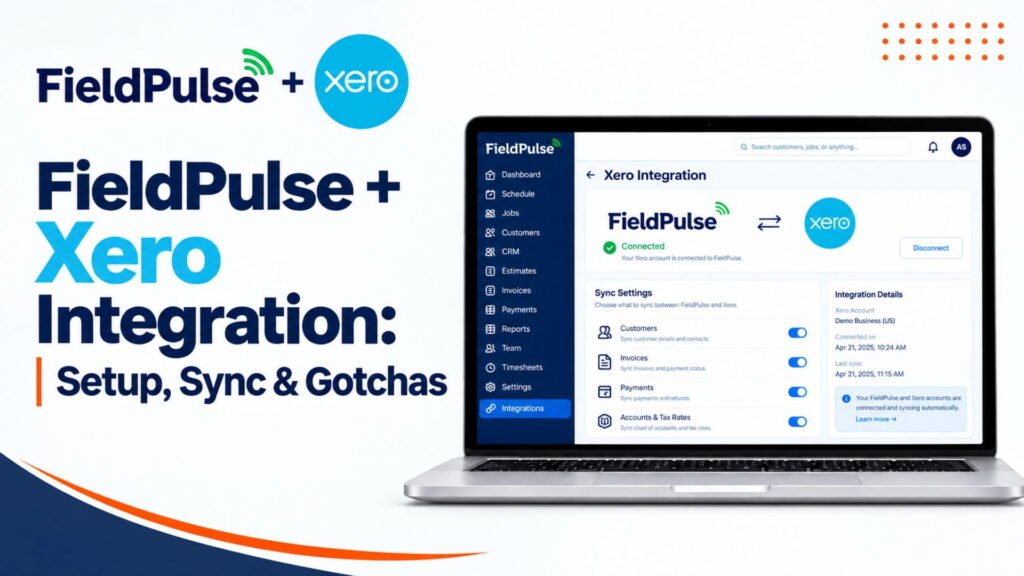
FieldPulse + Xero Integration: Setup, Sync & Gotchas
| Question | Answer |
|---|---|
| Does FieldPulse integrate with Xero? | Yes. FieldPulse offers a native two-way Xero integration. Xero states that customers/contacts, quotes, invoices, payments, invoice items and tax rates can sync between FieldPulse and Xero. The Xero App Store lists the integration for Australia and New Zealand. |
| Best for | FieldPulse users in Australia or New Zealand who already use Xero for accounting. |
| Not needed for | Businesses that do not use Xero. For US and Canadian businesses, verify the currently available accounting integrations with FieldPulse rather than treating Xero as available there; FieldPulse’s current public Xero listing specifically identifies Australia and New Zealand. |
| Which pricing plan includes it? | FieldPulse’s Australian pricing page currently lists Xero integration as an available feature, but does not publicly identify a specific plan or separate Xero add-on price. |
| How to integrate | FieldPulse’s Australian site says its team can walk customers through authenticating their Xero account. The Xero App Store directs users to FieldPulse’s Xero integration setup article or FieldPulse support for getting started. |
| Why integrate? | It synchronizes accounting-related data between the platforms, including customers/contacts, quotes, invoices, payments and invoice items, reducing duplicate data entry. |
Our Verdict
FieldPulse has a native, two-way Xero integration. Australia and New Zealand only are identified as supported countries in the Xero listing. Supported data like contacts, quotes, invoices, payment records, invoice items and tax rates synchronize between FieldPulse and Xero.
FieldPulse users in other markets must not assume that the Xero integration is available. Xero’s current FieldPulse listing identifies Australia and New Zealand specifically. FieldPulse separately documents QuickBooks Online integration for the United States, Canada and Australia.
Does FieldPulse Integrate With Xero?
Yes.
FieldPulse has a native Xero integration, which the vendor describes as two-way, allowing automatic customer, quote, invoice, payment record and invoice item synchronization. Xero’s shared-data section also identifies tax rates, payments, items, invoices and contacts as being shared in both directions.
FieldPulse’s Australian website independently confirms that FieldPulse integrates with Xero and describes the synchronization of customers, invoice items, quotes, invoices and payments.
Official status at a glance
- Type: Native FieldPulse/Xero integration
- Direction: Two-way
- Countries listed by Xero: Australia and New Zealand
- Shared data: Contacts, quotes, invoices, payment records, invoice items and tax rates
- Setup: Xero directs users to the FieldPulse Xero integration article or FieldPulse support.
What the Integration Does
The integration is designed to reduce redundant data entry between FieldPulse and Xero.
Xero explains that data can be imported from Xero into FieldPulse after connection, and that record creation/editing involving customers, invoices and payments can be synchronized between FieldPulse and Xero.
FieldPulse similarly describes its Xero integration as a tool to avoid duplication of effort when managing customers, invoice items, quotes, invoices and payments.
What It Does Not Do
The current Xero listing identifies the data categories supported by the FieldPulse and Xero integration, but I could not verify the following specific restrictions from the current FieldPulse/Xero official sources:
- Credit adjustments are not synced.
- Xero credit memos/credit notes do not return to FieldPulse.
- Estimates are strictly one-way.
- Only the first five contacts per customer sync.
- Bulk contact deletion does not sync.
- The first sync always follows a customers → line items → invoices sequence.
- A specific Xero sync frequency is documented.
- The exact SKU/name restrictions described below.
These should not therefore be described as confirmed facts without the current FieldPulse Help Center supporting them explicitly.
Who Is It For?
The Xero integration appeals to:
- FieldPulse customers using Xero
- Businesses in Australia or New Zealand (the countries currently listed by Xero for the FieldPulse app)
- Teams wanting supported customer, quote, invoice, payment, item and tax data to synchronize between FieldPulse and Xero
- Businesses looking to reduce duplicate accounting data entry.
Who Is It Not For?
It is not appropriate if you do not use Xero.
FieldPulse users in countries not currently listed by Xero should not assume that the FieldPulse/Xero integration will be available to them, but should rather contact FieldPulse to confirm.
For the US and Canada, FieldPulse’s current official documentation confirms QuickBooks Online integration. FieldPulse identifies QBO availability across the US, Canada and Australia and supports Essentials, Plus and Advanced.
If You Are in the US or Canada
QuickBooks Online
FieldPulse currently documents QuickBooks Online integration across the United States, Canada and Australia.
Support across QBO plan types includes:
- Essentials
- Plus
- Advanced
FieldPulse documents two-way synchronization of customers, line items, estimates, invoices and payments.
Read Our Fieldpulse & Quickbook integration guide here.
QuickBooks Desktop
FieldPulse’s current documentation says its QuickBooks Desktop integration supports QuickBooks Desktop 2023 and newer, not 2024 and newer.
Editions supported include:
- Contractor
- Pro
- Premier
- Enterprise
The integration works only on Windows. FieldPulse says that the QuickBooks Web Connector must be kept on and open for synchronization, and that the machine’s sleep mode must be turned off.
What You Need to Integrate
At a bare minimum, you need:
- An active FieldPulse account
- An active Xero account
- Authorization to connect the accounts
- Access to the FieldPulse Xero integration
- Xero says that users can refer to FieldPulse’s Xero integration article or contact FieldPulse via support@fieldpulse.com or the fieldpulse.com live chat for setup assistance.
- I could not verify from the current sources if any or all of the following are mandatory Xero requirements:
- FieldPulse Admin access
- FieldPulse support must enable the integration
- A Xero tax rate must exist even when no tax is charged
- Historical-record direction must be selected
- Default sales account must be selected
- Default payment account must be selected
These should therefore be deleted unless the current FieldPulse setup documentation confirms them.
Pricing
The current Xero listing does not include a separate Xero integration price; FieldPulse’s Australian website promotes Xero as an integration option but does not identify a separate Xero integration charge on this page.
Do not claim that a FieldPulse plan includes Xero integration unless FieldPulse confirms the plan that applies to the customer’s account.
Read Our Full Fieldpulse Pricing Breakdown here.
How to Integrate FieldPulse + Xero
Xero’s official listing directs customers to FieldPulse’s Xero integration article to set up the integration and includes FieldPulse’s support email and live-chat option.
Because the current FieldPulse setup article could not be independently verified from the retrieved sources, the following detailed sequence should not be published as verified:
- Request access from support.
- Open Company Settings.
- Open Features & Plugins.
- Select a Xero tile.
- Select historical synchronization settings.
- Select default sales, tax and payment accounts.
- Accept integration terms.
- Run the initial sync.
- Run a verification test.
The safe, source-supported statement is this:
Connect FieldPulse to Xero using the FieldPulse Xero integration setup guide, or contact FieldPulse support for assistance with authentication and setup.
Data Preparation
The original article has several highly specific claims around SKUs, item names and GST accounts that I could not verify from the current official FieldPulse/Xero sources.
In particular, do not publish these as verified rules unless they are directly documented:
- Every item must have a unique alphanumeric SKU.
- Special characters are prohibited in item names.
- Item names cannot contain both letters and numbers.
- “2 inch PVC elbow” will fail to sync.
- A GST account must be configured on every item.
- Xero requires a particular Products & Services category restriction.
FieldPulse’s public API documentation does show fields like Xero sales accounts and Xero tax accounts, but that alone does not confirm the detailed synchronization rules described in the original article.
What Data Syncs?
Here is the full direction map:
| Record type | Direction after first sync | Key note |
|---|---|---|
| Customers | Two-way | Xero contacts, suppliers and customers arrive as customers |
| Line items | Two-way | Unique SKU and GST account required |
| Invoices | Two-way | Syncs only after Invoiced status |
| Payments | Two-way | Uses the default payment account you picked |
| Estimates | One-way (FieldPulse to Xero) | Xero edits do not return |
Status Mapping
FieldPulse and Xero synchronize supported records in both directions. Xero’s official listing indicates that invoices, payments, contacts, items and tax rates are shared between the two systems. Xero notes that customers, quotes, invoices, payment records and invoice items can be synced automatically between FieldPulse and Xero.
However, the current public Xero listing does not document this full status-to-status mapping table.
Do not publish the following mappings as verified unless you have the current FieldPulse help center documentation:
- DRAFT → Draft
- SUBMITTED/AUTHORIZED → Invoiced
- PAID → Paid
- VOIDED → Void
- FieldPulse Draft → Xero Draft
- FieldPulse Archived/Void → Xero VOIDED
- FieldPulse Paid → Xero PAID
- Other FieldPulse statuses → Xero AUTHORIZED
- FieldPulse Archived estimate → Xero VOID
- Other estimates → Xero SENT
Sync Timing
FieldPulse’s Xero integration is documented as automatic, but the current Xero listing does not show a specific sync interval.
Therefore, avoid specifying a number of minutes or claiming that a first import will follow a particular sequence unless the current FieldPulse documentation confirms it.
As a practical test, try creating or updating a small test record and confirm the expected synchronized record appears in the other system.
Tax
Tax rates are explicitly documented by Xero as being shared from Xero to FieldPulse and vice versa.
In addition, FieldPulse users have reported Xero/GST-related issues in independent reviews, making it a good area to investigate. One Capterra reviewer mentioned that the Xero interface caused GST errors.
However, I could not verify the following specific rules from the current sources:
- Xero has a tax rate on every line item.
- FieldPulse uses exactly one tax rate for everything.
- A mismatched Xero/FieldPulse tax rate necessarily prevents an item from syncing.
- An invoice containing such an item necessarily fails to sync.
Do not state those as universal rules without the current FieldPulse documentation.
Sales Accounts by Customer or Job
I could not verify from the current public Xero listing that FieldPulse offers exactly these three levels of Xero sales-account configuration:
- Company default
- Customer-level override
- Job-level override
I would not publish that hierarchy as fact without direct FieldPulse documentation.
Similarly, the claim that the setting affects only new estimates and invoices created after activation requires direct documentation before publication.
A safer statement is:
FieldPulse’s Xero integration supports accounting data synchronization, and account/tax configuration may affect record mapping into Xero. Confirm available account mapping settings with FieldPulse before changing your accounting structure.
Common Issues
The current official and independent evidence supports designating the following as reasonable areas to investigate:
- Connection/authentication problems
- Missing invoices
- Customer/contact synchronization problems
- Item synchronization problems
- Tax/GST configuration problems
- Xero account or mapping problems
Xero specifically states that contacts, invoices, payments, items and tax rates are shared between FieldPulse and Xero.
An independent Capterra reviewer also mentioned GST errors with the Xero interface, demonstrating that tax-related problems can occur in practice.
I could not verify the following as documented FieldPulse troubleshooting rules:
- A “bad” record necessarily blocks every subsequent record.
- An invoice cannot sync until both its customer and line items have synchronized.
- The first import always follows a fixed customer → line item → invoice sequence.
- Sync stalls after the first import as a documented/common FieldPulse behavior
Fixes
For a missing or incorrect Xero record, start with the corresponding upstream data:
- Confirm the FieldPulse/Xero connection is authorized.
- Check if the customer/contact exists and synchronized correctly.
- Check the relevant item/line item data.
- Check tax rate and accounting configuration.
- Check the invoice/payment record itself.
- If the issue persists, use FieldPulse support.
Xero’s official listing refers users to FieldPulse’s Xero integration article and provides FieldPulse support at support@fieldpulse.com and website live chat.
| Issue | What to Check | Fix |
|---|---|---|
| Connection fails | Xero authorization and FieldPulse/Xero connection availability | Re-authorize the connection or contact FieldPulse support if you cannot connect. Xero’s FieldPulse listing directs users to FieldPulse’s setup guidance and support. |
| Invoice not in Xero | Whether the invoice and its related customer/item data have synchronized correctly | Check the invoice and related records in both systems. Do not state that an invoice must total at least $1 unless FieldPulse documentation confirms that requirement. |
| Item will not sync | Item data, tax configuration and the Xero/FieldPulse mapping | Check the item’s configuration and tax/account mapping. Do not state that a unique SKU, removal of symbols, or changing a $0 item to $1 is mandatory unless directly confirmed by current FieldPulse documentation. |
| Customer will not sync | Customer/contact information and existing records | Check the customer/contact data and whether a corresponding record already exists in Xero. |
| Duplicate data | Existing records in both systems | Review the existing records before manually recreating them. Resolve duplicates using the appropriate record-management process. |
| Wrong accounting data | Tax rates, items, invoices and accounting mappings | Compare the relevant FieldPulse and Xero configuration and correct the mapping. FieldPulse/Xero officially document two-way sharing of tax rates, items, invoices, payments and contacts. |
| Sync stopped | Connection authorization and the affected records/configuration | Check the connection and the specific record causing the problem, then contact FieldPulse support if synchronization does not resume. Do not state that disconnecting other Xero apps is a documented FieldPulse fix unless the current FieldPulse documentation confirms it. |
Specific Rules Worth Printing
Line items
Xero and FieldPulse share two-way synchronization for items.
Tax rates are also shared in both directions.
Customers
Customers/contacts synchronize between FieldPulse and Xero. Xero specifically lists contacts as shared both ways.
Xero settings
Tax rates, items, invoices, payments and contacts are part of the documented two-way FieldPulse/Xero synchronization.
What to Expect After Successful Integration
A successful connection should enable the supported records to synchronize between the two systems.
In Xero, you should be able to verify:
- FieldPulse customers/contacts appearing as Xero contacts
- FieldPulse items appearing as Xero items
- Invoices synchronizing between the systems
- Payments synchronizing between the systems
- Applicable tax-rate information being shared
Xero explicitly documents two-way sharing of contacts, invoices, payments, items and tax rates. It also describes automatic syncing of customers, quotes, invoices, payment records and invoice items.
In FieldPulse
Xero confirms that existing Xero data can automatically be imported into FieldPulse after connection. It also states that creating/editing customer, invoice and payment records can automatically be reflected across FieldPulse and Xero.
The specific claims about an ‘Open on Xero’ and ‘Synced’ column in the payments list should only be published if you can verify them from the current FieldPulse screenshots/documentation.
What to Verify After Connecting
For the first week, a practical verification checklist is:
- Customer/contact information matches.
- Test invoices appear correctly in both systems.
- Invoice totals and applicable tax information match.
- Payments appear correctly in both systems.
- Items and their accounting/tax mappings are correct.
- Accounting entries are going to the intended Xero accounts.
This is a recommended verification process, not a documented FieldPulse requirement.
Existing Records
Xero explicitly says that once FieldPulse is connected to Xero, existing Xero data can automatically be imported into FieldPulse.
However, I could not verify the original claim that a particular ‘historical data choice in step 5’ determines exactly what moves in each direction.
What Happens If Integration Fails?
The current Xero listing does not document a general data-loss scenario. It confirms that supported records can synchronize automatically and directs users to FieldPulse’s integration article or FieldPulse support for setup assistance.
Documented
- The integration is two-way for the supported shared data.
- Existing Xero data can be imported into FieldPulse.
- Customer, invoice and payment changes can automatically be reflected between the systems.
- FieldPulse provides support through its support email and website live chat.
How to Check What Is Wrong If It Shows “Failed”
Use a basic troubleshooting sequence:
- Confirm that the FieldPulse/Xero connection is still authorized.
- Check the affected customer/contact.
- Check the relevant items or line items.
- Check the invoice or payment record.
- Check tax-rate and accounting configuration.
- Check whether the same record already exists in Xero.
- Correct the underlying problem and test again.
- Contact FieldPulse support if the problem persists.
Xero’s official FieldPulse listing specifically provides FieldPulse’s support email and directs users to its setup documentation and live chat.
How to Determine If the Integration Is Working
A controlled test is a sensible way to verify the connection:
- Create a test customer.
- Create a test item.
- Create a test invoice.
- Verify the customer and item in Xero.
- Verify the invoice in Xero.
- Compare the invoice total and applicable tax information.
- Record a test payment.
- Verify the payment in Xero.
- Repeat with a representative real-world workflow after the test succeeds.
The exact requirements in the original test (first name + last name + email, SKU, price over $1, and “Finalize” to reach Invoiced status) should not be presented as mandatory unless supported by the current FieldPulse documentation.
What Happens After Integration Fails?
Avoid claiming a specific resynchronization mechanism unless FieldPulse documents it.
A safe statement is:
If a supported record does not synchronize correctly, check the connection and the affected customer, item, invoice, payment and tax/account configuration. Correct the underlying issue and contact FieldPulse support if the record remains unsynchronized.
Xero’s current listing confirms the integration’s supported data and provides FieldPulse’s support route.
Integration Needed or Not by Industry
This section can remain as an editorial assessment rather than a factual claim.
If you use it, make clear that the assessment depends on factors such as:
- Invoice volume
- Number of customers
- Payment volume
- Accounting workflow
- Whether the business already uses Xero
- Whether the FieldPulse/Xero integration is available in the business’s market
| Industry | Integration Need | Reasoning |
|---|---|---|
| HVAC | High | Frequent service work, estimates/invoices, labor and material tracking can create substantial accounting data. |
| Plumbing | High | Service calls, parts/materials, estimates, invoices and recurring maintenance can create significant accounting activity. |
| Electrical | Medium to High | Businesses may handle both service work and larger installation/project jobs, with labor, materials, estimates and invoices. |
| Landscaping | High | Recurring service work and repeat billing can make accounting synchronization useful for businesses with higher transaction volume. |
| Roofing | Medium | Project-based work can involve larger invoices, deposits and job costs, although transaction frequency may be lower. |
| Painting | Medium | Project-based billing and job costs can make synchronization useful, but transaction volume varies substantially by business. |
| Pest Control | High | Recurring visits, customer histories, treatments, estimates, invoices and payments can create ongoing accounting activity. |
| Handyman | Low to Medium | Smaller operators may have simpler workflows and lower transaction volumes, although the need increases as invoice volume and team size grow. |
These High / Medium / Low ratings are editorial assessments, not FieldPulse or Xero’s official classifications. Actual integration value depends on invoice volume, payment volume, accounting workflow, business size and how much data the company enters manually.
If your business sends dozens of invoices a week, reducing duplicate accounting entry can save meaningful administrative time. If you send only a few invoices a month, the time and effort required to configure and maintain an integration may provide less practical benefit.
By Situation
Already use Xero (AU or NZ):
Makes sense
- Clean up your Xero contacts and items!
- Ask your bookkeeper to review mappings
Switch from another accounting system
Do not connect before your new chart of accounts is final
- Disconnect old apps from Xero first
- Tax rates setup should come before anything else
Small team
- Worth if you invoice weekly
- Skip if you rarely invoice and your bookkeeper likes batch entry
Growing team
- Sync prevents duplicated effort as your invoicing grows
- More users = more opportunities for messed up customer names. Standardize early!
High invoice volume
- Standardize SKUs and item names first
- Watch for frozen invoices. One bad item stops all invoices using it
Multiple users:
- Only an Admin should connect and configure the sync
- Establish one standard for naming customers and items
- Prevent users from creating a customer they do not have
Existing historical data
- Use caution when choosing historical direction in step 5
- Remember FieldPulse only allows 5 Xero contacts per customer
- Duplicates in either system will create issues
Integration failure
- First try troubleshooting data issues (SKU, tax, status)
- Contact support if it is a connection issue, access issue or region issue
- Contact support if the checklist is complete and nothing syncs
What Others Are Saying
I broke these down into two categories. The first being verified, the second being user reports.
One item of note: I could not find any independent third party reviewing the FieldPulse Xero sync. Xero’s page for the app even says it has no reviews. The reviews that do exist are typically for QuickBooks, not Xero.
| No. | Source | Type | What it says | How to treat it |
|---|---|---|---|---|
| 1 | Xero App Store (AU) | Official Xero listing | FieldPulse has a two-way Xero integration for customers, quotes, invoices, payments and invoice items. It currently has 0 reviews. | Primary source; verified (Xero) |
| 2 | G2 | Review platform | Users report both positive and negative experiences with FieldPulse, including QuickBooks synchronization issues. | User experience; QuickBooks-focused |
| 3 | Capterra | Review platform | Reviews include reports of QuickBooks synchronization difficulties, including issues involving existing customer data. | User experience; do not generalize (Capterra) |
| 4 | Software Advice | Review platform | Lists FieldPulse’s accounting/integration features and provides third-party product information. | Secondary source; verify current details |
| 5 | SelectHub | Analyst aggregator | Summarizes FieldPulse reviews and reports occasional QuickBooks synchronization issues. | Secondary analysis; not primary evidence |
| 6 | FieldCamp | Software review site | Provides third-party information about FieldPulse and its integrations. | Secondary source; verify specific claims before publishing |
| 7 | LawnStarter | Industry blog | Provides third-party commentary about FieldPulse and references user-review information. | Secondary source; use cautiously |
| 8 | ServiceMag | Trade publication | Provides third-party information about FieldPulse pricing and integrations, including QuickBooks and API claims. | Third-party claim; verify with FieldPulse |
| 9 | RFP.wiki | Vendor analysis | Provides AI-assisted analysis of FieldPulse reviews, including reported QuickBooks Desktop issues. | Secondary/AI-assisted analysis; use cautiously |
What We Say
My independent assessment, based on the documentation and review patterns:
| Area | Assessment |
|---|---|
| Integration capability | Strong on paper. Covers the five record types most shops need. |
| Setup difficulty | Medium. The connection is easy. The data cleanup is the work. |
| Sync coverage | Good, with gaps. No credit memo or credit adjustment sync. |
| Reliability | Not independently verified. No Xero-specific user reviews found. |
| User fit | AU and NZ businesses already on Xero. |
| Industry fit | Best for high-invoice-volume trades like HVAC, plumbing and pest control. |
| Biggest gotcha | Regional limit. US and Canadian users cannot rely on it. |
Our Take
If you’re using Xero in Australia or New Zealand and considering FieldPulse, it can save you from having to enter duplicate accounting entries. According to the FieldPulse documentation, Xero integration allows two-way sync between FieldPulse and Xero of customers, quotes, invoices, payments and invoice items, with tax rates, items, invoices, payments and contacts included as shared data items.
Before you implement this integration, make sure that you understand how your customer, item, tax and accounting data is structured, and perform a trial run of the integration process with a small set of test records.
If you’re considering FieldPulse from a country other than Australia or New Zealand, make sure you research whether the accounting integration will be available where you’re based; Xero currently only lists Australia and New Zealand as supported countries for this Xero Add-on.
No matter which accounting application you’re using, make sure to test the integration thoroughly before putting it into production use. Create a test customer and invoice, make sure the records appear correctly in both applications, and ask your bookkeeper to review the accounting records generated by the integration before you rely on it to handle your live books.
Read Our Fieldpulse Review here.
Final Decision Snapshot
| If you… | Consider |
|---|---|
| Are in Australia or New Zealand and use Xero | Integrate, after cleaning your data |
| Are in the US or Canada | Plan around QuickBooks Online or Desktop |
| Do not use Xero | Not needed |
| Need credit memo or credit adjustment sync | Check limitations first |
| Have a simple bookkeeping workflow | Compare the benefit vs setup |
| Have frequent invoicing and accounting work | Evaluate the integration closely |
| Want Xero in the US or Canada | Ask FieldPulse in writing, then consider a custom bridge |
Confused About Fieldpulse ? Go Through Our Fieldpulse Hub.
FAQs
Does FieldPulse integrate with Xero?
Yes, but only for customers in Australia and New Zealand. FieldPulse’s Help Center describes a native, two-way sync for customers, line items, invoices and payments, plus a one-way estimate sync. US and Canadian customers are not covered. Their documented accounting options are QuickBooks Online and QuickBooks Desktop.
Which FieldPulse plan includes Xero integration?
FieldPulse does not publish this. Its pricing page is seat-based and custom-quoted, with no per-tier accounting list. The Xero integration is enabled per account on request. Third-party sites disagree on tiers, so ask your sales rep to confirm plan, region and any fees in writing.
Is the FieldPulse Xero integration free?
The docs do not list a separate fee. But I could not confirm that it is free either. You will need your own Xero subscription. Ask FieldPulse to confirm in your quote whether any integration or setup charge applies.
What data syncs between FieldPulse and Xero?
Five record types sync: customers, line items, estimates, invoices and payments. Xero contacts, suppliers and customers all arrive in FieldPulse as customers. Tax rates also come from Xero. Credit adjustments and Xero credit memos do not sync, and only the first 5 contacts per customer reach Xero.
Is the sync one-way or two-way?
It is two-way for customers, line items, invoices and payments. Estimates are one-way, from FieldPulse to Xero only. Edits to an estimate in Xero do not come back. After the first sync, the live rules apply regardless of your historical data choices.
How long does Xero syncing take?
FieldPulse does not publish a sync interval for Xero. The first import runs in order: customers, line items, then invoices. Large imports take longer. Test with one finalized invoice, check Xero after a few minutes, and contact support if it never appears.
Can FieldPulse and Xero create duplicate customers?
Yes, it can happen. FieldPulse’s docs warn that duplicates in either system cause sync issues, and duplicate Xero records will not sync. If a customer does not come over from Xero, do not recreate it by hand. It will not sync back because it shares the same name.
What should I do if the Xero integration fails?
Work through the checklist in order: customers, line items, invoices, then Xero settings. Check SKUs, tax rates, invoice status, dates and totals. Remove other connected apps in Xero. If nothing works, contact FieldPulse support at support@fieldpulse.com or through in-app chat.
How do I reconnect FieldPulse to Xero?
Go to Company Settings, then Features & Plugins, and open the Xero tile. FieldPulse’s screenshots show a Disconnect option there, and a Connect to Xero button when disconnected. The docs do not describe a reauthorization process, so contact support if the button is missing or access has been lost.
Can I use FieldPulse without connecting Xero?
Yes. FieldPulse runs invoicing, estimates and payments on its own. The Xero sync is optional and only matters if you want your books kept in step automatically. Without it, you would enter invoices into your accounting system by hand or in batches.