FieldPulse for HVAC: Is It the Right Fit? (2026 Honest Review)
60-Second Answer
FieldPulse is a strong fit for growing residential and light-commercial HVAC companies—typically with around 3 to 20 technicians—that need scheduling, dispatch, estimates, invoicing, customer-asset tracking, maintenance agreements and a mobile app in one system. It is generally simpler and more affordable than enterprise platforms such as ServiceTitan, although pricing is quote-based and depends on the company’s required seats and features.
| Best for | Growing residential and light-commercial HVAC companies with approximately 3–20 technicians |
| Less ideal for | Solo operators who need only basic scheduling and invoicing, or complex multi-location commercial organizations with advanced enterprise requirements |
| Typical company size | Small to midsize HVAC businesses; the exact fit depends on workflow complexity rather than technician count alone |
| Key strengths | Scheduling, dispatch, estimates, invoicing, payments, mobile field workflows, QuickBooks integration and customer-asset tracking |
| Important considerations | Pricing is quote-based; buyers should confirm plan-level features, asset-tracking depth and maintenance-agreement workflows during a demo |
| Bottom line | A strong middle-tier choice for HVAC companies outgrowing spreadsheets or basic apps but not ready for enterprise field-service software |
FieldPulse for HVAC at a Glance
Before you dig into a 20-minute demo, here’s the short version of what FieldPulse handles well and what it doesn’t for an HVAC business specifically.
| HVAC Need | FieldPulse Fit | Why |
|---|---|---|
| Scheduling & dispatch | ✅ | Drag-and-drop calendar, technician assignment, real-time status updates |
| Estimates | ✅ | Digital estimates with e-signature approval, good for install and replacement jobs |
| Invoicing & payments | ✅ | Built-in invoicing plus integrated payment collection in the field |
| Customer management | ✅ | Job history, notes and contact records tied to each customer |
| Technician mobile workflow | ✅ | Mobile app covers job details, photos, clock-in/out and payment collection |
| Service agreements | ✅ | FieldPulse can set service frequency, automatically create recurring jobs, link one or more customer assets, add recurring billing and send automated reminders. |
| Complex enterprise operations | ⚠️ | Multi-location and high-volume commercial dispatch may need more than FieldPulse offers out of the box |
The two rows above are worth a second look if you’re a growing HVAC business. Preventive-maintenance agreements are the cash cows of HVAC revenue. If your business model relies heavily on recurring maintenance agreements that are tied to a specific piece of equipment (rooftop unit’s serial number, when it was installed, what size filters it uses and when they last were changed, etc.) test-drive this process during your demo before signing on the dotted line.
FieldPulse can manage maintenance agreements, recurring jobs, associated assets and automated reminders, but you’ll want to make sure that the details they track and the process for maintaining them is as thorough and nuanced as your own.
FieldPulse HVAC Pros & Cons
Here’s the trade-off list in the absence of sales-oriented language. I’ve tried to focus on claims that show up frequently in FieldPulse’s own documentation and verified user reviews on G2 and Capterra.
Pros
- HVAC-specific workflow support for scheduling, dispatch and job tracking
- Dedicated asset-tracking feature for logging HVAC unit serial numbers, install dates and warranties, with maintenance agreements feature
- Singular system for estimates, invoices and payment collection, eliminating the need for technicians to juggle multiple apps
- Mobile app enables technicians to manage a job from start to finish on their phones, with an actual documented offline mode
- Customer and job history stored in a single CRM record instead of being file-drawerized
- QuickBooks Online and Xero synchronization, available if you already use desktop QB or have an accountant who does
- Moderate learning curve; most reviewers would not describe this software as difficult to get up to speed with
Cons
- Possibly more complex software than a single-vehicle independent contractor should consider; smaller HVAC businesses may find a simpler, cheaper alternative more suitable
- Several advanced features (custom forms, route optimization, multi-location management) are either tier-dependent or require significant configuration
- Not documented as a tiered pricing structure in the US; requires a sales rep to discuss costs, which makes budget comparisons challenging
- Several reviewers mention sync issues and performance bugs related to software updates, according to Capterra’s latest reviews
- B2B enterprises with an incumbent tech stack (non-QuickBooks accounting software, proprietary business intelligence tools, enterprise resource planning systems) may find integration challenges
- HVAC companies of enterprise scale will likely outgrow the software faster than they would a competitor’s product, ServiceTitan
Who Is FieldPulse Best For in HVAC?
FieldPulse tends to fit more into certain company sizes and service mixes than others. See how FieldPulse tends to perform across different technician counts and service types.
By technician count:
- Fewer than 2 technicians. Barely workable, but likely to find a lighter tool that gets 80% of the value for less cost per month.
- 2-3 technicians. FieldPulse’s natural fit. Enough to warrant a field service solution but too small to need enterprise-class tools.
- 4-10 technicians. Still a good fit, but start looking at solutions that can handle larger crews. You may still need to simplify your processes to avoid overwhelming your field service software.
- 10-25 technicians. Still workable but begin to see limitations, especially if you do a lot of commercial work. If in this range and considering FieldPulse, test thoroughly with your expected mix of residential and commercial jobs.
- 25+ technicians. FieldPulse could still work for more established residential or mixed-use companies, but bigger teams should research it alongside more robust field-service software and try out multi-crew scheduling, reports, permissions, integrations and multi-site projects during a demo. The number of technicians isn’t the only consideration, but overall operations and service complexity is also important.
By service mix:
- HVAC Residential. Probably the best fit. FieldPulse was designed with residential HVAC install and service in mind.
- HVAC Commercial. Light commercial work is still workable, but complex commercial HVAC with multiple units per customer and service-level agreements will test FieldPulse’s limits.
- HVAC Residential and commercial. Very common as companies grow. This mix requires some process changes (see notes about service tickets) or a secondary solution for larger commercial jobs.
How FieldPulse Fits an HVAC Workflow
It helps to walk through the actual job lifecycle rather than reciting features. Here’s how a job moves through FieldPulse for a residential HVAC call.
- Lead enters. Call, web form or referral creates a new customer record in the system
- Booking is made. Office staff adds the job to the dispatch calendar
- Dispatcher sends job to technician. The technician receives job, address and customer notes via mobile app
- Technician inspects and identifies need for repair or replacement. Notes, pictures and equipment details are added to the job
- Estimate is generated. Technician or office staff sends out a digital estimate for repairs or replacement
- Customer approves. Estimate is e-signed and turned into a work order
- Job is completed. Real-time status updates sent to the office
- Invoice is produced. Invoice pulls from the completed work order, often on the same day
- Customer makes payment. Payment can be made in the field via mobile app or later through the customer portal
- File is closed. Job, notes, and payment history placed on customer account for next service call
This is a solid loop for simple residential service and install jobs. Step 10 is where recurring maintenance agreements come back into play, and FieldPulse has a stronger feature here than many reviews would suggest. FieldPulse includes Assets module which links a piece of equipment (HVAC unit, boiler, etc) to a customer record, including serial numbers, installation date, service history, and warranty information, and a separate Maintenance Agreements module which connects to the asset.
In practice, this means that your technician can open up the job, see exactly which unit is in question, and have relevant service history for that specific unit. What I would want to see in a demo is how strongly that connects to scheduling the next service call for that unit, as that can vary based on the plan and configuration. Our preventive maintenance software guide for field service covers everything you need for a complete preventive maintenance workflow, so you have a reference for what to ask for.
HVAC-Specific Features That Matter
Not all FSM software features are equally relevant for an HVAC company. This is the list of criteria worth evaluating.
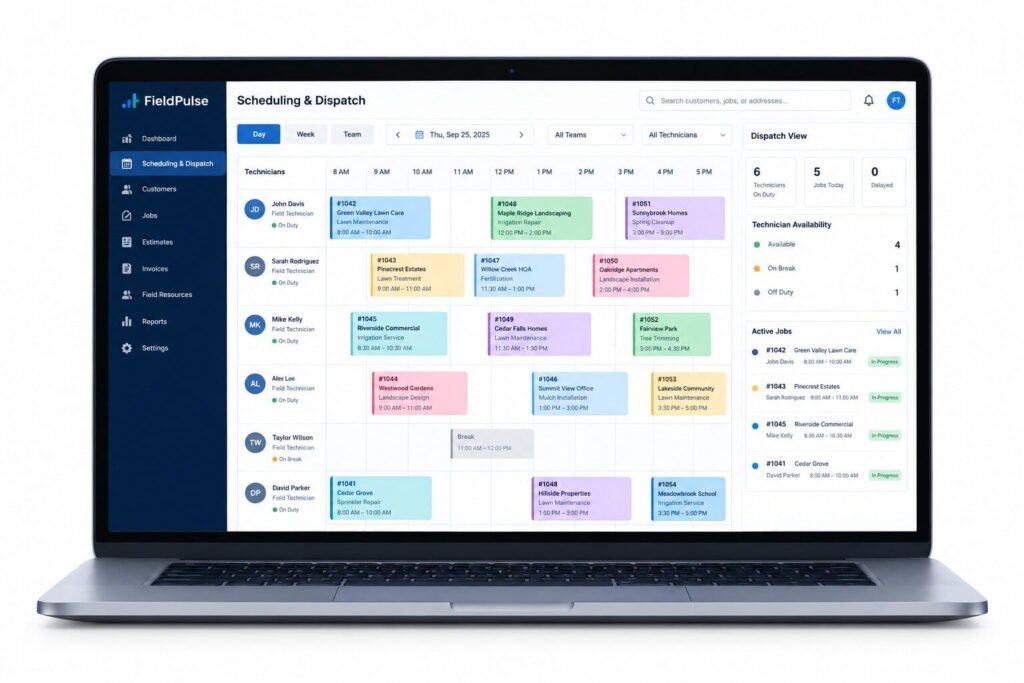
Scheduling & dispatch: Visual calendar, technician availability, and drag and drop rescheduling. FieldPulse addresses this use case for single location dispatch needs.
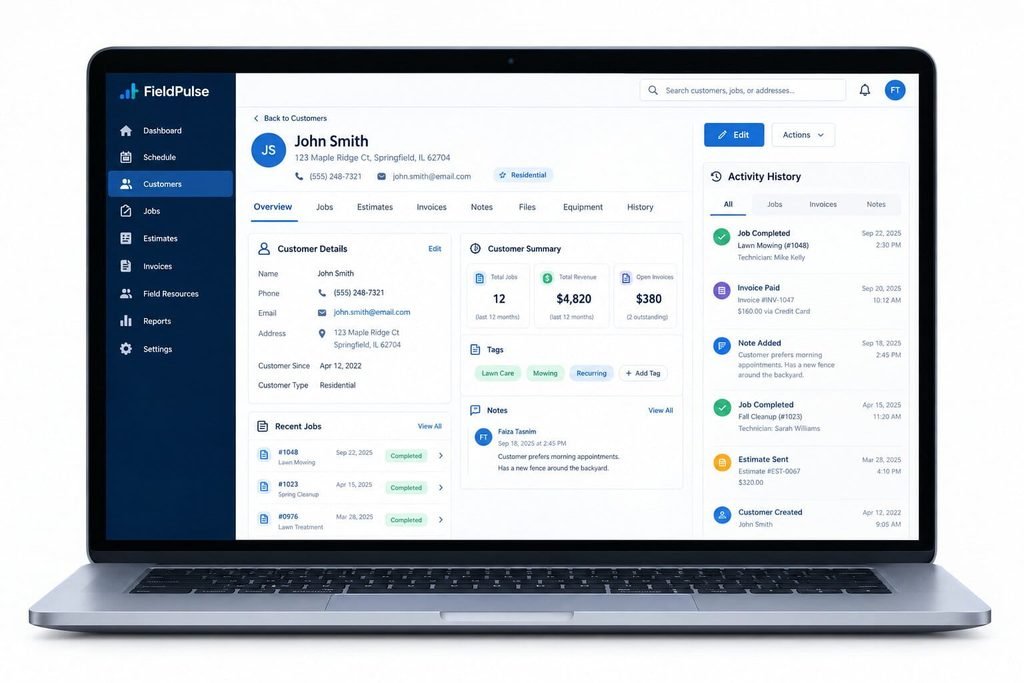
CRM / customer history: Having a customer’s work history, notes, and attached equipment accessible from the main menu in the office and viewable by the technician in the field is a must.
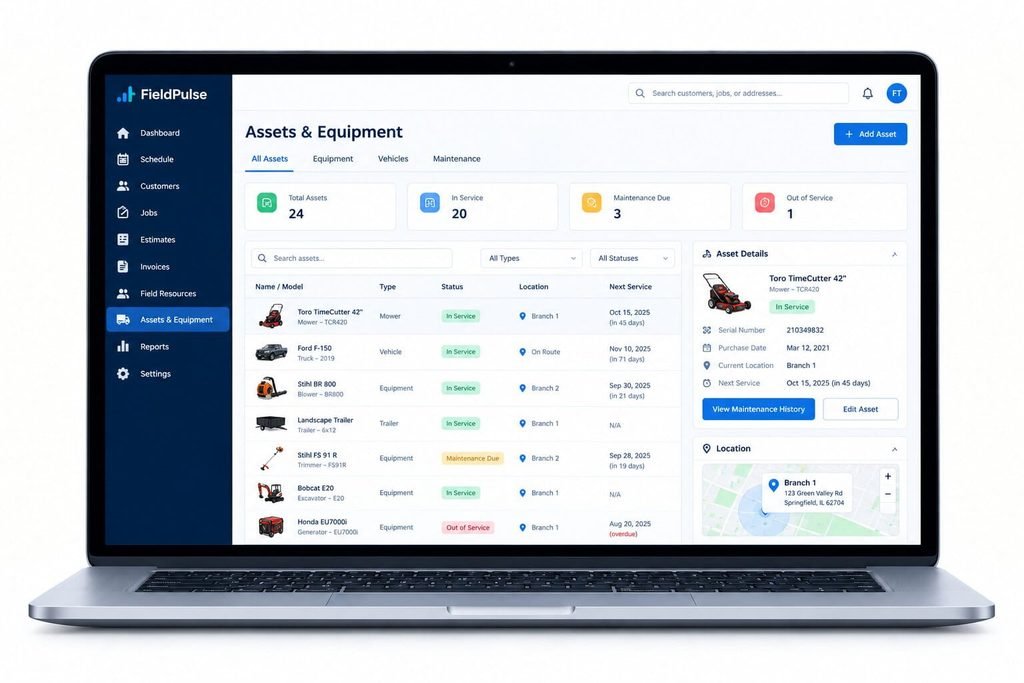
Asset and equipment tracking: One of the more HVAC-specific features. Ability to track customer assets (HVAC unit) and company assets (service van, special tools) separately with notes, warranty dates, equipment make/model and serial number. Particularly relevant if your techs sell service contracts on an equipment basis.
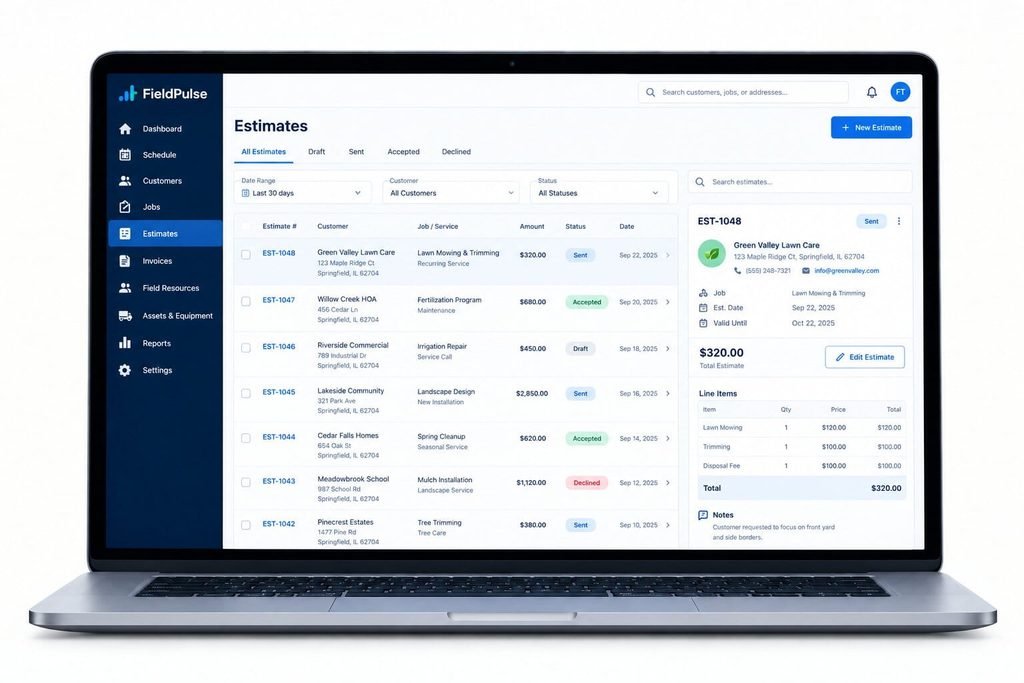
Estimates: Tiered estimate templates (good/better/best) are relevant for replacement equipment quotes, where the customer may be considering different brands and price points.
Pricebook: Standardized pricebook to prevent individual techs from quoting wildly different prices for the same service. Available as a feature but may require setup to configure for your desired level of detail.
Invoicing & payments: Accepting field payments can accelerate collections and improve cash flow. Particularly valuable if integrated with QuickBooks.
Mobile app: Technicians require offline access to tickets and the ability to update job status with limited connectivity. Only consider a FSM software with mobile app if your technicians have consistent cellular connection (avoid basements and rural areas).
Reporting: Basic job and revenue reporting is available, but companies analyzing technician performance and productivity or selling commercial accounts need to see a sample report specific to their needs in a demo.
Integrations: QuickBooks Online, Xero, Zapier, Google Calendar and a handful of marketing tools. If your accounting or marketing software isn’t listed, confirm compatibility before choosing a FSM vendor.
Recurring / service work: Maintenance agreements are available as a specific feature tied to the asset tracking system described above. In a demo, request to see the specific alert system for contract renewal notices that applies to your chosen plan level, as this will vary between the tiers.
Where FieldPulse Software Stands to Lose Out
Any balanced FieldPulse review should include the scenarios when this software cannot live up to expectations. Here are the cases when I would advise an HVAC business owner to consider other options.
An ultra-small team with no administrative staff: A less feature-rich and affordable scheduling and invoicing software could be a much better option for you.
The need for enterprise-level reporting and multi-site capabilities: FieldPulse has robust asset management and maintenance agreement tracking that covers most of the use cases for the HVAC industry. At the same time, its reporting tools are adequate for an average subcontractor but may prove insufficient for a company with several branches or high-end commercial clients.
A large team of technicians and contractors: Managing 25+ technicians and contractors and larger commercial accounts may require more advanced multi-branch and multi-site field service software.
A need for extensive integrations beyond QuickBooks, Xero, Zapier, and similar applications: Double-check the list of available FieldPulse integrations to make sure that your critical software is compatible with your accounting system.
A preference for readily available, transparent pricing published on the vendor’s website: Most resellers of FieldPulse software do not have transparent pricing on their websites. The overall cost structure of the solution is only available after you request a proposal from the seller, which may be a tedious process for some business owners.
FieldPulse vs. HVAC Alternatives
Below you’ll find a quick summary of how FieldPulse compares with three other field service software platforms HVAC owners typically consider.
FieldPulse vs. Jobber
Jobber has published pricing and a very large customer base to its credit. We think FieldPulse is the right choice for HVAC owners who need more flexibility and complexity in their job management solution. If you want to compare costs before heading to sales, review our Jobber review .
FieldPulse vs. Housecall Pro
Housecall Pro is best in class when it comes to customer experience and mobile field service apps, and has published pricing as well. FieldPulse would be our preferred choice for more complex back office needs, overall. If mobile first impressions and marketing automation options matter most, schedule a demo for both systems.
FieldPulse vs. ServiceTitan
ServiceTitan is better for larger and more complex HVAC operations. It has stronger commercial account management and reporting features at the enterprise level. FieldPulse is faster to implement and lower cost, better for most small and midsize HVAC companies. But serious multi-unit or multi-skilled trade contractors should look at ServiceTitan’s extra features. See our ServiceTitan review for more information.
Claims about pricing, support responsiveness, and third-party review rankings should be verified before publication because they may change over time.
if you are struggling to choose between Fieldpulse and its alternatives, consider going through our Fieldpulse alternative guide.
FieldPulse HVAC Fit Scorecard
Instead of using a star rating system, we evaluate how well FieldPulse fits these specific requirements, and you can judge for yourself.
Fast Scheduling and Dispatch
Requirement: Fast scheduling and dispatch for residential HVAC service calls
Evidence: FieldPulse includes drag and drop scheduling and sends job information to techs via their FieldPulse mobile app
Limitations: Fewer multi-location dispatch features than enterprise HVAC software
Verdict: FieldPulse fits residential HVAC businesses perfectly
Estimates, Invoicing and Payments
Requirement: Ability to manage estimates, invoices and accept payments
Evidence: FieldPulse’s estimate to invoicing workflow and built-in payment portal. QuickBooks integration.
Limitations: Invoice templates not as customizable as QuickBooks
Verdict: Works well for most HVAC companies; integrates with QuickBooks for more complex commercial invoices
Equipment-Based Maintenance Agreements
Requirement: Ability to organize maintenance agreements by type of equipment
Evidence: Assets feature lets you log equipment serial numbers, installation dates, warranty expirations, and service histories. Can be associated with Maintenance Agreements.
Limitations: Renewal reminders depend on your FieldPulse plan and setup; confirm details during your demo
Verdict: Great fit, but be sure to test auto-renewals for maintenance contracts in demo mode before transferring a large customer base to FieldPulse
Technician Mobile App Reliability
Requirement: Reliability of mobile app in areas with spotty cellular connections
Evidence: FieldPulse’s help documentation is explicit about offline features.
Limitations: Depends on cellular data plans and mobile device performance
Verdict: Test the FieldPulse mobile app in your service territory before rolling it out to all your technicians.
HVAC Business Growth Beyond 20 Techs
Requirement: Ability to scale beyond 20 technicians and acquire larger commercial clients
Evidence: FieldPulse ‘s multi-location management tools; experience with larger teams.
Limitations: For complex commercial projects, or if you have more than 20 technicians or five branch locations, request a demo and ask to see larger team and commercial features in action.
Verdict: FieldPulse works for small to midsize HVAC contractors, but larger firms should compare FieldPulse and ServiceTitan.
What HVAC Owners Say About FieldPulse
I would like to separate users’ claims from my own considerations, as both sides need to be seen in the context of choosing between two options for an HVAC owner.
According to a Capterra review titled “FieldPulse for an HVAC business” (March 2026),, the software received a “5 out of 5” rating, and the reviewer highlighted its scheduling, invoicing, quoting, and QuickBooks integration features. The only negative thing about the FieldPulse review was that invoices were too simplistic for the user’s needs, so they opted for QuickBooks invoicing solutions instead.
Another user stated that they considered Housecall Pro for their HVAC business, but FieldPulse appeared to be a superior choice for them. It is noteworthy that the user mentioned above marked the review as vendor-referred with an incentive given, so it is better to consider it as one of many.
Review Platform Snapshot
4.7/5
G2, 374 reviews
4.6/5
Capterra, 495 reviews
2015
Founded, Dallas TX
Beyond that one review, the larger trends are consistent. G2 currently has FieldPulse listed at 4.7 out of 5 from 374 reviews, where users especially highlight ease of use and customer support responsiveness. Capterra’s current score stands at 4.6 out of 5 from 495 reviews, where they also note recurring complaints about syncing, performance, data management and update stability.
Positive trends
- Customer support responsiveness is raised repeatedly
- Scheduling and dispatch is intuitive according to most
- Onboarding wasn’t a huge hurdle for most reviewers
Negative trends
- Syncing or performance issues with updates were a consistent concern
- Some reviewers wished invoicing were more customizable
- Many reviewers were concerned about the lack of transparency around pricing during the pre-sales process
My reading of this is that the support and usability trends are consistent enough across independent platforms to trust, and the syncing and update issues are worth probing into on a sales call about recent changes.
Final 60-Second Decision Checklist
Use this before you book a demo, to know what questions to ask beyond the standard sales script.
Consider FieldPulse if:
- You have 3-20 technicians working on residential or light commercial HVAC work
- You want scheduling, estimates, invoicing and a mobile app in one system
- You already use or plan to use QuickBooks Online or Xero
- You’re looking to move beyond spreadsheets or a whiteboard, but aren’t ready to pay ServiceTitan pricing
- You value responsive customer support during onboarding
Look at alternatives if:
- You’re a solo operator who just needs basic scheduling and invoicing
- You have 25+ technicians with multi-location commercial dispatch needs
- You need more integrations than QuickBooks, Xero, Zapier and Google Calendar
- Having published, comparison-ready pricing is more important than a negotiated quote
Five yes/no questions to answer before you commit:
- Do you have 3 or more technicians, or do you expect to have 3 or more soon?
- Is your business primarily residential or light commercial HVAC?
- Are you comfortable with a sales call to get final pricing, versus a published price list?
- Are you comfortable confirming the exact maintenance-reminder automation for your plan tier during a demo, versus assuming it’ll be like alternatives?
- Do you already use, or are you willing to use QuickBooks Online or Xero for accounting?
If you answered yes to most of these, FieldPulse is worth a demo. If you answered no to two or more, it’s worth comparing to Jobber, Housecall Pro or ServiceTitan before you commit.
My recommendation: FieldPulse delivers on its middle-of-the-road reputation from an implementation perspective. It’s a substantial upgrade over spreadsheets, and a much lighter lift than an enterprise FSM platform. The companies I’d recommend it to are growing residential HVAC businesses that need to get organized, but don’t want to commit to a six-figure software investment.
The companies I wouldn’t recommend it to are solo operators who don’t need this much organization yet, and large multi-location commercial HVAC operations that need enterprise-grade reporting and analysis FieldPulse can’t provide. Either way, do your own math before you commit – our field service software ROI calculator can help you value what moving from spreadsheets or a legacy tool could do for your business before you sign a contract.
The Bigger Picture: Why This Decision Matters for HVAC Companies Right Now
This is a huge decision, and the timing is of the essence. Indeed, according to the US Bureau of Labor Statistics, heating, air conditioning, and refrigeration mechanics and installers are projected to see demand for their services jump by 11% between 2025 and 2035. This compared to the 3% projected increase for all occupations combined.
The BLS projects that some 40,600 job openings for HVAC technicians will be available per year over the next decade. This means that for your HVAC company, the need for efficient scheduling, dispatching, and billing solutions will only grow as your employee base and customer base grow.
I see too many HVAC business owners put off making the move to adopt scheduling and dispatching software for their field service operations until they experience the effects of inadequate or absent solutions. Scheduling software can eliminate double bookings, reduce technician downtime, ensure no customer interactions go undocumented, and reduce billing errors and delays.
It is important to recognize that you cannot solve process issues with your field service operations by adopting the wrong software solution for your business needs. The correct solution for your business will help you streamline operations, reducing administrative burden while helping you take on more work than ever before.
If you are still stuck on making the right decision, consider going through our Fieldpulse Review guide.
Confused About Fieldpulse ? Go Through Our Fieldpulse Hub.
Frequently Asked Questions
Is FieldPulse good for HVAC companies?
FieldPulse works well for HVAC companies with roughly 3 to 20 technicians doing residential or light commercial work. It handles scheduling, dispatch, estimates, invoicing and mobile technician workflows in one system. It’s less well suited to solo operators who need very little structure, or large commercial HVAC operations that require enterprise-level reporting and multi-location dispatch.
How much does FieldPulse cost for HVAC businesses?
FieldPulse does not publish a single, fixed US pricing tier ladder; pricing is generally confirmed through a sales conversation and may vary by technician count and feature tier. Third-party estimates and reseller pages report a range of figures, but these are not consistently confirmed, so the most reliable step is requesting a direct quote from FieldPulse before comparing it to competitors with published pricing.
Does FieldPulse integrate with QuickBooks?
Yes. FieldPulse integrates with QuickBooks Online and QuickBooks Desktop, syncing customers, invoices and payment data. Several verified reviewers specifically cite the QuickBooks integration as a reason they chose FieldPulse over alternatives, though at least one reviewer noted they still used QuickBooks directly for more detailed, descriptive invoices than FieldPulse’s native invoice format allows.
Is FieldPulse better than ServiceTitan for HVAC?
It depends on company size. FieldPulse is generally less expensive and faster to implement than ServiceTitan, with a lighter learning curve, making it a better fit for smaller and mid-size HVAC shops. ServiceTitan is built for larger, more complex commercial HVAC operations that need deeper enterprise reporting, multi-location management and advanced dispatch logic that FieldPulse doesn’t fully replicate.
Does FieldPulse have a mobile app for HVAC technicians?
Yes. The FieldPulse mobile app lets technicians view job details, capture photos, clock in and out, collect payment and send invoices directly from the field. FieldPulse documents an offline mode that allows the app to continue functioning with limited or no signal and sync once connectivity returns, though real-world reliability should be tested in your specific service area before full rollout.
Can FieldPulse track HVAC maintenance agreements?
Yes. FieldPulse has a dedicated Maintenance Agreements feature linked to its Assets feature, which logs a specific HVAC unit’s serial number, install date, warranty window and service history against the customer record. This is one of the more HVAC-specific parts of the platform. What’s worth confirming in a demo is exactly how the renewal-reminder workflow is configured for your plan tier, since the level of automation can vary by setup.
What size HVAC company is FieldPulse best for?
FieldPulse is most commonly recommended for HVAC companies with 3 to 50 technicians.
Is FieldPulse easy to learn for HVAC technicians?
Most verified reviewers describe FieldPulse’s learning curve as manageable rather than steep, with onboarding support and customer service frequently cited as strengths. Some reviewers note an initial adjustment period while learning the platform’s customization options, but this generally resolves within the first few weeks of regular use.
What are FieldPulse’s biggest weaknesses for HVAC companies?
The most commonly cited weaknesses are a lack of published, comparison-ready pricing, and occasional reports of syncing or performance issues around software updates, per Capterra’s current review summary. Companies with complex existing tech stacks beyond QuickBooks, Xero, Zapier and Google Calendar may also encounter integration limitations, and very large multi-location commercial operations may need deeper enterprise reporting than FieldPulse currently offers.
How does FieldPulse compare to Jobber and Housecall Pro for HVAC?
FieldPulse, Jobber and Housecall Pro all target similar small-to-mid-size HVAC businesses, but differ on pricing transparency and depth. Jobber and Housecall Pro publish standard pricing tiers publicly, which makes upfront comparison shopping easier, while FieldPulse requires a sales conversation.
FieldPulse is frequently rated strong on business operations depth and support quality in G2 category comparisons, while Housecall Pro is often cited for mobile app polish. The right choice depends on whether pricing transparency or operational depth matters more to your specific business.