FieldPulse Reporting: Full Breakdown (2026 Review)
Does FieldPulse have reporting? Yes.
FieldPulse offers 60+ prebuilt reports, a Raw Data builder with filters, grouping, and CSV export, and a drag-and-drop dashboard built from saved widgets. It fits small to mid-size trade teams well.
Watch-out: shops with 15+ technicians or analyst-level needs report hitting limits.
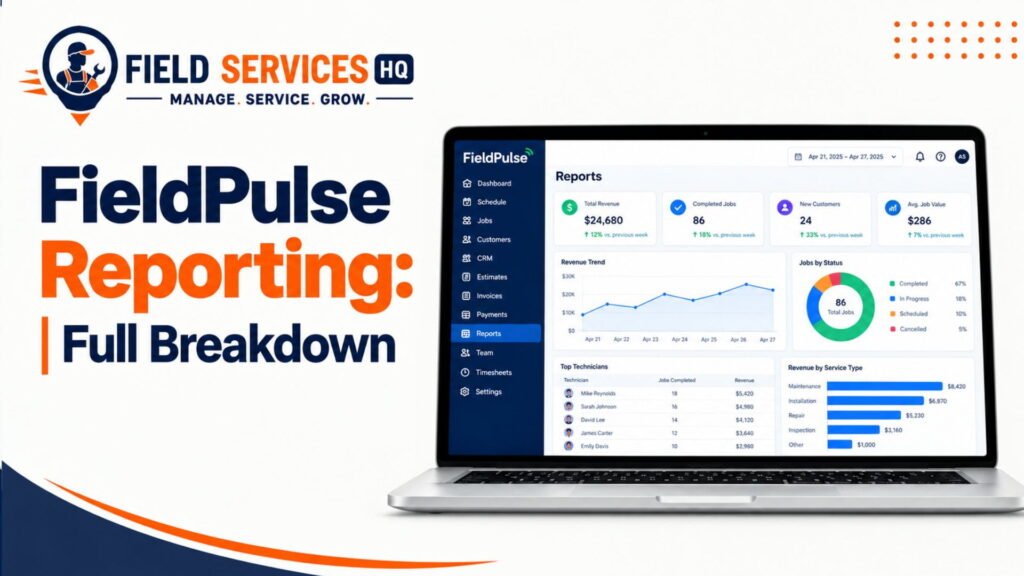
You can’t fix what you can’t see.
That is why reporting is important in a service company. Jobs, invoices and hours worked can add up quickly. Without reports, you may be guessing at what is going on.
My name is Ryan Mitchell, and I have spent more than 11 years working with field service software. From my experience, there are a number of reports that are vital to making decisions about your software. In this article, I will go over what FieldPulse reporting can do for you, what it can’t do, and who it is for.
As stated on the company’s features page, the application includes over 60 built-in reports, plus the ability to create your own.
| Area | What FieldPulse Offers |
|---|---|
| Prebuilt reports | 60+ ready-made reports fieldpulse |
| Custom reports | Raw Data builder with filters, grouping, columns help.fieldpulse |
| Dashboard | Drag-and-drop Pulse Dashboard with saved widgets help.fieldpulse |
| Export | CSV download of the report on screen help.fieldpulse |
| Mobile | Dashboards on the app (individual, team, multi-location) fieldpulse |
| Record types | Jobs, invoices, payments, timesheets, plus 14 more help.fieldpulse |
What Does FieldPulse Reporting Actually Cover?
FieldPulse’s Help Center contains an expansive reporting section. Per the Reporting collection, they offer reporting guides for job, estimate, invoice, payment, timesheet, project, maintenance agreement, asset, customer, and purchase order reports.
They also offer inventory, item usage, inventory count, and inventory audit reports. Not shabby for a mid-market solution, eh?
Job & Work Order Reporting

Of course, the job reporting is going to be a priority for most. As the field service management guide notes, you can learn what’s been done, when, and by whom.
According to FieldPulse’s September 2024 release notes, job reports will now show how long a job was in a particular status, including start time, end time, and time spent in status.
This is great for seeing if your crews are getting bottlenecked anywhere. Say you’ve got jobs stuck waiting on parts for a week.
Good reports to start with include:
- Jobs by status
- Jobs by technician
- Jobs by job type
- Jobs stuck waiting on a status for too long
Technician Reporting
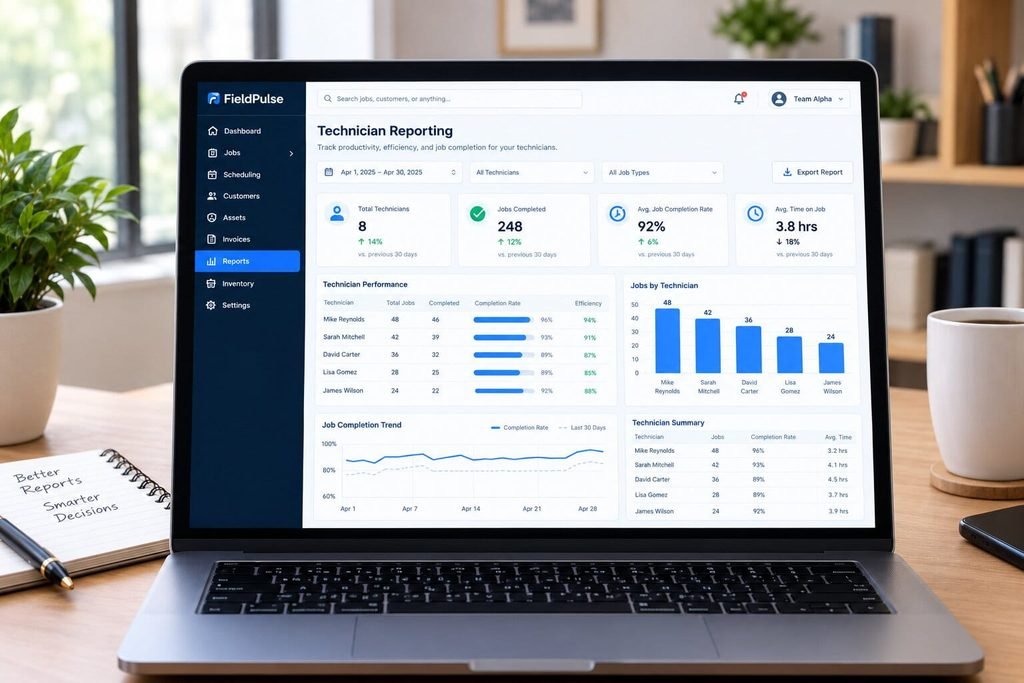
Technician reports cover how productive and efficient they are, and the percentage of jobs done. According to FieldPulse’s reporting page, you can measure the productivity, efficiency, and job completion of individual technicians.
In tandem with timesheet reporting, these reports balance hours spent with results.
Labor costs are typically one of an organization’s highest expenses. According to the U.S. Bureau of Labor Statistics, the median wage for an HVAC professional was $59,810 as of May 2024. Therefore, every hour an employee is underutilized, it already incurs a cost.
Customer Reporting
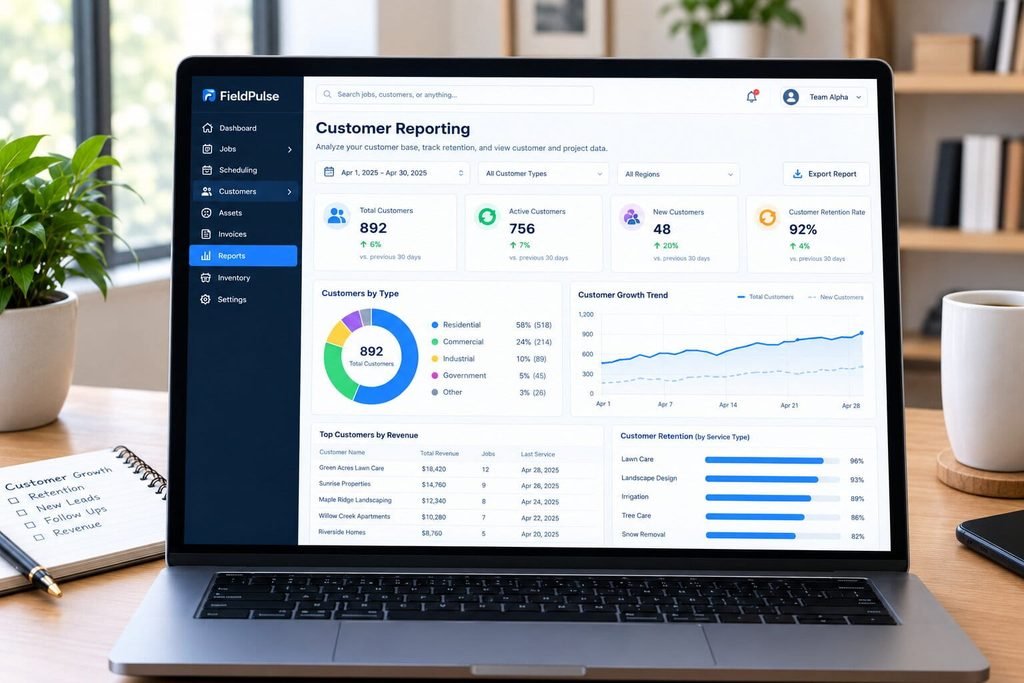
Customer reporting lets you sort and bucket your customer base. According to Fieldpulse’s December 2024 update notes, they now have Customer and Project raw data reports.
Customer retention is generally less expensive than finding new prospects.
In accordance with Aberdeen Group research provided by AEX Software, companies having a first-time fix rate higher than 70% have 86% average customer retention, whereas customer retention drops by approximately 10% when the first-time fix rate is lower than 70%.
Financial Reporting
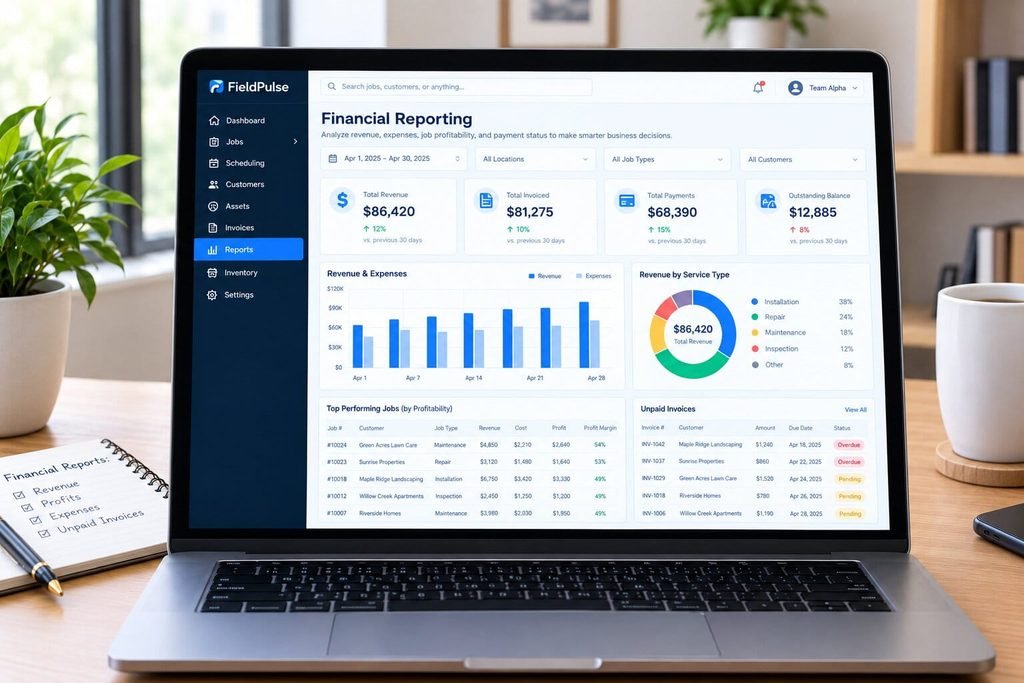
Financial reports cover invoicing, payments, and job profitability. According to FieldPulse you can analyze revenue streams, job profitability, and expenses.
I’m always interested in unpaid invoices. According to the Raw Data Reporting guide, you can filter any field on a record. Fortunately, that includes unpaid invoices.
Scheduling & Dispatch Reporting

Most field service management systems don’t have a dedicated “dispatch reporting” module. With FieldPulse, you’ll have to cobble together a view from job, timesheet, and status reports.
According to FieldPulse’s December 2024 notes, the schedule will now indicate conflicting jobs across linked companies. This is helpful for businesses that operate multiple brands.
Here are some dispatch KPIs to consider:
- Number of jobs per technician per day
- Day between job creation and scheduled visit
- Number of reschedules
- Number of return visits
- Other Reporting Capabilities
In addition to the main reports, FieldPulse offers asset, maintenance agreement, and inventory reports.
The Inventory Audit can be helpful for tracking inventory theft. According to the December 2024 FieldPulse Notes , the Inventory Audit Report captures who made the change, which inventory hub was involved, and the magnitude of the change.
Project reports bucket jobs by status, tags, and team. According to the Project Reports guide , you can bucket by assigned team and status.
FieldPulse Reporting Dashboard: What Can You Actually See?
The FieldPulse reporting dashboard is called the Pulse Dashboard. According to FieldPulse’s help center, it is self-updating and you choose what reports appear in it.
You can add standard reports and visual reports. You also set the time window and size of each widget. Here’s how it works:
- Navigate to Reporting -> Management tab
- Run a Raw Data report
- Save as Report -> Save as Widget
- Navigate to the Pulse Dashboard -> Configure Dashboard
- Choose your Widgets, Time Period, and Row Height
According to the guide, preset time periods include This Month, Today, and Last 90 Days. Row Height ranges from Short to Extra Extra Tall.
As it’s a mobile-first reporting tool, it’s easy enough to switch between individual, team, and multi-location reporting within the app itself.
Can You Customize FieldPulse Reports?
Absolutely, within limits. According to the Raw Data Reporting Guide you select a time period, then load the data, then perform the following:
- Filter on any field on the record
- Drag and drop columns to group by unique values
- Choose which columns to display
- Save as Widget
- Download as CSV
There’s also more advanced reporting available. According to FieldPulse Docs , pivot tables are an option, as is creating a visual report for a highlighted range of cells.
The documentation is inconsistent on this front. Some pages refer to this as the Raw Data Beta while others simply refer to it as Raw Data. Best to ask your rep which plan level you’re on.
According to one Capterra reviewer, there is a learning curve associated with advanced customization and reporting. Build in about an hour’s worth of work for setting up your reports, rather than five minutes.
FieldPulse Reporting for Owners
Owners care about revenue, margin, open and unpaid invoices, technician productivity, and customer retention. FieldPulse is mostly capable of providing these metrics. Margin is the wild card, depending on how well your crews are entering job costs.
According to the Business Employment Dynamics data from the BLS, about half of new employer establishments shut down within five years. Maintaining sufficient liquidity is a concern for any business.
A suggested owner scorecard might look like this:
- Revenue this week vs last week
- Open, unpaid invoices
- Jobs completed per technician
- Return visits
- Estimates sent vs won
FieldPulse Reporting for Office Managers
Office managers care about the invoicing, payments, and follow-up process. FieldPulse gives them filterable lists they can export.
The benefit here is reducing manual data entry. According to Professor Raymond Panko’s research on spreadsheets, humans make mistakes on the majority of spreadsheets they create. The less copying and pasting, the better.
Some reports office managers might want to run:
- Unpaid and overdue Invoices
- Payments received by day
- Estimates waiting on a response
- Timesheets for review prior to payroll
- Purchase orders outstanding
FieldPulse Reporting for Operations & Dispatch Managers
Operations and dispatch managers care about time and status. Fieldpulse’s status duration fields will be helpful here.
According to Aberdeen Group research cited by ServicePower, 17% of organizations either don’t measure the metric or don’t know their number.
You can approximate a first-time fix rate in FieldPulse by:
- Tagging return visits or callback jobs consistently
- Running a report by job type and tag
- Dividing first-call completions by total jobs
- The key is to be able to tag consistently, something that’s absolutely doable within FieldPulse.
FieldPulse Reporting by Trade
Varying trades have varying needs when it comes to reporting. Let’s break down how FieldPulse fits each trade.
HVAC
The HVAC industry is highly dependent on equipment and maintenance agreements. Fortunately, FieldPulse has asset and maintenance agreement reports.
According to the Bureau of Labor Statistics, HVAC technicians are set to see 8% growth from 2024 to 2034, with about 40,100 openings per year. Scheduling and technician productivity reporting will be most valuable in this competitive industry.
Plumbing
Plumbers, pipefitters, and steamfitters deal with emergency calls and callbacks. You’ll want to create reports by job type and tag.
According to Construction Dive, again citing the Bureau of Labor Statistics, employment of plumbers and pipefitters is projected to grow 4% from 2024 to 2034. Since the projected growth is slower than other industries, efficiency reporting will be helpful.
Electrical
Electricians have a mix of service calls, panel upgrades, and estimates. Estimate reports will let you see how many estimates turn into jobs.
Again according to the Construction Dive article, electrician employment is projected to grow 9% from 2024 to 2034, with about 81,000 openings. A fast-growing industry means a greater focus on estimate win rates.
Roofing, Fencing, and Painting
Roofing, fencing, and painting companies deal with projects, rather than individual service calls. This makes project reports most appropriate. Group projects by status, tag, and team.
Also useful would be inventory and purchase order reports. Tracking material costs per job is helpful in this low-margin industry.
Landscaping and Pest Control
Landscaping and pest control companies typically have recurring service agreements, and need route optimization. FieldPulse has maintenance agreement reports.
Should route density be a concern, comparing FieldPulse to our Service Autopilot review would be helpful, as that platform is designed around recurring service and routing.
What FieldPulse Reporting Does Well
Here are the aspects of FieldPulse reporting that stand out to me.
- Their reporting touches on a variety of records, from jobs to inventory audits.
- The ability to run reports filtered by any field on a record.
- Widgets in the Pulse Dashboard that can be saved as reports.
- Exporting reports as CSV files.
- Overall ease of use that reviewers continue to cite.
Having reviewed 340+ G2 and Capterra reviews, ease of use and the mobile app are strong points. They also note that reporting is a frequent pain point, so read reviews from both sides.
According to Softabase, FieldPulse fits best for contractors with 3 to 25 technicians looking for an all-in-one scheduling, CRM, and invoicing solution.
FieldPulse Reporting Limitations
No product is without its limitations. Here are some things to be aware of with FieldPulse reporting.
- As one Capterra reviewer noted, advanced customization and reporting can feel limiting at scale.
- There’s a learning curve involved with building visual reports..
- There appears to be variation between sources on what reporting capabilities are available at which plan level.
One thing to note on sources is the fact that some sources are competitors. Always take third-party analysis with a grain of salt, and compare it to the vendor’s documentation, and your own observations.
Always get that in writing before signing up.
FieldPulse Reporting vs. Spreadsheets
Spreadsheets are often utilized as a reporting tool because they’re ubiquitous.
However, spreadsheets are error-prone and insecure. According to Professor Raymond Panko’s research on spreadsheet errors, developers introduce uncorrected errors in 2% to 5% of formulas, on average, and the larger the spreadsheet, the more errors there are likely to be.
Here’s how they compare:
| Factor | FieldPulse Reporting | Spreadsheets |
|---|---|---|
| Data entry | Pulled from live jobs | Manual or pasted |
| Error risk | Lower, if job data is clean | Higher, per Panko’s research |
| Flexibility | Limited to available fields | Unlimited |
| Field updates | Instant from the app | Delayed |
| Cost | Software subscription | Low |
My take: use FieldPulse for daily numbers. Export to a spreadsheet only for one-off analysis.
FieldPulse Reporting vs. Other FSM Software
Reporting depth varies a lot across platforms. Here’s a fair snapshot.
| Platform | Reporting Reputation | Best For |
|---|---|---|
| FieldPulse | Broad reports, flexible raw data, some limits at scale | 3 to 15 tech shops |
| Housecall Pro | Job costing, commissions, routes; less custom | Small residential teams |
| Jobber | Reporting tied to plan tier (job costing, team productivity) | Solo to growing crews |
| ServiceTitan | Deepest dashboards and report builder | Larger, complex operations |
Go through our Fieldpulse alternatives guide for a deep dive.
Does FieldPulse Reporting Worth The Investment?
We don’t disclose pricing information for FieldPulse. For teams using their own contractors, FieldPulse typically costs between $40-$75 per technician, and $$99 to $399+per month plus add ons, according to third-party reports. You might want to view our [fieldpulse pricing guide] to identify an approximate value based on your plan/team size.
You’ll also want to budget for optional add ons including phone, AI, and fleet tracking.
The Ultimate FieldPulse ROI Calculation
Your best ROI calculation for FieldPulse reporting will involve identifying the value of billable hours you could recover through improved reporting.
For example, let’s assume you own an HVAC business that has been incurring avoidable return trips:
- $28.75/hour – median HVAC technician wage
- $43 – cost of an avoidable 1.5 hour return trip
- $1,720 – 40 avoidable return trips/month (technician wages alone)
This does not include the cost of fuel, vehicles, admin time, and opportunity cost of billable hours lost to return trips. If FieldPulse reporting allows you to identify and eliminate the root cause of avoidable return trips, it could generate substantial savings.
Of course, this is just an example. Your labor costs, volume, and reporting capabilities will change the math entirely.
FieldPulse Reporting:Pros and Cons
Pros
- 60+ prebuilt reports
- Filter, group, and export any dataset
- Custom widgets on a live dashboard
- Covers inventory, assets, and agreements
- Praised for ease of use
Cons
- Advanced customization has a learning curve
- Reviewers report limits at scale
- Pricing and plan gating aren’t transparent
- No native BI-style analytics
- Some third-party claims conflict with official docs
Read our full FieldPulse review for more information on pros and cons.
What You Should Choose ?
| Your Situation | Suggested Move |
|---|---|
| 3 to 10 techs, want simplicity | FieldPulse is a strong candidate |
| 10 to 15 techs, growing fast | Trial reports hard before committing |
| 15+ techs, need analytics | Compare ServiceTitan-class tools |
Confused About Fieldpulse ? Go Through Our Fieldpulse Hub.
Frequently Asked Questions
Does FieldPulse have reporting?
Yes. FieldPulse includes 60+ prebuilt reports, a Raw Data report builder, and a customizable Pulse Dashboard. According to FieldPulse, you can also create your own reports.
What reports does FieldPulse offer?
FieldPulse offers reports for jobs, estimates, invoices, payments, timesheets, projects, maintenance agreements, assets, customers, purchase orders, and inventory.
Can I customize FieldPulse reports?
Yes. You can filter, group, choose columns, and save views as widgets.
Does FieldPulse have a dashboard?
Yes. The Pulse Dashboard is configurable. According to the Help Center, you save reports as widgets, then choose widgets, time periods, and sizes.
Can I see technician performance in FieldPulse?
Technician performance reports measure productivity, efficiency, and completion rates. Some reviewers say deeper technician-level profitability is harder to get.
Can I export FieldPulse reports?
Yes. You can download the on-screen report as a CSV. Some reviewers describe wider export workflows as cumbersome, so test this in your demo.
Does FieldPulse track first-time fix rate?
You can approximate it with consistent tags on return visits.
Is FieldPulse reporting good enough for a growing company?
For most small teams, yes. Shops beyond about 15 techs often hit a ceiling. Test your must-have reports before you commit.
Is FieldPulse better than Jobber or Housecall Pro for reporting?
It depends on your size. FieldPulse offers broad raw-data reporting, while Jobber ties depth to plan tier and Housecall Pro keeps reports simpler.
How much does FieldPulse reporting cost?
FieldPulse does not publish a separate price for its reporting features. Reporting is part of the FieldPulse platform, which is priced per seat and customized based on your team and plan.