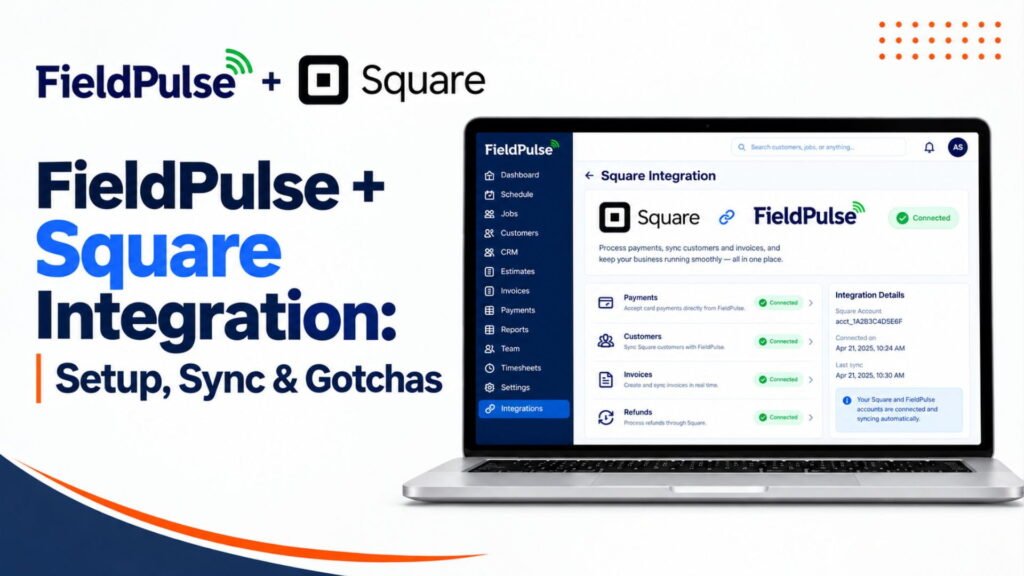
FieldPulse + Square Integration: Setup, Sync & Gotchas
Yes, FieldPulse integrates with Square for payments.
FieldPulse’s official documentation says you can link your Square account with FieldPulse and initiate a Square payment from a FieldPulse invoice on a smartphone or computer. After the payment is approved in Square, the linked FieldPulse invoice is automatically updated with the Square transaction number.
FieldPulse currently documents the Square payment integration in its Help Center, so you can use its official documentation as the starting point for setup and workflow verification.
Quick Table
| Question | Answer |
|---|---|
| Does FieldPulse integrate with Square? | Yes. FieldPulse’s official Help Center documents a Square payment integration that links a Square payment to a FieldPulse invoice. |
| Best for | Businesses that already use Square for payments and want to initiate a Square payment from a FieldPulse invoice while having the resulting Square transaction number recorded on the FieldPulse invoice. |
| Not needed for | Businesses that do not use Square or that prefer to use FieldPulse Payments instead. |
| Which pricing plan includes it? | FieldPulse’s current official Square documentation does not state a specific pricing-plan requirement for the integration. Confirm availability and plan eligibility with FieldPulse before publishing a plan-specific claim. |
| How to integrate | FieldPulse’s official documentation confirms that you can link your Square account with FieldPulse and initiate a Square payment from a FieldPulse invoice on a smartphone or computer. It does not currently document the specific Company Settings → Features & Plugins setup path in the source reviewed. |
| Why integrate? | A Square payment can be initiated from a FieldPulse invoice, and after the payment is approved in Square, the linked FieldPulse invoice is automatically updated with the Square transaction number. |
Our Verdict
FieldPulse and Square integrate. FieldPulse’s official documentation shows how to integrate a Square payment into a FieldPulse invoice. The documentation focuses on how to use Square to pay an invoice and record the resulting Square transaction number in FieldPulse.
There is currently an entry for FieldPulse’s Help Center about integrating Square, titled: “Payment Integration with Square”. It says that you can link your Square account with FieldPulse and process a Square payment from a FieldPulse invoice on either a cell phone or the desktop computer. If you’re already using or evaluating Square in production, make sure it does what you want before implementing the integration for your regular invoices. Otherwise, weigh the options in FieldPulse’s built-in FieldPulse Payments against using Square to collect card payments through the FieldPulse integration.
Does FieldPulse Integrate With Square?
Yes, FieldPulse has documentation on a Square payment integration. You can link this accounting platform’s accounts with Square and process a payment from a FieldPulse invoice on either a computer or cell phone. When the payment goes through in Square, the corresponding FieldPulse invoice gets updated to show the Square reference number.
How do I know if the integration between FieldPulse and Square works?
Here is a list of specific information about the integration between these two business applications:
- Direct or third-party: FieldPulse’s documentation refers to linking one’s Square account with FieldPulse. There is no mention of Zapier as a neccesary tool for this payment integration.
- What it connects: This accounting software’s invoice gets paid through a Square payment processed by hand on either a desktop computer or cell phone.
- What syncs (as documented): When the Square payment gets approved, the FieldPulse invoice that got paid gets updated to reflect the Square transaction number.
- What is not mentioned: Invoices, customers, items, tips, refunds, fees, payouts, and deposits do not get mentioned as syncing in the reviewed documentation.
- One-way or two-way: In general, the FieldPulse documentation mentions a payment method and the updating of an invoice.
- Documentation: As of the date of this article, there is a Help Center entry at FieldPulse for this payment integration.
The Square documentation makes mention of the products it refers to as Square Register and Square Point of Sale. These terms use Square’s old brand names for its point of sale systems.
Why the Sources Disagree
- FieldPulse Help Center: FieldPulse currently documents a Square Payment Integration. Their documentation confirms that one can link their Square account with FieldPulse, initiate a Square payment from a FieldPulse invoice, and have the linked invoice automatically updated with the Square transaction number. Their documentation also specifically provides information about FieldPulse Payments and Partner Payments.
- Contractor ToolStack (May 2026): Their May 2026 review notes that FieldPulse uses Square for payment processing through only as of April 2026. This is a third-party editorial note and should be considered separately from FieldPulse’s documentation.
- Square: Square’s documentation confirms that Square supports integrations with third-party applications via their App Marketplace, but the Square documentation reviewed does not include a FieldPulse-specific integration guide.
- Capterra: Capterra’s FieldPulse information includes user-review references to Square integration/payment functionality. One specific published review notes the choice of FieldPulse because of QuickBooks and Square integration.
- G2: G2 confirms that FieldPulse offers payment collection in the field, electronic payments and third-party integrations, but the reviewed G2 material does not confirm the specific Square workflow.
The safest conclusion is to rely on FieldPulse’s current Square documentation for the existence and documented behavior of the integration. Third-party sources can provide additional context but should not override the current official documentation without evidence of a product change.
Who Is It For?
Best-fit businesses
- Businesses that already use Square for card processing
- Crews that use Square for taking in-person card payments
- Owners that want Square payment activity associated with the corresponding FieldPulse invoice
Best-fit teams
- Techs that collect payment in the field
- Office staff that need the FieldPulse invoice to reflect the resulting Square transaction
Best-fit use cases
- A repair or service call that concludes with an in-person card payment
- Service invoices where the payment needs to be associated with the FieldPulse invoice
Who Is It Not For?
Businesses that do not use Square
- The Square integration isn’t needed if one does not use Square.
- FieldPulse also offers FieldPulse Payments for its own payment options.
Businesses that do not need the connected workflow
- If customers pay by methods that do not use Square, the Square-specific integration would not be relevant.
- FieldPulse separately supports its own invoicing and payment workflows.
Businesses expecting unsupported sync features
- Do not assume that customers, items, tips, refunds, fees, payouts or bank deposits synchronize between the FieldPulse and Square. The current FieldPulse Square documentation specifically documents initiating a Square payment from a FieldPulse invoice and updating that invoice with the Square transaction number.
- Do not describe the Square connection as equivalent to FieldPulse’s accounting integrations unless the specific data flow is documented.
What You Need to Integrate
- FieldPulse account: A FieldPulse account with access to the relevant payment functionality.
- Square account: A Square account that can accept payments.
- Square authorization: FieldPulse’s documentation refers to linking the Square account with FieldPulse.
- Device: FieldPulse notes that a Square payment can be initiated from a smartphone or computer.
- Hardware: Hardware requirements depend on how one accepts the Square payment. Do not claim that a Square Reader, Stand or Tap to Pay are a requirement for the FieldPulse integration unless FieldPulse specifically confirms it.
- Required plan or add-on: The current Square documentation reviewed does not identify a specific FieldPulse pricing plan or add-on requirement. Confirm current eligibility with FieldPulse.
- Country: Do not infer the Square integration’s supported countries from FieldPulse Payments’ US availability. Confirm the supported country directly with FieldPulse for the Square integration.
How to Integrate: Step by Step
FieldPulse’s current documentation confirms the workflow but does not provide enough information to safely replicate every current account-setting button label. Do not invent a setup path.
- Confirm eligibility. Ask FieldPulse if the Square integration is available for one’s account and country.
- Link your Square account. FieldPulse’s documentation states that the Square account can be linked with FieldPulse.
- Authorize the connection. Complete the authorization requested during the connection process.
- Create or open a FieldPulse invoice.
- Initiate the Square payment. FieldPulse indicates that a Square payment can be initiated from the FieldPulse invoice on a smartphone or computer.
- Complete the payment in Square.
- Verify the invoice. After the payment is approved in Square, FieldPulse states the linked invoice is automatically updated with the Square transaction number.
- Test the workflow. Before relying on the integration operationally, verify the payment, invoice status and transaction number in both systems.
Common Issues
FieldPulse’s current Square documentation does not offer a comprehensive Square-specific error-code or troubleshooting reference, so the following should be regarded as practical checks rather than documented FieldPulse error conditions.
- Cannot connect: Confirm that the Square account is eligible and that the FieldPulse account has access to the integration.
- Authorization problem: Recheck the Square account being connected and complete the authorization process again if necessary.
- Integration unavailable: Contact FieldPulse support to confirm if the integration is available for one’s account.
- Expected data is not appearing: Check if the specific data was actually documented as part of the Square integration. The official documentation specifically identifies the Square transaction number as the information returned to the linked FieldPulse invoice.
- Payment/invoice mismatch: Confirm that the payment was initiated from the intended FieldPulse invoice rather than processed independently in Square.
- Sync timing question: FieldPulse documents the invoice update after the Square payment is approved but doesn’t specify a separate guaranteed synchronization time.
- Connection problem: Contact FieldPulse or Square support depending on if the problem occurs in FieldPulse’s integration flow or in Square’s payment system.
Important Verification Note
The strongest current evidence is FieldPulse’s own documentation: FieldPulse does currently document a Square payment integration. Their specific page indicates that a Square payment can be initiated from a FieldPulse invoice and that the resulting Square transaction number is added to the linked invoice.
Fixes
| Issue | What to Check | Fix |
|---|---|---|
| Connection fails | Whether the Square integration is available for your FieldPulse account and whether the Square account can be authorized | Recheck the Square account and authorization process. If the integration is unavailable, contact FieldPulse support. Do not assume that a missing option can be enabled through a specific Features & Plugins setting unless FieldPulse confirms that path. |
| Authorization error | Whether the correct Square account is being connected and whether authorization was completed successfully | Recheck the Square account and complete the authorization process again. If authorization continues to fail, contact FieldPulse or Square support. |
| Payment/invoice not updated | Whether the Square payment was successfully approved and whether the payment was initiated from the intended FieldPulse invoice | Verify the payment in Square and check the linked FieldPulse invoice. FieldPulse documents that, after an approved Square payment, the linked invoice is automatically updated with the Square transaction number. Do not charge the customer again until the payment status has been verified. |
| Data missing | Whether the missing information is actually documented as part of the Square integration | Do not assume that customers, items, tips, refunds, fees, payouts or bank deposits synchronize. FieldPulse’s current Square documentation specifically documents the payment workflow and the Square transaction number being added to the linked invoice. |
| Duplicate records | Whether the duplicate resulted from a separate import, integration or manual entry | Investigate the source before merging or deleting records. FieldPulse’s duplicate-customer merge feature can be used for duplicate customer records, but it should not be presented as a Square-specific fix. Also verify Square before taking action if you suspect a duplicate payment. |
| Connection disconnected | Whether the Square authorization is still active and whether the FieldPulse connection remains available | Reauthorize the connection if necessary. If the connection cannot be restored, contact FieldPulse or Square support. Square provides controls for managing connected applications, but the exact current Square-side removal/reconnection workflow should be verified in Square’s documentation. |
What to Expect After Successfully Integrated
What should happen (as documented)
- You can pay a square payment from field pulse invoice on phone or computer
- After you pay a square payment that you approved in square, the linked field pulse invoice is updated with transaction number from square.
Where it shows up
- field pulse invoice is updated with square’s transaction number
- square payment still shows up in square
When should it sync, roughly
field pulse does not give a time for when it publishes, only that when the square payment is approved, it updates the field pulse invoice
What stays in field pulse
- the field pulse invoice and payment information stays on field pulse
- don’t assume that customers, jobs, estimates, tips, refunds, fees, payouts or any other data will automatically sync unless field pulse tells you so
what stays in square
- payment transaction still shows on square
- square’s general payment, payouts, and transaction features still run by square, field pulse document said they do not import square payouts, disputes, or any other data.
Check after first payment
- the field pulse invoice shows paid.
- the amount paid matches the invoice amount
- the square transaction was approved.
- the square transaction number shows on the linked field pulse invoice
- payment was made to the right square account.
What happens if it goes wrong?
field pulse’s documentation on square does not show a full matrix on failure states and recovery, so we can’t say for sure that it will retry, drop, or reject failed transactions.
Use this verification method.
- Where the data lives: First check if the payment went through in square. Field pulse documents the invoice updates as happening after the square payment is approved
- Manual retry: don’t charge the customer again right away. First check if square already processed the payment.
- finding failed records: compare the field pulse invoice with the transaction in square.
- Duplicates after a retry: if there are actually two square transactions at once, investigate the duplicate payment in square before doing any refunds or corrections.
If you use quickbooks, treat it as an accounting workflow. field pulse documents quickbooks integrations, but don’t assume a square transaction will be a quickbooks duplicate without looking into the accounting sync
How to check what is wrong if shows “failed”
- Check the field pulse invoice. Look at if it was paid.
- Check square. See if the payment went through or not.
- Check the amount. Make sure it was the right amount that you intended to pay with the field pulse invoice.
- Check the square account. Make sure it was the right square account that the payment came from
- Check the transaction number. If the payment was approved in square, see if the transaction number shows up on the linked field pulse invoice
- capture error message: save any error messages, invoice number, amount, and time
- do not retry payment immediately if you have not confirmed square has not already charged the customer.
- contact support and give them the information from your field pulse invoice and, if you have it, the square transaction number
How to determine if it works
- The square account is successfully linked with field pulse.
- a square payment can be made from a field pulse invoice.
- the amount you meant to pay shows up for the square payment.
- the square payment is approved.
- the linked field pulse invoice gets automatically updated with the square transaction number.
- the transaction can be found in square
- the field pulse invoice and square transaction are the same payment.
Is the Integration Needed by Industry?
The square integration is needed for businesses that use square to accept payments and want to pay it from field pulse invoices
It is less for businesses that don’t use square or have another form of payment process.
don’t rate the integration for any industry unless you have a methodology and proof for it. The concern should be if your technicians or office staff already use square and if having square payments linked to field pulse invoices will suit your payment processes
Important verification note
field pulse’s current official documentation confirms square payment integration, initiating square payment from a field pulse invoice, and automatically adding square transaction number to linked field pulse invoice after approval
An independent 2026 review of field pulse mentioned square as field pulse’s payment processor, but that is a third party source and shouldn’t be used to extend what field pulse has documented for the integration with square.
| Industry | Integration Needed? | Why | When It Makes Sense |
|---|---|---|---|
| HVAC | Maybe | Repair calls often end with a card payment on site. | Your techs already carry Square. Agreement billing runs on FieldPulse tools. |
| Plumbing | Maybe | Emergency calls usually get paid the same day. | You want a transaction ID on every invoice. |
| Electrical | Maybe | Service calls pay at the door. Panel jobs often use deposits. | Mostly small-ticket service work. |
| Appliance Repair | Maybe | Fast, small-ticket, pay-at-door jobs. | Techs already use Square readers. |
| Handyman | Often useful | Many small jobs paid on the spot. | One-person or small crews on Square. |
| Landscaping | Rarely | Recurring routes bill by invoice or card on file. | One-off jobs paid on site. |
| Roofing | Rarely | Big tickets, deposits and financing dominate. | Small repairs only. |
| Painting | Rarely | Deposits and progress payments are common. | Small touch-up jobs. |
| Pest Control | Maybe | Recurring plans lean on cards on file. | One-time treatments paid at the door. |
| Other Field Services | Depends | Depends on how your techs get paid. | You already use Square and collect on site. |
By Situation
- Already using Square: This is the most immediate use case for the documented Square integration. FieldPulse indicates that a Square account can be linked and a Square payment initiated from a FieldPulse invoice. After approval of the Square payment, the linked FieldPulse invoice will show the Square transaction number.
- Migrating from another FSM: Determine what your expectations are for handling payments before migrating. FieldPulse has migration resources, but migration support should be confirmed for the source platform and data to move.
- Starting with FieldPulse: Evaluate the available payment options in FieldPulse relative to the Square workflow before establishing a payment process. FieldPulse separately offers FieldPulse Payments.
- Taking payments through Square: Confirm the documented workflow and ensure that the resulting Square transaction number shows up on the linked FieldPulse invoice.
- Need payment synchronization: The documented Square connection involves payment workflow: a Square payment can be initiated from a FieldPulse invoice and the Square transaction number added to the linked invoice. Do not assume that it offers overall payment-data synchronization.
- Need customer synchronization: The current Square documentation does not document customer synchronization. FieldPulse has separate integrations and synchronization capabilities for other platforms: do not apply those capabilities to Square without documentation.
- Multiple technicians: If multiple technicians use Square, determine which Square account/location and payment workflow applies to each technician. FieldPulse’s Square documentation confirms that the payment can be initiated from a smartphone or computer, but it does not document a per-technician Square-location reporting workflow.
- Growing service business: Consider how the payments will reconcile between FieldPulse and Square. FieldPulse’s documented Square workflow links the payment to the FieldPulse invoice, but should not be described as overall accounting synchronization.
- Simple payment workflow: The integration can be helpful if the business already uses Square and wants to initiate Square payments from FieldPulse invoices.
- Complex accounting or payment workflow: Do not use the Square documentation to suggest wider accounting synchronization. FieldPulse separately documents accounting integrations such as QuickBooks.
What Others Are Saying: External Sources
The available sources do not confirm every detailed claim about the Square connection, so the best evidence should come from FieldPulse’s current documentation.
- FieldPulse Help Center — Payment Integration with Square: FieldPulse explicitly documents that a Square account can be linked with FieldPulse, that a Square payment can be initiated from a FieldPulse invoice on a smartphone or computer, and that the linked invoice is updated with the Square transaction number after approval.
- FieldPulse’s current product/help-center material: FieldPulse separately documents payment processing and other integrations. Do not use the absence of a Square article from an integrations index to conclude that Square is unsupported when a current Square-specific Help Center article exists.
- Contractor ToolStack: Its May 2026 FieldPulse review indicates that payment processing routes through Square and discusses Square as FieldPulse’s payment processor. This is an independent editorial claim and should be distinguished from FieldPulse’s own documentation.
- FieldServicesHQ: Its 2026 FieldPulse review also describes FieldPulse as using Square for payment processing. This is independent editorial material, not FieldPulse’s official documentation.
- Capterra: Capterra’s current FieldPulse profile includes payment-related mentions of Square Payments and CardPointe based on reviewer mentions. Its current reviews also discuss FieldPulse’s payment processing and other integrations.
- G2: G2 confirms that FieldPulse has payment collection in the field and third-party integration capabilities, but the reviewed G2 material does not confirm the detailed Square-specific workflow.
- Square: Square’s developer documentation describes its own Point of Sale and payment APIs. Those general Square capabilities should not be presented as evidence that Square independently documents every FieldPulse-specific behavior.
- Third-party reviews: Independent review sources can provide context about FieldPulse’s payment and integration capabilities, but they should not be used to override FieldPulse’s current documentation when describing the exact Square workflow.
What We Say
What it does well: FieldPulse documents a workflow that allows users to initiate a Square payment from a FieldPulse invoice and then records the Square transaction number on the linked invoice after approval.
Where it needs verification: The detailed Square setup process, plan eligibility, country availability and troubleshooting behavior should be confirmed with FieldPulse before making account-specific claims.
Who should consider it: Businesses already using Square that want to initiate Square payments from FieldPulse invoices.
Who may not need it: Businesses that do not use Square or that prefer another FieldPulse payment workflow.
Biggest thing to verify: Confirm the current availability, account eligibility and exact setup process with FieldPulse.
Most important questions to ask support:
- Is the Square integration available for my FieldPulse account and country?
- Is there a specific plan or add-on requirement?
- Exactly what payment information is recorded in FieldPulse after a successful Square payment?
- What happens if Square approves the payment but the FieldPulse invoice does not update?
Do not use a specific Square processing rate as a FieldPulse rate unless the applicable current rate has been independently verified for the customer’s Square account and payment method. Square’s pricing can vary by product, payment method and market.
Read Our Fieldpulse Review guide.
Important Documentation Distinction
FieldPulse’s current official documentation confirms the Square payment integration clearly. It specifically states that a Square account can be linked with FieldPulse, a Square payment can be initiated from a FieldPulse invoice, and the linked FieldPulse invoice will be automatically updated with the Square transaction number after the payment is approved.
Independent sources also discuss Square in connection with FieldPulse, including Contractor ToolStack and FieldServicesHQ.
However, review platforms such as Capterra and G2 should be used as supporting evidence about FieldPulse generally, not as proof of undocumented Square-specific setup steps or synchronization behavior. Capterra currently reports 498 FieldPulse reviews and includes payment and integration-related reviewer information, while G2 confirms field payment collection and third-party integrations.
Final Decision Snapshot
| Situation | Decision |
|---|---|
| Already use Square + FieldPulse | Use it. First get support to confirm it is active, then test one small payment. |
| Need the supported Square workflow | Yes. The documented workflow is invoice total to Square, transaction ID back. |
| Don’t use Square | Skip it. Look at FieldPulse Payments (US) or Partner Payments. |
| Need unsupported data sync | Don’t assume it exists. Ask about the API, Zapier or QuickBooks. |
| Want a simple payment workflow | Good fit if your techs already use Square. Otherwise one all-in-one route is simpler. |
| Need complex accounting/payment automation | Look at FieldPulse Payments with QuickBooks sync, which has published error docs. |
Confused About Fieldpulse ? Go Through Our Fieldpulse Hub.
FAQs
Does FieldPulse integrate with Square?
Yes, according to FieldPulse’s Square partner page. The page describes opening the Square mobile app from an invoice and recording the Square transaction ID on the payment. The current Help Center has no Square setup article, so confirm with support.
Is the FieldPulse + Square integration direct?
It appears direct. The partner page describes a login and authorization step and mentions no middleman. Zapier also lists Square as a connectable app, but that is a separate route and I did not verify what it can do.
Which FieldPulse plan includes Square integration?
No official source I found says. FieldPulse’s own blog lists three plans: Essentials, Professional and Enterprise, all custom quoted. Ask support in writing whether Square is included, and at what cost.
How do I connect Square to FieldPulse?
An admin opens Company Settings, then Features & Plugins, and looks for Square. Then sign in to Square and authorize. If you don’t see it, contact support by chat or at support@fieldpulse.com.
What data syncs between FieldPulse and Square?
Documented: the invoice total goes to the Square app, and the Square transaction ID comes back to the FieldPulse payment record. Not documented: customers, items, tips, refunds, fees and payouts.
Does FieldPulse sync Square payments?
Payments taken through the hand-off are recorded with the transaction ID, per the partner page. Payments taken in Square outside that flow are not documented as syncing. Record those with Mark a Payment.
Is the integration two-way?
It isn’t described as a two-way sync. It is a payment hand-off: the total goes out and the result comes back. Ask support if you need anything beyond that.
Why is my FieldPulse + Square integration failing?
FieldPulse publishes no Square error list. Common checks: the option isn’t enabled, the wrong Square account or location is signed in, access was removed in Square, or the payment never finished. Check Square first.
How do I fix a failed Square sync?
Check Square for the transaction before anything else. Don’t charge the card again. If Square took the payment, record it in FieldPulse with Mark a Payment and note the transaction ID. Then reconnect if needed and contact support.
How long does FieldPulse take to sync with Square?
FieldPulse does not publish a timing for Square. The documented flow is tied to a completed payment. Test it with a small payment and check the invoice right after.