Simpro Reporting & Business Intelligence: Full Breakdown
Field service and project-based trade businesses generate large volumes of operational data every day, including job costs, technician hours, quote activity, stock movements, invoice aging, and project progress. Simpro brings much of this information into one system, and its reporting tools are designed to turn that operational data into usable business insights. Simpro offers more than 70 pre-built reports covering areas such as job activity, staff performance, financial reporting, inventory, and project management.
Simpro is one of the most widely used ERP-style platforms for commercial trades (HVAC, electrical, plumbing, fire and security), and reporting sits at the center of how businesses use it to run operations. But “does Simpro have reporting and BI” is a more layered question than it looks, because Simpro actually ships two distinct reporting systems, and which one you get access to depends on your plan.
In my experience working with contractors evaluating and implementing field service platforms, this is one of the most misunderstood parts of the Simpro ecosystem. Businesses often assume “reporting” is a single feature, sign up expecting full business intelligence, and then discover the real BI tool sits behind a specific tier. This guide breaks down exactly what Simpro offers, how its BI Reporting tool actually works, its real limitations, and how it compares to purpose-built alternatives.

Quick Answer: Does Simpro Have Reporting and BI
Yes. Simpro provides both standard reporting and BI Reporting. Its reporting library includes more than 70 pre-built reports covering areas such as job productivity, work in progress, stock value, profit and loss by job, sales invoices, and cost to complete. Simpro BI Reporting is included with Simpro Premium and allows users to create customised reports, dashboards, and data visualisation
Key Takeaways
- Simpro offers more than 70 pre-built reports covering areas such as job productivity, WIP, stock value, profit and loss by job, sales invoices, and cost to complete.
- Simpro BI Reporting is a separate, more advanced tool for custom report building, drag-and-drop dashboards, and self-service data questions. It is included with Simpro Premium subscriptions.
- BI Reporting data can lag up to 24 hours behind live activity because it runs off a synced database snapshot, not real-time transactions.
- Report customization can become more difficult for teams without advanced data or BI skills. Verified user reviews have specifically mentioned limitations when creating customized reports without advanced skills or external tools.
- Third-party analytics tools (Power BI connectors, dedicated Simpro BI partners, and marketplace apps) exist specifically to fill gaps in native reporting depth.
- For businesses in HVAC, electrical, and plumbing, Simpro’s reporting is most useful when paired with clean job costing and cost centre setup from day one.
What Simpro Reporting and Business Intelligence Actually Means
Simpro is built around the idea that operational activity (quoting, scheduling, job costing, invoicing, inventory) should feed directly into reporting without manual re-entry. That’s a genuinely strong foundation for reporting accuracy, because the numbers come from the same system technicians and office staff are already using.
There are two distinct products worth separating clearly:
Standard Simpro Reports. This is a library of pre-built, ready-to-run reports covering job productivity, sales invoices, cost to complete, stock required, price discrepancies, job activity, and aged receivables, among others. Simpro states its reporting suite includes over 70 reports, with the option to receive automated insights directly to your inbox. These reports can be scheduled and sent daily, weekly, or monthly, which is genuinely useful for owners and managers who want a recurring financial or operational snapshot without logging in every day. simprogroupsimprogroup
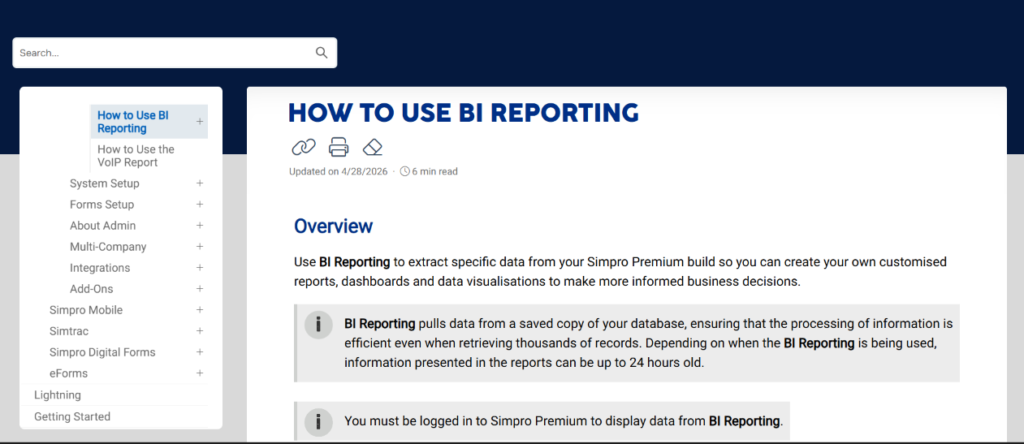
Simpro BI Reporting. This is the self-service business intelligence layer, and it’s the part most people mean when they ask about “Simpro BI.” According to Simpro’s own documentation, BI Reporting is used to extract specific data from your Simpro Premium build so you can create your own customised reports, dashboards and data visualisations. Crucially, it pulls data from a saved copy of your database, which keeps performance efficient even when retrieving thousands of records, but means the information can be up to 24 hours old. simprogroupsimprogroup
That distinction between standard reports and BI Reporting matters more than most vendor pages make clear, and it’s the first thing I’d confirm before assuming your current plan includes it.
Simpro BI Reporting: How It Works
Simpro’s BI Reporting tool is essentially a query-and-dashboard builder layered on top of your operational data. Users can ask their own data questions rather than being limited to fixed report templates, then pin the results to a dashboard for ongoing tracking.
A few practical realities of how it functions:
- Snapshot-based, not live. Because it runs on a synced database copy rather than your live transactional database, don’t expect BI Reporting to reflect a job that closed an hour ago. Plan around a same-day-or-next-day lag.
- Requires Simpro Premium and an active login. You have to be logged in to Simpro Premium to display data from BI Reporting. simprogroup Simpro positions BI Reporting as a Premium capability, so businesses should confirm their subscription level before building a reporting strategy around custom dashboards and self-service BI.
- Deactivates with inactivity. If BI Reporting is not accessed for more than 90 days it becomes temporarily unavailable, and reactivates automatically on the next sync, typically within 24 hours, once someone opens it again. This is a small but real operational detail worth knowing if BI Reporting is set up early but not used consistently by the team. simprogroup
- Custom dashboards by business area. Users can create separate dashboards for finance, operations, sales, and workforce metrics, which several Simpro implementation partners highlight as one of the tool’s stronger use cases. One partner focused on BI Reporting implementation notes it gives businesses the ability to create dashboards containing multiple reports, perfect for management meetings, accountability, and KPIs. findyourmo .This dashboard-based approach can be useful for separating finance, operations, sales, and workforce KPIs instead of relying on one large report for every business function.
Simpro has also run dedicated training webinars on this feature, covering practical applications such as how to identify labour capacity bottlenecks for job prioritisation and how to analyse gross profit per hour, per cost centre. That’s a good sign the tool is capable of meaningful operational analysis, but it also signals that getting real value out of it takes deliberate setup, not just flipping it on. simprogroup
Simpro describes BI Reporting as a tool for extracting specific data from a Simpro Premium build and turning it into customised reports, dashboards, and data visualisations. This makes it useful for businesses that need to move beyond fixed report templates and analyse their own KPIs and business questions.
Standard Simpro Reports vs. BI Reporting: Side-by-Side
| Capability | Standard Reports | BI Reporting |
|---|---|---|
| Included with | Most Simpro plans | Simpro Premium |
| Report format | Pre-built templates (70+) | Custom, self-service report building |
| Data freshness | Generally reflects current data | Synced snapshot, up to ~24 hours old |
| Scheduling/automation | Yes, daily/weekly/monthly to inbox | Dashboard-based, not the same automated email delivery |
| Best for | Recurring financial and job snapshots | Ad hoc analysis, custom KPIs, cross-department dashboards |
| Learning curve | Low, run and read | Moderate to high, especially for complex questions |
| Examples | Job Productivity, Job WIP, Stock Value, Aged Receivables | Custom labour capacity views, gross profit per cost centre, sales pipeline dashboards |
What Simpro’s Standard Reports Actually Cover
The built-in report library is genuinely broad, and for many small to mid-sized contractors it covers the day-to-day questions that matter most without ever touching BI Reporting.
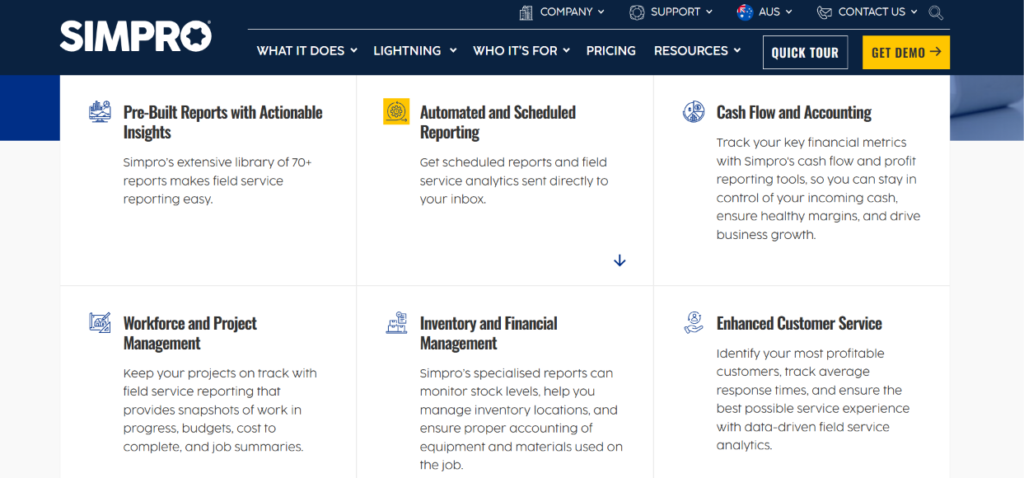
Simpro’s reporting library contains more than 70 pre-built reports covering operational, financial, workforce, inventory, and project information.
Financial visibility is a strong point here. Simpro’s reporting covers cash flow and profit reporting to ensure maximum financial visibility, letting you track paid and unpaid invoices and generate reports that highlight overdue payments sortable by days overdue. It also shows the payment method linked to each invoice, giving insight into customer payment behavior, which is a small but genuinely useful detail for businesses chasing down collections. simprogroupsimprogroup
On the operational side, standard reports track field service analytics like project progression, job activity, and staff performance drawn from everyday operations. According to Simpro, the most commonly used reports in Premium builds are streamlined into a single page and include Job Productivity, Job WIP, Stock Value, Profit and Loss by Job, Job Activity, Price Discrepancies, Stock Required, and Aged Receivables, among others. simprogroupsimprogroup
Simpro specifically highlights reports such as Job Productivity, Job WIP, Stock Value, Profit and Loss by Job, Job Activity, Price Discrepancies, Stock Required, and Aged Receivables.
In practice, this means an HVAC or plumbing business can run a Monday morning Aged Receivables report and a Job Productivity report without ever building a custom dashboard. It’s the BI Reporting layer that becomes necessary once you want to cross-reference those data points, for example labor cost per cost centre against quoted margin, or technician utilization against revenue by service line.
Where Simpro Reporting Falls Short (Trustworthiness Check)
No reporting system is a perfect fit for every business, and it’s worth being direct about where Simpro’s reporting has real limitations, based on verified user feedback across review platforms.
Report customization has a skill ceiling. In a verified Capterra review, one accounts manager noted that report customisation is limited unless you have advanced skills or external tools, which can be a challenge for teams needing flexible reporting. This tracks with what I typically see during implementations: the standard reports are solid out of the box, but once a business wants something genuinely custom, BI Reporting requires someone comfortable with data structures, not just office admin staff running templates. capterra. This limitation is also reflected in verified user feedback. A Capterra review specifically mentioned that report customization can be limited without advanced skills or external tools.
Data sync delays are a recurring complaint. While Simpro’s own documentation is upfront about the roughly 24-hour sync window, some users report the lag feels worse in practice. One reviewer described relying on BI Reporting that was always broken with syncing delays, running about two days out of date, meaning reports were never fully current. Treat official timing as the baseline expectation, and confirm current performance during a trial or demo rather than assuming it’s always exactly 24 hours. trustpilot. Because BI Reporting relies on synced data rather than directly querying live transactional activity, businesses should consider data-refresh timing when using the tool for time-sensitive decisions.
Cost centre-level reporting has gaps. A user comparing Simpro to another platform noted materials reporting could only be specified by job number and not by cost centre number, which made it difficult to extract clean information on large jobs with multiple cost centres. If your business runs large commercial jobs with granular cost centre tracking (common in commercial HVAC and electrical work), this is worth testing directly against your own job structure before committing. trustradius. Businesses with complex multi-cost-centre projects should therefore test the reporting structure against their own workflows before relying on it for detailed project analysis.
Support quality is inconsistent across reviews. Satisfaction scores vary meaningfully by source. On one review aggregator, Simpro holds a 3.9 out of 5 overall rating with support and functionality each scoring 7 out of 10 in satisfaction breakdowns, while other platforms show ratings closer to 3.6 to 4.2, with support responsiveness cited unevenly. This doesn’t mean the software is unreliable, but it does mean you should weight recent, verified reviews over marketing claims when evaluating onboarding and support for reporting-specific questions. softwarefinder. For example, Capterra currently lists Simpro at 4.0 out of 5 from 148 reviews, with an ease-of-use rating of 3.7 and a customer-service rating of 3.8. These figures represent Capterra reviewers and should not be treated as a measurement of every Simpro customer.
None of this means Simpro’s reporting is a bad choice. It means it rewards businesses that invest in clean setup (correct cost centres, consistent job coding, defined KPIs) and that budget time or a specialist for BI configuration rather than expecting it to be self-explanatory from day one.
Third-Party Simpro BI and Analytics Tools
One of the clearest signals that native Simpro reporting doesn’t fully satisfy every business’s BI needs is the number of third-party tools built specifically to extend it.
Dedicated Simpro-focused BI consultancies have emerged specifically to close this gap. One such partner describes itself as a specialist Business Intelligence and Analytics consultancy focused on the Simpro ecosystem, founded by a former Simpro Solution Architect, supporting Simpro users globally in designing, building, and optimizing end-to-end BI processes. Their offering spans jobs and quotes reporting (job costing, margin by job, quote pipeline and win rates) and project-level reporting (budget vs actual, cost-to-complete, WIP and project profitability), delivered through Power BI dashboards connected directly to Simpro data. simprogroupsimprogroup
Marketplace dashboard apps have taken a similar approach, packaging Simpro data into purpose-built views. One such app markets itself as a platform where every dashboard and metric is designed around how Simpro businesses actually operate, organizing data across finance, job costing, sales pipeline, staff utilisation, and customer value views, with tiers offering 40-plus business KPIs, a company health score, AR aging and DSO tracking, job costing with budget versus actual variance, and staff schedule utilisation. simprogroupsimprogroup
The existence of this ecosystem isn’t a criticism of Simpro so much as a realistic expectation-setter: native reporting handles the fundamentals well, but growing or multi-entity businesses commonly layer on Power BI connectors or specialist dashboards once their reporting needs mature past templates and basic dashboards.
Simpro can also be extended through integrations and data-access options when businesses need reporting capabilities beyond their native setup. These options can be relevant for businesses that need to combine Simpro data with information from other systems
How to Get More Value From Simpro Reporting: A Practical Approach
From an implementation perspective, the businesses that get the most out of Simpro’s reporting and BI tools tend to follow a similar pattern. A practical approach looks like this:
- Audit your cost centre and job structure first. Reporting is only as good as the data feeding it. Inconsistent job coding is the single most common reason BI Reporting output looks messy or unusable.
- Confirm your plan tier before you plan around BI Reporting. Simpro’s standard reporting library includes more than 70 pre-built reports, while BI Reporting is associated with Simpro Premium. Confirming the available reporting features before implementation can help businesses avoid building processes around capabilities that are not included in their plan.
- Start with 3 to 5 KPIs, not 30. Labour utilization, gross margin per job, and aged receivables are a strong starting set for most trades. Expand from there once the team trusts the numbers.Simpro’s existing reporting options already cover metrics such as job productivity, WIP, stock value, profit and loss by job, and aged receivables, giving businesses a starting point before they build more customised dashboards.
- Assign report ownership. One person (often an office manager or operations lead) should own scheduled reports and BI dashboard upkeep. Reporting tools that nobody owns tend to go stale.
- Test data lag against your actual decision cadence. If you need same-day numbers for daily dispatch decisions, standard reports paired with live job status may serve you better than BI Reporting’s snapshot data.
- Evaluate third-party BI only once native reporting is fully utilized. Power BI connectors and marketplace dashboards add real value, but they’re best layered on top of a clean native setup, not used to paper over messy job data.
For businesses running heavier commercial workloads, this ties directly into broader platform decisions. If you’re evaluating how Simpro’s reporting holds up specifically for commercial HVAC, electrical, or plumbing operations, it’s worth reviewing how job costing and reporting interact with each trade’s typical project structure, since large multi-cost-centre commercial jobs are exactly where reporting gaps show up first.
Industry-Specific Considerations
HVAC. Commercial HVAC businesses tend to rely heavily on job costing accuracy and preventive maintenance tracking, since service contracts and recurring maintenance revenue are core to profitability. Reporting that connects maintenance agreement performance to technician time and parts usage is worth setting up early. If preventive maintenance scheduling is part of your operation, it’s also worth reviewing how Simpro handles preventive maintenance workflows alongside reporting, since maintenance data quality directly affects the accuracy of related BI dashboards.
Electrical. For electrical contractors running installation and inspection work, cost centre-level reporting granularity matters most, particularly on larger panel upgrade or commercial installation jobs where labor and materials need to be tracked separately by phase.
Businesses handling larger electrical projects can also test Simpro’s reporting structure against their own cost, labour, and project-tracking requirements before implementation.
Plumbing. Plumbing businesses juggling emergency calls alongside scheduled work benefit most from real-time job activity visibility. Given the sync delay on BI Reporting, standard reports and live job status views tend to be more useful for same-day dispatch decisions, while BI dashboards are better suited to weekly or monthly profitability reviews.
The timing of reporting data should also be considered when BI dashboards are being used alongside same-day operational decisions.
Common Mistakes to Avoid
- Assuming all Simpro plans include BI Reporting. Confirm this before making reporting a core part of your evaluation.Simpro distinguishes its broader standard reporting capabilities from BI Reporting available with Premium, so businesses should verify the features included in their specific subscription.
- Ignoring the data sync delay when making time-sensitive decisions. Don’t rely on BI Reporting for same-day dispatch or cash decisions.
- Skipping cost centre setup before go-live. Retrofitting clean job coding after months of inconsistent data entry is far more painful than setting it up correctly from the start.
- Overbuilding dashboards nobody checks. More reports isn’t more insight. Start narrow.
- Comparing Simpro reporting to generic BI tools without accounting for context. Simpro’s reporting is purpose-built for trade and project-based data structures, which is a real advantage over generic spreadsheet-based reporting, even with its limitations.
Best Practices for Field Service Reporting and BI
Regardless of platform, a few principles hold up consistently across ERPNext, other FSM platforms, and Simpro:
- Treat reporting as an ongoing process, not a one-time setup task.
- Reconcile automated reports against source data periodically to catch sync or configuration issues early.
- Keep dashboards role-specific: owners need profitability views, dispatchers need job status, technicians need almost nothing beyond their own schedule.
- Document what each KPI means and how it’s calculated, so reporting doesn’t become a black box as staff turn over.
FAQs
Does Simpro have reporting and business intelligence built in?
Yes. Simpro includes a library of 70+ standard reports available across most plans, plus a dedicated BI Reporting tool for custom dashboards and self-service data questions, available with Simpro Premium.Simpro offers more than 70 pre-built reports, while its BI Reporting capability provides options for customised reports, dashboards, and data visualisations through Simpro Premium.
FAQ: What is Simpro BI Reporting used for?
What is Simpro BI Reporting used for?
Simpro BI Reporting is used to extract specific data from a Simpro Premium build to create customised reports, dashboards, and data visualisations for more informed business decisions, such as labour utilization, cost centre profitability, and custom KPI tracking. simprogroup
This makes BI Reporting particularly relevant for businesses that need customised KPIs and dashboards beyond the standard report library.
How current is the data in Simpro BI Reporting?
Simpro’s BI Reporting pulls from a synced copy of the database, and Simpro states data can be up to 24 hours old. Some users report longer delays in practice, so it’s worth confirming current sync performance during a trial. simprogroup
Is Simpro BI Reporting included in every plan?
No. BI Reporting is included with Simpro Premium builds. Standard, pre-built reports are more broadly available across plans, but custom dashboard building is a Premium-tier capability. simprogroup
Simpro’s standard reporting library and Premium BI Reporting should therefore be treated as separate capabilities when evaluating the platform.
What reports come standard with Simpro?
Commonly used standard reports include Job Productivity, Job WIP, Stock Value, Profit and Loss by Job, Job Activity, Price Discrepancies, Stock Required, and Aged Receivables, among 70-plus total reports covering finance, job activity, and staff performance. simprogroup
Simpro states that its reporting library contains more than 70 reports, including commonly highlighted reports such as Job Productivity, Job WIP, Stock Value, Profit and Loss by Job, Job Activity, Price Discrepancies, Stock Required, and Aged Receivables.
Can Simpro reports be automated and scheduled?
Yes. Standard reports can be scheduled and sent directly to your inbox daily, weekly, or monthly, which is useful for recurring financial and operational check-ins without manual report generation. simprogroup
Simpro states that reports can be scheduled for daily, weekly, or monthly delivery.
What are the main limitations of Simpro’s reporting tools?
The most commonly cited limitations in verified reviews are limited customization without advanced skills, data sync delays in BI Reporting, and restricted cost centre-level detail on materials reporting for complex jobs.
Do businesses need third-party tools to get full value from Simpro reporting?
Not necessarily, but many growing businesses do adopt Power BI connectors or specialist Simpro BI consultancies once their reporting needs exceed native dashboard capabilities, particularly for advanced job costing and margin analysis.
Is Simpro reporting good for small trade businesses?
Standard reporting is generally sufficient for smaller operations focused on job costing, invoicing, and basic profitability tracking. BI Reporting becomes more valuable as the business grows and cross-departmental analysis becomes necessary.
How does Simpro reporting compare to other field service platforms?
Simpro’s reporting is generally considered strong for job-based financial reporting given its deep integration with quoting, job costing, and invoicing. Its main trade-off compared to some competitors is the learning curve for custom BI reporting versus simpler, template-only reporting in more basic FSM tools.
Final Thoughts
Simpro’s reporting and BI capabilities are genuinely strong for a platform built around trade and project-based work, particularly for financial visibility and standard operational reporting. Where it asks more of the user is in BI Reporting: real value there depends on clean underlying data, realistic expectations about the sync delay, and often a dedicated person or partner who understands how to structure custom reports.
If you’re currently evaluating Simpro against other platforms or deciding how deep to go with BI Reporting versus a third-party analytics layer, it’s worth reviewing our full breakdown of Simpro’s reporting and BI capabilities alongside how it performs for your specific trade, whether that’s commercial HVAC, commercial electrical, or commercial plumbing work, before committing to a Premium upgrade purely for BI access.