Simpro for Fire & Security: Is It the Right Fit?
If you run a fire protection or security contracting business in the USA or Canada, you have probably had at least one demo of Simpro, or at least heard a competitor mention it. It shows up on almost every shortlist for trade contractors, and the vendor lists fire protection and security among the industries it serves. The harder question is whether it fits your mix of installations, inspections, service contracts and compliance paperwork.
That is what this guide covers. I look at Simpro through the lens of a fire and security operation: quoting large installs, running recurring inspection routes, keeping defensible records, and getting paid without three people re-keying the same invoice. I also cover where it is likely to feel heavy, what pricing looks like, and how to decide without relying on a sales deck. Where I cite numbers, they come from named sources, and where a number is a third-party estimate rather than a published price, I say so.
Quick Answer: Simpro is a good fit for small to mid-sized fire and security contractors that combine project work (installations, retrofits) with recurring service and maintenance, and that want quoting, scheduling, asset tracking, job costing and invoicing in one system. It is a weaker fit for very small crews that need a simple tool, or for contractors whose main need is deep, code-specific inspection reporting that a purpose-built fire inspection platform handles natively. Always confirm your compliance forms and reporting in a live demo before you sign.
Key Takeaways
- Simpro is a trade-focused field service management platform that lists fire protection and security among its core industries, with operations across the US, UK, Australia and Canada.
- Its strengths for this trade are quote-to-cash coverage (estimating, job costing, scheduling, invoicing) and asset maintenance tools that support recurring service work.
- Simpro does not publish pricing. Third-party estimates vary widely, so treat any number you read online as a rough guide and get a written quote.
- Fire inspection work is record-heavy. NFPA 72 and NFPA 25 both expect documented inspection, testing and maintenance, so check how Simpro’s digital forms and reports match what your authority having jurisdiction (AHJ) accepts.
- Accounting integrations (QuickBooks, Xero) and Zapier can remove double entry, but each has limits you should test before go-live.
- The best way to decide is a scored evaluation using your own jobs, sites and forms, not a feature checklist.
What Is Simpro and How Does It Apply to Fire and Security?
Simpro is a cloud-based field service management (FSM) and job management platform built for trade contractors. According to Simpro’s fire protection software page, it is designed to let you track fire protection work from the office on a desktop or from the field on a phone or tablet, with tools for jobs, asset maintenance, workflows and compliance reporting.
Definition: What Is Simpro?
Simpro is a subscription-based software platform that connects quoting, job management, scheduling, inventory, asset maintenance, invoicing and reporting for trade and service businesses, including fire protection and security contractors.
That “connected” idea matters more than any single feature. In my experience, most fire and security businesses do not fail because they lack a scheduling tool. They struggle because the quote lives in one place, the parts order in another, the inspection report in a third, and the invoice in accounting. Every handoff is a chance to lose money or paperwork.
Who Simpro Is Built For
Review data gives a useful picture. On Capterra, Simpro’s listing notes that 95% of reviewers come from small companies, and it shows security and investigations as one of the larger reviewer segments at 17%. On SelectHub, Simpro carries an 82% user satisfaction rating based on 644 reviews across three review sites, although reviewers also flag a steep learning curve because of the depth of the platform.
Read those two facts together and you get a realistic profile: a capable, broad platform that rewards contractors willing to invest in setup and training.
Why Fire and Security Contractors Need More Than Generic Field Service Software
Fire and security work has a few traits that make generic scheduling apps feel thin.
The Stakes and the Records Are Real
Fire protection is not a nice-to-have service. According to the NFPA’s 2024 fire loss research summary, U.S. fires in 2024 totaled 1.39 million, caused 3,920 deaths and $19.1 billion in damage, and home fires accounted for 75% of civilian fire deaths and injuries. The full report, Fire Loss in the United States, is worth bookmarking if you need a credible statistic for a client proposal.
That context explains why inspection, testing and maintenance (ITM) is documented so carefully. NFPA 72, the National Fire Alarm and Signaling Code, covers the installation, performance, inspection, testing and maintenance of fire alarm systems, and NFPA 25 covers water-based systems such as sprinklers. Guidance published by facilities and compliance sources consistently says the building owner is ultimately responsible for making sure ITM happens and records are kept, but the contractor produces much of that documentation. Requirements differ by jurisdiction and adopted edition, so confirm with your AHJ. In Canada, provincial codes and CAN/ULC standards apply instead, and the same advice holds.
The Data Volume Problem
Device-level inspection creates a lot of data. As one fire ITM guide puts it, a 400-device system produces 400 individual test records. Multiply that by dozens of sites and multiple visit types per year, and it becomes clear why paper and spreadsheets stop working.
The Margin Problem in Mixed Project and Service Work
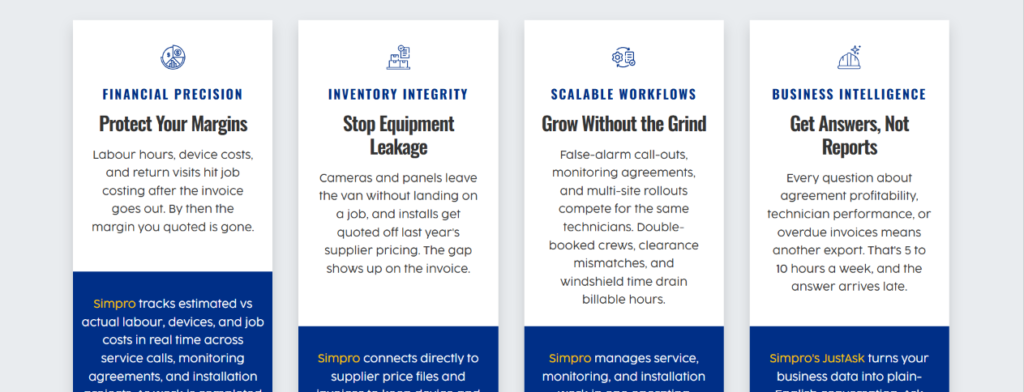
Many fire and security contractors run two businesses inside one: lumpy project revenue and steady recurring service revenue. Project work needs estimating, progress billing, materials tracking and job costing. Service work needs route planning, contracts, asset history and quick invoicing. Software that only does one well forces you into workarounds for the other.
Simpro Features That Matter for Fire and Security Work
Here is how I evaluate FSM software: I look at how a feature solves a specific operational problem, not at the length of the feature list. These are the areas where Simpro is most relevant.
Quoting, Estimating and Takeoffs
Simpro offers quoting and estimating tools, and its pricing page describes a Takeoffs tool for counting symbols and marking up plans for jobs, quotes and tenders. For security and fire alarm installs, where device counts drive the quote, plan markup that feeds directly into a quote can save real estimating time. Test it on one of your actual drawings during the demo. Symbol recognition works differently on clean CAD exports and on scanned paper plans.
Job Management, Scheduling and Dispatch
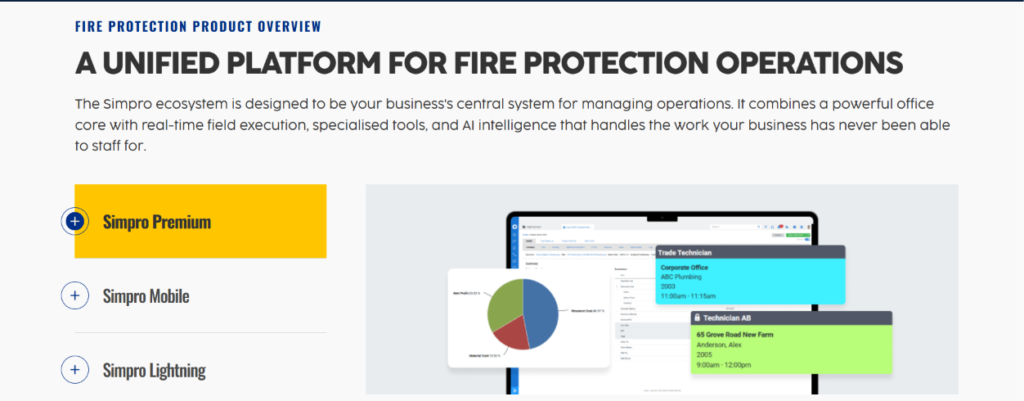
Simpro’s job scheduling handles staff, equipment and contractors, and its mobile app supports real-time updates between the office and the field. For a fire contractor, the practical questions are:
- Can you schedule a recurring inspection series and see it against install crews?
- Can a dispatcher see who is qualified for what (for example, technicians with the right certifications for a given system)?
- Can travel time and site access notes be captured per location?
Ask to see these scenarios, not generic demos.
Asset Registers, Maintenance Plans and Service Contracts
This is where fire and security businesses should spend the most demo time. Third-party summaries describe Simpro’s asset features as capturing and sharing asset test readings and quoting defects, and Simpro’s own materials highlight automated asset maintenance and recurring jobs. The workflow you want is: asset recorded at install, inspection scheduled from the service plan, test results recorded on site, defects converted to a quote, and the repair booked as a follow-up job. If any link in that chain requires manual re-entry, note it.
Digital Forms and Compliance Reporting
Simpro’s Digital Forms add-on lets you build custom forms for technicians in the field. That flexibility is useful, but it also means the form quality depends on how well you build it. Before signing, bring a sample of your current inspection report and ask whether the output matches what your AHJ, insurers and customers accept. In my experience, this single test settles more evaluations than any other.
Mobile, Inventory and Job Costing
Simpro Mobile supports clocking in and out, job updates and invoicing from the field. Inventory and job costing matter to fire and security firms because panels, detectors, cabling and devices are expensive and easy to lose track of between the warehouse and the van. Ask how stock is allocated to jobs and how variances show up in reporting.
Reporting, Data Feeds and Security Controls
Simpro Data Feed uses rule-based automation to pull data from emails and attachments and create or update jobs and quotes, which can help if you receive many purchase orders or work requests by email. On security, Software Finder reports two-factor authentication, role-based access, audit logs and single sign-on through Microsoft Entra and Okta. If you handle customer sites with access control or alarm data, ask about permissions by role and how audit logs work in practice.
Simpro vs Other Options for Fire and Security Contractors
No platform is best for everyone. This table compares broad categories rather than declaring winners, and you should verify current capabilities directly with each vendor.
| Factor | Simpro | Purpose-built fire and security tools (for example, Uptick) | General residential FSM tools |
|---|---|---|---|
| Primary focus | Multi-trade field service and job management | Asset maintenance for fire and security | Home service scheduling and invoicing |
| Project quoting and job costing | Strong, includes takeoffs and estimating | Varies by vendor | Usually basic |
| Recurring service and asset history | Supported through asset maintenance features | Core strength | Often limited |
| Inspection and compliance reporting | Custom digital forms; verify output | Typically built around fire inspection workflows | Usually generic forms |
| Accounting integrations | QuickBooks, Xero, others | Varies | Varies |
| Best for | Contractors mixing install and service work | Service-heavy inspection businesses | Small residential crews |
| Typical trade-off | Setup and learning curve | May be lighter on project costing | May not scale to commercial work |
Simpro vs Purpose-Built Fire Tools
Uptick describes its platform as asset maintenance software built specifically for fire and security businesses. That focus can mean tighter inspection workflows out of the box. Simpro’s advantage is breadth: if a large share of your revenue is installation and project work, a single platform that also handles estimating, materials and job costing can reduce the number of systems you manage. If you are 90% recurring inspections, a specialist may feel faster to deploy. Note that Uptick’s page is vendor content, so treat comparisons with appropriate skepticism and validate claims in demos.
Simpro vs General Residential FSM
Tools built for home services often win on price and speed of setup, but they can struggle with commercial complexity: multi-site customers, purchase orders, progress claims, and asset-level history. If your customers are building owners and property managers rather than homeowners, the extra structure in Simpro is usually worth it.
Simpro Pricing: What Fire and Security Contractors Should Expect
Here is the honest answer: Simpro does not publish its prices. Its own pricing page says pricing is tailored to team size, whether users are in the office or field, and the add-ons you choose, and it directs you to request a quote.
Third-party sources try to fill the gap, but their figures disagree. That is normal for quote-based software and a reason to treat all of them as unverified.
| Source (third-party estimate) | Reported figure | How to treat it |
|---|---|---|
| ITQlick | A single license may start around $70 per month; a 10-user team roughly $700 to $1,200 per month | Market-analysis estimate, not a quote |
| Field Service Guide | About $150 to $300 per user per month, based on user reports | Estimate from user reports; wide range |
| BlueSuite comparison page | Roughly $70 or more per user per month; implementation reported at $3,000 to $10,000 or higher for small businesses | Published by a competitor; note the bias |
| Simpro (official) | Custom quote based on users and add-ons | The only figure that counts |
The takeaway is that estimates range from roughly $70 to $300 per user per month depending on the source, the tier, and the add-ons, so budget conservatively and build your business case on a written quote that lists every module, mobile license and implementation fee.
Cost Drivers Beyond the License Fee
When I compare software costs, I look at total cost of ownership rather than the monthly line item. Watch for:
- Implementation and data migration fees
- Training time for office staff and technicians (this is real payroll cost)
- Add-ons such as Digital Forms, Data Feed or premium messaging
- Additional mobile or field licenses
- Integration costs, such as third-party connectors or Zapier plans
- Internal admin time to maintain forms, price books and asset templates
ROI Considerations
I would not promise a specific return, and you should be wary of anyone who does. A practical way to frame ROI is to measure a few numbers before and after: quote turnaround time, invoice lag (days from job completion to invoice sent), percentage of inspection reports delivered on time, and callbacks caused by missing information. If the quote-to-invoice lag drops by several days across all your jobs, the cash flow effect alone can be meaningful. Do the arithmetic with your own volumes.
A Realistic Scenario: How the Workflow Plays Out
This is an illustrative scenario, not a client result.
Imagine a 12-person contractor that installs and services fire alarms and access control for small commercial buildings. Today, estimates are built in spreadsheets, inspection reports are typed up after each visit, and invoices are entered into accounting by the owner’s spouse on Friday afternoons.
In a connected setup, the estimator counts devices on the plan and produces a quote. When the customer accepts, it becomes a job with materials allocated. On completion, the technician captures results on a mobile form, the report goes to the customer, any failed devices become a quote for repairs, and the invoice moves to accounting without retyping. The scenario works only if the forms, asset templates and price book were configured properly at the start. Most of the value comes from that setup, not from the software alone.
Integrations: QuickBooks, Xero, Zapier and the API
Most contractors already have accounting in place, so integration quality can make or break adoption.
Accounting: QuickBooks and Xero
Simpro’s own integration pages describe one-click transfers of invoices, customers and suppliers to QuickBooks and of invoices, timesheets, customers, suppliers and contractor details to Xero, plus the ability to apply payments in one system and sync them to the other. For a deeper walk-through of how each connection works in practice, see our guides on connecting Simpro with QuickBooks and setting up Simpro with Xero.
Test these questions during evaluation: which fields map, how tax codes for US states or Canadian provinces are handled, what happens when an invoice is edited after transfer, and who fixes a sync error.
Automation With Zapier and the API
Simpro’s Zapier integration page states that Simpro does not charge for using the integration, though Zapier has its own free and paid plans. It is a practical way to connect lead forms, CRMs or messaging tools without custom code. Our overview of Simpro and Zapier automation covers example workflows. Third-party summaries also note that Simpro offers an API, which matters if you have unusual systems, but budget developer time if you go that route.
A word of caution from an implementation perspective: every integration is another thing that can break. Start with accounting, get it stable, then add automation one workflow at a time.
Industry-Specific Recommendations
Fire Alarm and Detection Contractors
Prioritize asset registers at the device level, inspection frequency scheduling, and report templates aligned with your AHJ. Check how sensitivity test results, panel history and deficiency lists are stored and retrieved. NFPA 72 expects qualified personnel, so track technician certifications where the system allows.
Sprinkler and Suppression Contractors
Water-based systems under NFPA 25 have inspection schedules that vary from weekly to multi-year. Test whether Simpro can model multiple recurring intervals for a single site without creating a maintenance headache, and how it handles impairment notices and follow-up repairs.
Security and Access Control Installers
Installation-heavy security firms benefit most from estimating, materials tracking and project job costing. Look at how the platform handles progress billing, warranty periods, and recurring monitoring or service agreements.
Contractors With Adjacent Services
Many fire and security firms also service kitchen suppression, HVAC-adjacent systems or refrigeration equipment for the same customers. If that describes you, our article on Simpro for refrigeration is worth a read, since multi-trade asset tracking is where a broad platform can pay off.
Pros and Cons of Simpro for Fire and Security
Pros
- Broad coverage from quote to invoice in one system
- Asset maintenance and recurring job support for service contracts
- Digital forms for custom field data collection
- Established accounting integrations and a Zapier connection
- Multi-market presence, including the US and Canada
- Role-based access, audit logs and two-factor authentication
Cons
- Pricing is not public and estimates vary widely
- Reviewers report a steep learning curve
- Custom forms require design effort to match inspection requirements
- Implementation and training are real projects, not a weekend task
- May be more platform than a very small, service-only crew needs
Is Simpro the Right Fit? A Decision Framework
Simpro Is Likely a Strong Fit If
- You do both installation projects and recurring service
- You need job costing and margin visibility by job
- You have several office staff and a growing field team
- You want one platform instead of stitching together four tools
- You are willing to invest in setup and training
Look More Closely at Alternatives If
- Nearly all your revenue is inspection routes with heavy code-specific reporting
- You have fewer than a handful of technicians and need something running this month
- Your customers demand a specific inspection report format the platform cannot reproduce
- You cannot commit staff time to implementation
A Simple Scorecard
Rate each item from 1 to 5 after your demo, weighting the ones that matter most to your business:
- Quote and takeoff speed on a real plan
- Recurring inspection scheduling
- Asset history and defect-to-quote workflow
- Match to your current inspection report
- Mobile usability for technicians (test with your least technical one)
- Accounting sync accuracy
- Reporting on job profitability
- Total cost of ownership from a written quote
A platform scoring poorly on the items that touch compliance should not win on price alone.
How to Evaluate and Implement Simpro: Step by Step
- Map your workflows. Write down how a job moves from lead to cash today, including who touches it at each step.
- Collect real samples. Gather two or three current quotes, inspection reports, a service agreement and a recent invoice.
- Request a written quote. Ask for every module, license type, onboarding fee and support tier itemized.
- Run a scripted demo. Give the vendor your samples and ask them to recreate them live.
- Talk to reference customers. Ask for fire or security contractors of similar size, and ask what took longest to set up.
- Plan the data migration. Decide which customers, sites and assets to import and clean the data first.
- Pilot with one team. Start with one crew and one service line, then expand.
- Train in short sessions. Field technicians retain more from short, job-specific training than from a long classroom day.
- Review after 90 days. Compare your before-and-after metrics and adjust forms and workflows.
Common Mistakes to Avoid
- Buying on features instead of workflows. A long feature list means little if your inspection report cannot be reproduced.
- Skipping data cleanup. Migrating messy customer and asset data just moves the mess.
- Underestimating training. Technicians who dislike the app will find workarounds, and the data quality drops.
- Over-customizing on day one. Start with standard workflows and refine after real use.
- Turning on every integration at once. Fix accounting first, then automate.
- Ignoring AHJ and insurer requirements. Confirm accepted formats before you build templates.
Best Practices for Getting Value From Simpro
- Assign one internal owner for setup and ongoing admin
- Build a clean price book and asset template library before go-live
- Standardize job types and naming so reporting stays useful
- Use mobile forms with required fields to reduce missing information
- Review job costing weekly at first, so estimating errors surface fast
- Schedule a quarterly review of forms, templates and user permissions
Frequently Asked Questions
Is Simpro good for fire and security companies?
Yes, for many of them. Simpro lists fire protection and security among its core industries and offers quoting, scheduling, asset maintenance, invoicing and reporting in one platform. It suits contractors that combine installation and service work, but you should confirm inspection report formats and asset workflows in a live demo.
How much does Simpro cost?
Simpro does not publish its prices and provides custom quotes based on users and add-ons. Third-party estimates range from roughly $70 to $300 per user per month, but these are unverified. Request a written quote that itemizes licenses, add-ons, implementation and training.
Does Simpro have a free trial or free version?
Review sites such as SoftwareWorld report that Simpro offers neither a free version nor a free trial. Availability can change, so confirm current demo and trial options directly with Simpro.
Can Simpro handle fire alarm and sprinkler inspections?
It can support recurring inspections through asset maintenance features and custom digital forms. Because NFPA 72 and NFPA 25 require documented ITM, test whether the report output matches what your AHJ and customers accept before you commit.
Does Simpro work in the USA and Canada?
Yes. Software Finder reports that Simpro supports operations across the US, UK, Australia and Canada. For Canadian work, check how taxes, provincial requirements and CAN/ULC-based reporting are handled.
Does Simpro integrate with QuickBooks and Xero?
Yes. Simpro documents integrations with both QuickBooks and Xero for transferring invoices, customers and suppliers, with Xero also covering timesheets. Test field mapping, tax handling and error correction before going live.
Can I automate workflows with Simpro and Zapier?
Yes. Simpro has a Zapier integration, and Simpro states there is no cost from Simpro to use it, although Zapier’s own plans apply. Start with one or two simple workflows and expand after they prove stable.
Is Simpro hard to learn?
Some reviewers describe a steep learning curve because the platform is broad. Budget time for structured training, a designated internal owner, and a phased rollout with one team first.
What are the best alternatives to Simpro for fire and security contractors?
Options include purpose-built asset maintenance platforms such as Uptick, other multi-trade FSM systems, and general service software. The right choice depends on whether your revenue leans toward projects, recurring inspections or a mix of both.
How do I decide if Simpro is the best software for fire and security in my business?
Score it against your own workflows using a demo built from your real quotes, inspection reports and invoices. If it handles your compliance paperwork, asset history and quote-to-cash flow at a total cost you can justify, it is a strong candidate. If not, keep looking.
Final Thoughts
Simpro is a serious, broad platform, and for a fire and security contractor doing both project and service work, it deserves a place on the shortlist. It is not automatically the best choice, and I would be skeptical of any article that says otherwise. The deciding factors are usually unglamorous: whether your inspection reports come out the way your AHJ expects, whether assets and defects flow into quotes without retyping, and whether your team will actually use the mobile app.
Do the scripted demo, get the written quote, and score the results honestly. The right software is the one your technicians will use and your office can trust, not necessarily the one with the longest feature list.
Next Steps With Field Services HQ
If you are comparing platforms, start with our dedicated guide to Simpro for fire and security, then look at the integration guides for QuickBooks and Xero so your accounting setup does not become an afterthought. Explore the rest of the Field Services HQ library for field service management software comparisons, scheduling and dispatch guides, and contractor resources to help you make the decision with confidence.
For labor market context on the technicians you are trying to keep productive, the U.S. Bureau of Labor Statistics occupational data for security and fire alarm systems installers is a reliable place to start.