Simpro Scheduling & Dispatch: Full Breakdown
If you run a commercial HVAC, electrical, plumbing, or fire protection company, scheduling and dispatch are probably where your operation either makes money or quietly bleeds it. A tech sitting in traffic instead of on a job site, a dispatcher juggling three spreadsheets and a whiteboard, a maintenance visit that falls through the cracks: these aren’t small annoyances. They show up directly in your labor costs and your first-time fix rate.
In my experience working with field service and ERP implementations, scheduling and dispatch are usually the first two modules a growing contractor actually stress-tests in any software platform. Everything else, quoting, invoicing, reporting, only works well if the schedule underneath it is accurate. This breakdown covers exactly how Simpro handles scheduling and dispatch, what the tools actually do day to day, where they hold up well, where they fall short, and how to decide if Simpro is the right fit for your operation.
What Is Simpro Scheduling & Dispatch?
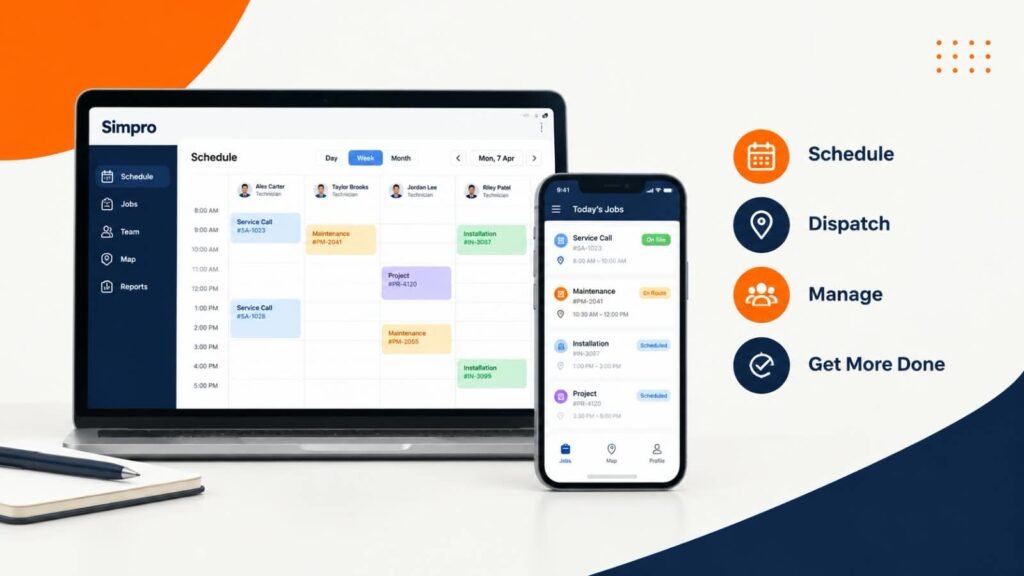
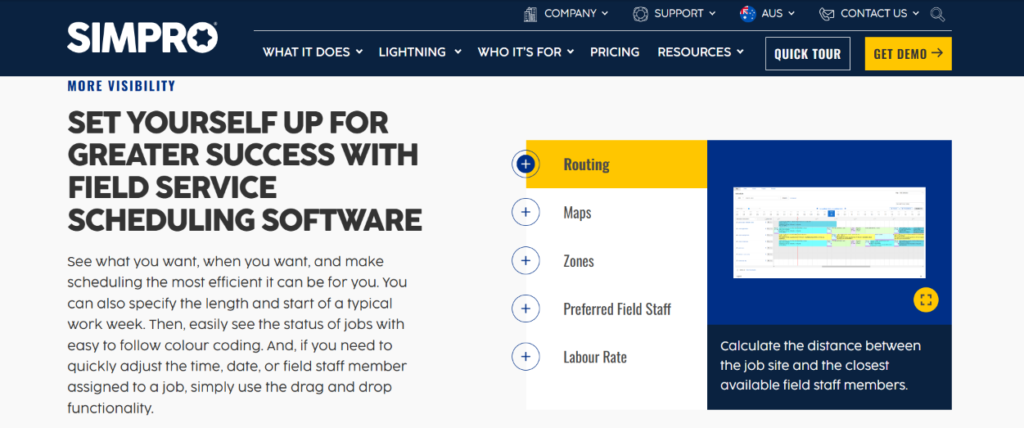
Simpro scheduling and dispatch is the part of the Simpro field service management platform that lets office staff build technician calendars, assign jobs based on skill and location, and push work orders to the field in real time through a mobile app. Simpro’s scheduling and dispatch tools give businesses a central view of staff availability, job status, and field resources. Its scheduling calendar supports day, week, month, and project views, with options including routing, maps, zones, preferred field staff, and labor rates. Simpro also says its system can calculate the distance between a job site and available field staff, helping dispatchers make location-based assignment decisions.
That’s the short version. The longer version is that scheduling and dispatch in Simpro aren’t really two separate features. They’re two sides of the same workflow: scheduling decides who should do the work and when, dispatch gets that decision into the technician’s hands and keeps everyone updated as conditions change during the day.
How Simpro’s Scheduling System Works
The Central Job Calendar
Simpro’s scheduling module runs on a centralized calendar that pulls together service calls, maintenance visits, quoted projects, and emergency work into one view. Simpro’s scheduling calendar provides day, week, month, and project views, with job-status color coding and drag-and-drop scheduling options. The platform also provides routing, map, zone, preferred field staff, and labor-rate options to help businesses organize field resources around each job.
For a business running a mix of reactive service calls and planned maintenance, that combined view matters more than it sounds like it should. I’ve found that the businesses struggling most with scheduling software are the ones trying to manage service work in one tool and project work in another. When both live on the same calendar, a dispatcher can see that a technician already has a half-day commercial installation before slotting in an emergency call.

Technician Skill and Availability Matching
Simpro provides several scheduling options for matching field resources to jobs, including routing, zones, preferred field staff, labor rates, and distance calculations between job sites and available field staff. Its newer AI Scheduler also evaluates technician roles, skills, licenses, cost-center eligibility, and zones when generating scheduling suggestions.
Calendar views also separate out different work types, including service calls, quoted projects, maintenance visits, and emergency work, so a dispatcher isn’t trying to eyeball the difference between a one-hour repair and a multi-day project on the same undifferentiated grid.
Drag-and-Drop and Multi-Day Scheduling
Simpro is designed to support more than simple single-visit scheduling. Its platform covers break-and-fix service, large-scale project management, and planned maintenance, while its scheduling tools provide project-level calendar views alongside day, week, and month views.
Recurring and Preventive Maintenance Scheduling
Maintenance agreements are where a lot of scheduling tools start to show their limits, because a PM contract isn’t a single job. It’s a recurring obligation that needs to regenerate on its own schedule, get assigned automatically, and stay visible months in advance. Simpro handles recurring visits as part of its scheduling engine, which ties directly into its preventive maintenance scheduling tools. From an implementation perspective, this is worth testing carefully during a demo: ask to see how a 12-month maintenance contract actually populates onto the calendar, not just how a single job gets created.
How Simpro’s Dispatch System Works
Real-Time Dispatch to the Mobile App
Once a job is scheduled, dispatch is the process of getting it in front of the technician with everything they need to do the work. Simpro pushes job details, customer history, notes, and attachments to a mobile app so technicians aren’t calling the office for information mid-job. Status changes flow back to the office and the customer automatically as a job moves from assigned to en route to complete, which keeps everyone working from the same picture without anyone having to make a phone call to check.
Simpro’s broader platform connects scheduling with field operations, while Simpro Mobile includes clock-on and clock-off functionality that records when technicians start and finish work and communicates that information back to the office. Simpro also promotes fleet tracking through Simtrac, which can help businesses identify the location of field teams when assigning work.
Location Tracking and Technician Status
Dispatchers can see where technicians are and what job status they’re in, which supports faster reassignment when a job runs long or a higher-priority emergency call comes in. That live view is what makes it possible to reroute the closest available technician to an emergency without pulling everyone off their current jobs to ask where they are. This is one issue I commonly see with businesses that haven’t adopted real-time dispatch tools yet: the office finds out a job is running behind only when the customer calls to complain, instead of seeing it on a live board.
Automated Customer Notifications
Simpro can trigger customer-facing updates as a technician is assigned, en route, or on site, which cuts down on “where’s my technician” phone calls into the office. That’s a small feature on paper, but at volume it removes a meaningful amount of admin time from a dispatcher’s day.
Simpro AI Scheduler
Simpro’s current AI Scheduler is designed to generate a draft technician calendar rather than simply making individual scheduling suggestions. According to Simpro, the system considers factors such as technician roles, skills, licenses, cost-center eligibility, zones, site access windows, job urgency, and remaining estimated hours. It then presents the proposed schedule for dispatcher review, with the ability to change the technician, date, or time before approving it. Simpro also states that jobs the AI cannot schedule remain visible with a reason, such as an unavailable eligible technician, a closed site, missing capacity, or a scheduling conflict.
Does Simpro Have Scheduling and Dispatch?
Yes. Scheduling and dispatch are core, built-in modules in Simpro, not add-ons or third-party integrations. They sit alongside quoting, work orders, billing, and time tracking as part of the standard platform, and they’re typically the modules contractors put through the heaviest testing during a demo, since they’re what dispatchers and technicians touch every single day.
Key Benefits of Simpro’s Scheduling & Dispatch for Field Service Businesses
Reduced Travel Through Location-Based Scheduling
Simpro provides routing, map, zone, and distance-based scheduling options to help dispatchers consider technician location when assigning work. Its AI Scheduler also includes route efficiency among the factors used when generating schedule proposals. These tools are designed to help businesses make more informed scheduling decisions, although the actual reduction in travel time will depend on factors such as job density, geography, technician availability, and how the business configures its scheduling process.
Better Technician-to-Job Matching
Scheduling accuracy can affect whether the right technician reaches the right job. Simpro provides scheduling options based on factors such as zones, preferred field staff, routing, and distance, while its AI Scheduler adds checks for technician skills and licenses. These capabilities can help dispatchers consider technician suitability alongside availability when building schedules.
Better Visibility Into Technician Workloads
Simpro gives dispatchers visibility into staff availability and job schedules through its centralized scheduling tools. Its calendar can be viewed by day, week, month, or project, making it easier to identify scheduling conflicts and redistribute work when availability changes.
Improved Customer Communication
Automated dispatch notifications and accurate ETAs reduce the volume of “when will the tech arrive” calls hitting your office phone. This is a smaller line item than travel time or fix rate, but it adds up in dispatcher hours saved over a full year.
Simpro Scheduling & Dispatch Review: Strengths and Limitations
What Users Like
Based on aggregated user feedback across major review platforms, the strengths that come up most consistently are job costing accuracy, reporting depth, strong inventory and procurement tools, and the platform’s ability to handle complex, multi-phase commercial work. For scheduling and dispatch specifically, users tend to highlight the skill-and-location-based assignment logic and the ability to manage service calls, projects, and maintenance visits from one calendar.
Current Capterra data lists Simpro at 4.0 out of 5 based on 148 reviews, with 72 five-star, 40 four-star, 12 three-star, 7 two-star, and 17 one-star reviews as of September 2026. Recent reviewers specifically mention scheduling, job tracking, and the integration between different parts of the system as useful for improving visibility across projects. Other reviews highlight scheduling, inventory, project management, and centralized access to job information.
Where Simpro Falls Short
User feedback also shows that Simpro can have a learning curve. Capterra reviews include comments about the platform feeling complex or unintuitive for some users, while other reviewers describe implementation and setup as requiring significant time and training. One recent review also described the interface as requiring multiple clicks for some common tasks.
This suggests that implementation and user training should be part of the evaluation process, particularly for businesses moving from simpler scheduling systems.
This is balanced because you’re showing both positive and negative user experiences.
Simpro does not publish a standard public price for its main plans. Capterra currently lists Simpro Premium and additional plan options as custom-quote, per-user-per-month pricing. The Premium plan includes features such as quoting and estimating, field and contractor scheduling, real-time inventory management, field operations management, invoicing and payments, and accounting and financing.
| Consideration | Detail |
|---|---|
| Best fit | Mid-market commercial contractors (10 to 500 technicians) |
| Core scheduling strength | Skill, location, and priority-based dispatch on one shared calendar |
| Pricing model | Custom quote; pricing varies by plan and requirements |
| Accounting integration | Xero, QuickBooks Online and Desktop; QuickBooks sync described by users as shallow |
| Newer capability | AI Scheduler for schedule generation and optimization |
| Where it can feel heavy | Small residential-only shops with simple, single-visit jobs |
Simpro vs Other Field Service Software for Scheduling & Dispatch
Choosing between platforms usually comes down to operating model rather than feature checklists. In my experience, the decision splits along a fairly predictable line: how much of your revenue comes from quoted, multi-phase commercial projects versus single-visit residential service calls.
| Factor | Simpro | Lighter FSM Tools (e.g. Jobber, Housecall Pro) |
|---|---|---|
| Ideal business size | Mid-market to enterprise, 10 to 500+ techs | Small to mid-size, often 1 to 25 techs |
| Scheduling complexity handled | Multi-day, multi-crew, project-based, plus recurring maintenance | Primarily single-visit service calls |
| Job costing depth | Strong; built for margin visibility on complex jobs | Lighter, often adequate for simpler pricing models |
| Inventory and procurement | Robust, connects directly to Simpro inventory management | Basic or add-on |
| Learning curve | Higher, more configuration up front | Lower, faster to onboard |
If your operation is closer to reactive residential service with straightforward one-visit jobs, a lighter platform may get you live faster with less overhead. If you’re running recurring commercial maintenance, multi-phase installs, and crews that need coordinated dispatch across job types, Simpro’s scheduling depth is built for exactly that complexity.
How Simpro Connects Scheduling and Dispatch to the Rest of the Business
One issue I commonly see with businesses evaluating scheduling software in isolation is forgetting that scheduling doesn’t operate alone. It’s the hinge between sales, operations, and finance.
Simpro positions scheduling as part of a wider field-service workflow rather than an isolated calendar. Its platform combines scheduling with quoting, inventory management, field operations, invoicing, payments, and reporting, allowing information to move between operational stages instead of being managed in separate systems.
From Quote to Schedule
When a quote is approved in Simpro, it can move directly into the scheduling queue without a dispatcher manually re-entering job scope, materials, and pricing. That connection between Simpro’s quoting tools and the calendar removes a common point of data loss, where a sales-approved scope doesn’t match what the technician actually shows up prepared to do.
Inventory and Parts Availability
Dispatching a technician to a job that needs a part you don’t have in stock is one of the most preventable causes of a failed first visit. Because scheduling is tied to Simpro’s inventory management, dispatchers have visibility into stock levels and can factor parts availability into who gets assigned to a job, not just who’s geographically closest.
Reporting and Dispatch Performance
You can’t improve what you’re not measuring. Simpro’s scheduling and dispatch activity feeds directly into its reporting and business intelligence tools, which is where utilization rates, travel time, and first-time fix rate actually become visible to management rather than living only in a dispatcher’s head.
Preventive Maintenance Scheduling
As covered earlier, recurring maintenance work runs through the same scheduling engine as one-off service calls, tied into preventive maintenance scheduling. For businesses building a maintenance agreement revenue base, this is one of the more valuable parts of the platform, since missed PM visits are both a customer retention risk and a compliance risk on certain equipment types.
Industry-Specific Considerations
HVAC
HVAC businesses often combine planned maintenance with reactive service work, which makes scheduling flexibility particularly important. Simpro supports both break-and-fix service and planned maintenance workflows, while its scheduling tools provide different calendar views and options for routing, zones, preferred field staff, and technician location
Plumbing
Plumbing dispatch has to weigh emergency calls (burst pipes, no water) against scheduled estimates and installation work. Technician availability windows tend to be tighter here because customers expect same-day response on emergencies, which puts more pressure on accurate real-time location tracking during dispatch.
Electrical
Electrical work often carries licensing and certification requirements that vary by job type and jurisdiction, which makes skill-based dispatch particularly important. Sending a technician without the right certification to a panel upgrade or inspection isn’t just inefficient, it can create a compliance problem.
Common Mistakes When Setting Up Scheduling & Dispatch in Simpro
- Not maintaining technician skills and license information. Simpro’s AI Scheduler uses technician roles, skills, licenses, cost-center eligibility, and zones when creating schedule proposals, so inaccurate staff information can affect the quality of those recommendations
- Treating the calendar as a single view for every job type. Businesses that don’t separate service calls, projects, and maintenance visits end up with a cluttered calendar that’s harder to read at a glance.
- Ignoring recurring maintenance setup during onboarding. PM schedules that aren’t configured correctly at the start tend to get patched manually for months afterward.
- Underestimating the QuickBooks sync testing needed. Given the shallow integration noted by users, skipping a real sync test before go-live is a common source of post-launch frustration.
- Not training dispatchers on drag-and-drop rescheduling workflows. A powerful calendar doesn’t help if the person using it daily reverts to spreadsheets out of habit.
Best Practices for Getting the Most Out of Simpro Scheduling & Dispatch
- Build technician profiles with full skill and certification data before your first live schedule. This is the foundation skill-based dispatch runs on.
- Separate work types on the calendar view so dispatchers can distinguish service calls, projects, and maintenance visits without extra clicks.
- Track travel and routing performance over time. Simpro provides routing, map, zone, and distance-based scheduling tools, so businesses can monitor whether their scheduling process is making effective use of technician locations.
- Review first-time fix rate by technician, not just company-wide. It’s the clearest signal of whether dispatch decisions are working.
- Review AI-generated schedules before approval. Simpro’s AI Scheduler produces draft schedule proposals that dispatchers can modify before approving and committing them.
- Revisit recurring maintenance schedules quarterly to catch contracts that have quietly drifted out of sync with actual site visit frequency.
Is Simpro Scheduling & Dispatch Right for Your Business? Decision Framework
Ask yourself these questions before committing:
Do you manage a combination of service, project, and planned-maintenance work?
Do you need scheduling based on technician availability, location, skills, or licenses?
Do you want scheduling connected with inventory, field operations, quoting, and invoicing?
Are you prepared to invest time in implementation and user training?
If you answered yes to most of these, Simpro’s scheduling and dispatch tools are likely a strong fit. If your operation is smaller, largely residential, and mostly single-visit work, it’s worth comparing Simpro against lighter platforms before committing to the implementation effort.
Frequently Asked Questions
Does Simpro have scheduling and dispatch built in?
Yes. Simpro includes scheduling and dispatch functionality as part of its field-service platform. Its scheduling tools provide calendar views, staff availability, routing, maps, zones, preferred field staff, and other options for managing field resources.
What does a Simpro Scheduling and Dispatch review show
Current user reviews show both positive and negative experiences. Capterra currently lists Simpro at 4.0/5 from 148 reviews. Reviewers mention scheduling, job tracking, centralized information, and integration between workflows as strengths, while some reviews mention complexity, implementation effort, and usability concerns.
How does Simpro dispatch technicians to jobs?
Simpro provides scheduling options based on factors such as technician location, zones, preferred field staff, routing, and availability. Its AI Scheduler additionally considers technician roles, skills, licenses, cost-center eligibility, and other scheduling constraints when generating recommendations.
Does Simpro support recurring maintenance scheduling?
Yes. Recurring and preventive maintenance visits are scheduled through the same calendar engine as one-off service calls, allowing maintenance agreements to regenerate automatically rather than requiring manual rebooking.
Is Simpro’s scheduling and dispatch system good for small businesses?
Simpro is primarily built for mid-market commercial contractors with 10 to 500 technicians. Smaller, residential-focused shops with simple single-visit jobs may find lighter, less configuration-heavy platforms a better initial fit.
What is the Cooper AI scheduler in Simpro?
Cooper is Simpro’s AI scheduling assistant, introduced as part of the 2026 RAIN update. It automatically builds daily technician schedules by weighing location, skills, certifications, availability, and job history to reduce drive time and improve job-to-technician matching.
How much does Simpro cost for scheduling and dispatch features?
Simpro does not publish pricing publicly. Reported ranges run roughly from 150 to 300 dollars per user per month, with enterprise pricing quoted individually based on user count and modules.
Does Simpro integrate with QuickBooks for billing after dispatch?
Yes, Simpro integrates with QuickBooks Online and QuickBooks Desktop, though users report the integration can require extra attention on larger, more complex accounts.
What is a good first-time fix rate benchmark for field service dispatch?
Industry research from Aberdeen Group puts the average first-time fix rate around 75 percent, with top-performing organizations reaching 88 percent or higher. Skill-based dispatch, like Simpro’s, is one of the primary levers for closing that gap.
Can Simpro’s scheduling system handle multiple crews on one project?
Yes. Simpro supports multi-day, multi-technician scheduling for project-based work, which is one of the reasons it’s commonly selected over lighter, service-call-only field service platforms.
Final Thoughts
Scheduling and dispatch are the operational core of any field service business, and they’re usually the first place inefficiency shows up and the last place it gets fixed. Simpro’s approach, tying skill-based dispatch, a centralized calendar, and real-time mobile updates directly into job costing, inventory, and reporting, is built for contractors who’ve outgrown spreadsheet scheduling and need that level of connected visibility.
It isn’t the lightest platform on the market, and it isn’t meant to be. For mid-market commercial contractors juggling service calls, maintenance agreements, and multi-phase projects at the same time, that depth is usually the point. If you’re evaluating your options, the practical next step is testing your own hardest weekly workflow, not the vendor’s demo script, against what Simpro’s scheduling and dispatch tools can actually do.