Simpro Setup Guide: Getting Started (Step-by-Step)
Setting up Simpro for the first time is one of those projects that looks simple on a sales call and gets complicated fast once you’re staring at an empty catalogue and a blinking cursor. I’ve sat in on enough implementation kickoffs to know that the businesses who get the most out of Simpro aren’t the ones with the biggest budgets. They’re the ones who go into setup with a clear sequence, realistic timelines, and a habit of building the foundation before touching the fancy features.
This guide walks through the full Simpro setup process from pre-implementation planning through go-live, based on how Simpro’s own implementation process is structured and what I’ve found actually works when service businesses configure the platform for real-world use. Whether you’re a five-person HVAC shop or a 60-technician electrical contractor, the sequence below applies. Only the depth changes.
Quick Answer: Setting up Simpro involves five stages: pre-implementation planning (defining goals, gathering historical data), core system configuration (company settings, security groups, custom fields), catalogue and price build (importing supplier catalogues, pre-builds, labor rates), workflow setup (scheduling, quoting templates, job types, accounting integration), and go-live with staff training. Most small to mid-sized field service businesses take 6 to 12 weeks from kickoff to go-live, and larger multi-department operations often take 2 to 3 months or longer.
Key Takeaways
- Simpro setup follows a defined sequence: Getting Started, System Setup, Training, and Go-Live, and skipping steps almost always creates rework later.
- Your catalogue and price build are the foundation of accurate quoting, job costing, and inventory, so they deserve more time than most businesses budget for.
- Simpro implementations typically run 6 to 12 weeks for smaller operations and 2 to 3 months or more for multi-branch or enterprise setups, according to user-reported implementation experiences.
- A Simpro Implementation Consultant guides most new accounts through onboarding, but the businesses that succeed still do significant prep work on their own before that process starts.
- Security groups, custom fields, and job types should be configured before you import your catalogue, not after, because they determine how your data gets structured.
- Accounting integration (Xero, QuickBooks, MYOB, Sage) should be connected and tested with sample transactions before you go live, not discovered as a problem in your first billing cycle.
What Is Simpro and Who Is It Built For?
Simpro is a cloud-based field service management and job management platform built for trade and service businesses that handle quoting, scheduling, job costing, inventory, and invoicing in one system. It’s widely used across HVAC, electrical, plumbing, fire and security, and other trade industries, and it scales from single-location shops to multi-branch commercial and enterprise operations.
Where Simpro differentiates itself from lighter-weight field service apps is depth. It handles complex, multi-phase commercial project work, detailed job costing, asset and preventive maintenance planning, and inventory across multiple warehouses or vehicles. That depth is also why setup takes real planning. A platform with this many configuration points rewards businesses that map out their workflows before they start clicking around the settings menu.
If your business runs mostly simple, single-visit residential jobs, a lighter tool might get you moving faster. If you’re managing service agreements, recurring maintenance, multi-technician commercial projects, or complex inventory across job sites, Simpro’s configuration depth is the reason contractors choose it over simpler competitors in the first place.
Before You Start: Simpro Pre-Implementation Checklist
The single biggest mistake I see is treating Simpro setup as something that starts the day the implementation consultant calls. In my experience, the businesses that go live smoothly have already done the following before that first call happens.
1. Define what success looks like
Write down the two or three operational problems you’re trying to solve. Are you trying to stop double-booking technicians? Get accurate job costing so you know which job types are actually profitable? Replace three disconnected tools (a scheduling app, a spreadsheet for quotes, and QuickBooks) with one system? Your answer shapes which parts of Simpro you configure first and how deeply you build them out.
2. Gather your historical pricing and cost data
Simpro’s catalogue and pricing structure need real numbers, not placeholders. Pull your most commonly used materials and their current supplier costs, ideally by reviewing supplier quotes or invoices from roughly the last three to six months. Using outdated or discounted pricing here is one of the most common causes of underpriced quotes after go-live.
3. Map your current job types and workflows
List out the different kinds of jobs you run (service calls, installs, maintenance visits, project work) and how each one currently flows from lead to invoice. Simpro uses this to configure job types, quote templates, and work order structures. If you don’t map it out first, you’ll end up rebuilding it mid-implementation.
4. Inventory your team structure and roles
Who needs to see pricing? Who can approve quotes over a certain dollar amount? Who dispatches technicians? This determines your security group setup, which controls what each user role can view, edit, and approve inside Simpro.
5. List your suppliers and accounting software
Note which suppliers you buy from regularly, since some (like major electrical and plumbing distributors) offer Simpro-formatted price files that import more cleanly than a generic spreadsheet. Also confirm which accounting package you’re using (Xero, QuickBooks, MYOB, Sage, or Exact), since this affects how your accounting link gets configured.
Simpro Setup: Step-by-Step Process
Simpro’s own onboarding process is generally structured around four phases: Getting Started, System Setup, Training, and Go-Live. Here’s what each phase actually involves in practice, along with the details Simpro’s official onboarding materials don’t always spell out.
Step 1: Getting Started, Strategy and Milestones
This is the planning phase, usually run with your assigned Simpro Implementation Consultant. You’ll define your rollout strategy, set milestones for each configuration stage, and assign responsibility for tasks like data collection and catalogue prep. One practical tip from this stage: assign a single internal project owner, even at a small company. Implementations that get split across three people with no clear owner tend to stall because nobody is accountable for the next step.
Step 2: Core System Configuration
Before touching your catalogue, configure the settings that shape everything downstream:
- Company settings: business details, tax settings, default terms, and branding for quotes and invoices.
- Security groups: role-based permissions controlling what each user type (office staff, technicians, managers) can see and do. Go to System, then Setup, then Security Groups to review and adjust these.
- Custom fields: if you need to track information Simpro doesn’t capture by default (a certification number, a specific asset ID format, a regional compliance field), set these up now under System, Setup, System Setup, Custom Fields, since they affect how catalogue items, jobs, and customer records are structured later.
- Job types and cost centers: define how you categorize and report on different kinds of work, since this determines what your job costing and profitability reports look like once you’re live.
Step 3: Build Your Catalogue
Your catalogue is the foundation of material management in Simpro. It drives stock management, pre-build pricing, quoting accuracy, and job costing, so it deserves careful setup rather than a rushed bulk import.
You have three main options for populating it:
- Supplier-specific price files. Many major suppliers can generate a Simpro-formatted price file for you, which imports more cleanly than a generic spreadsheet because it already matches Simpro’s expected structure.
- Generic catalogue import. You build a spreadsheet using Simpro’s Catalogue Import Template, with required fields including Group, Subgroup, Part Number, Description, and Cost Price, then import it in bulk.
- Manual entry. Practical only for a very small number of frequently used items, or for testing the import process with one or two items before committing to a full file import.
A few practical lessons on catalogue setup:
- Organize items into logical Groups and Subgroups from the start. Retrofitting this structure after your catalogue has grown to a few thousand items is painful and time-consuming.
- Confirm cost prices are current, not a special-project discount rate, or your quotes will underestimate true job costs.
- If you’re switching from another system, resist the urge to import every historical item. Bring across what you actively use and let the rest go. A clean, well-organized catalogue of 500 accurate items beats a messy one with 5,000 stale entries.
Step 4: Set Up Pre-Builds and Labor Rates
Pre-builds combine materials and labor into a single billable item that can be added to jobs, quotes, and invoices in one click, which is where a lot of the time savings from Simpro actually come from once you’re live. Rather than manually assembling the same combination of parts and labor for a common job (say, a standard water heater install or a thermostat replacement), you build it once as a pre-build and reuse it every time.
At the same time, configure your labor rates and cost centers so that job costing reflects your actual labor costs, not a generic default rate. This is also where you’ll set up any digital labor calculators or job difficulty ratings if your plan includes them, which help estimate labor time more accurately based on job complexity rather than a flat hourly guess.
Step 5: Configure Scheduling, Dispatch, and Mobile
With your catalogue and pricing in place, move on to the operational workflows technicians and dispatchers will use daily:
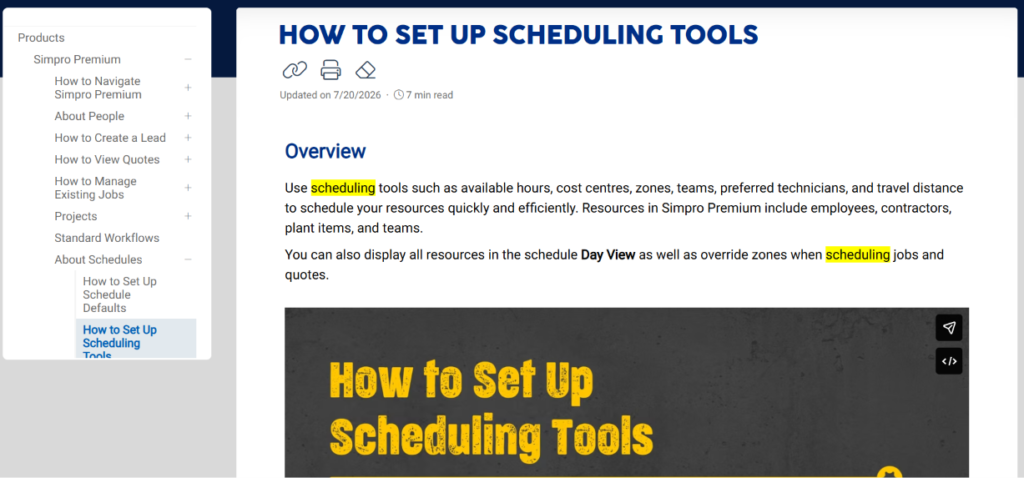
- Set up technician profiles, skills, service areas, and availability so the scheduling board reflects reality.
- Configure Simpro Mobile so field technicians can view job details, update job status, capture signatures, and log time and materials from the field.
- Decide on your dispatch rules, whether that’s manual dispatch by an office coordinator or a more automated approach based on technician location and availability.
For a deeper walkthrough of this stage, our Simpro scheduling and dispatch guide covers how to configure the scheduling board, technician views, and dispatch workflows in more detail.
Step 6: Connect Your Accounting Software
Simpro integrates with Xero, QuickBooks, MYOB, Sage, and Exact through its Accounting Link feature. To connect it, go to Utilities, hover over your accounting package’s name, and follow the prompts to authorize the connection. Once connected, you’ll need to map your Simpro accounts to the correct accounts in your accounting software so that invoices, payments, and cost data sync correctly.
Before go-live, test this integration with a handful of sample transactions rather than trusting it blind. If you’re on a desktop accounting package rather than a cloud-based one, flag this early with your implementation consultant, since desktop integrations can involve more moving parts.
Step 7: Build Your Quoting Templates
Set up your quote and invoice templates with your branding, standard terms, and the specific language your business uses. If you quote using take-off templates for estimating (common in electrical, HVAC, and fire protection work), configure these now so your estimators aren’t building quotes from scratch once you’re live. Our Simpro quoting setup guide goes deeper into structuring quote templates, digital takeoffs, and approval workflows.
Step 8: Training and Team Rollout
Simpro’s implementation process includes structured training sessions with your Implementation Consultant, tailored to your workflows rather than a generic walkthrough. This is the stage to actually involve your team, not just your office manager. Technicians who never see Simpro until go-live day tend to resist it. Technicians who get even a short hands-on session beforehand tend to adopt it much faster.
Plan for a real learning curve here. Simpro is a deep platform, and most businesses report it takes technicians a few weeks of daily use before the workflow feels natural rather than effortful.
Step 9: Go Live
Go-live is not the finish line, it’s the start of the next phase. Keep your Implementation Consultant or support contact accessible for the first few weeks, since this is when edge cases in your specific workflows tend to surface. Simpro offers live chat support and case-based support for ongoing issues after go-live, which is worth using early rather than letting small configuration issues pile up.
Simpro Implementation Timeline: What to Realistically Expect
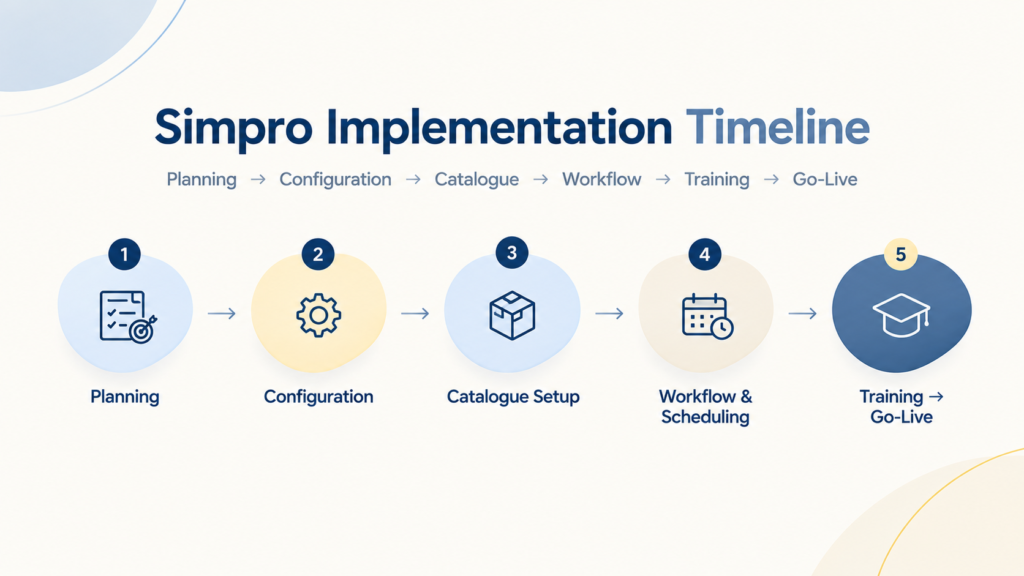
Small businesses running 1 to 10 users typically need 4 to 8 weeks, mostly depending on catalogue size and how much historical data needs cleanup. Mid-sized operations with 10 to 30 users generally need 6 to 12 weeks, driven by multiple job types, integration complexity, and the scope of staff training. Multi-branch or enterprise operations with 30 or more users often take 2 to 3 months or longer, largely because of multiple locations, custom workflows, and complex accounting mapping.
User-reported implementation timelines commonly describe the full process, from kickoff to confident daily use, taking two to three months for mid-sized and larger operations. Simpler, single-location setups with a lean catalogue can move faster. The businesses that consistently underrun these timelines are the ones that complete the pre-implementation prep work covered earlier in this guide before their kickoff call.
What Simpro Setup Actually Costs
Simpro doesn’t publish pricing publicly, which is a common frustration for contractors trying to budget before a sales call. Based on user-reported figures and third-party pricing analysis, here’s a realistic range.
The per-user monthly subscription runs roughly $150 to $300 per user, per month, based on user-reported figures for Simpro’s core plans. The mobile app is often billed as a separate per-user add-on where applicable. Setup and implementation fees vary significantly by business size and complexity, with some businesses reporting several thousand dollars in setup costs. Some users also report built-in annual price increases in the range of roughly 8 to 12 percent.
Because Simpro’s pricing isn’t published, the only reliable way to get an accurate number for your business is to request a quote directly and ask specifically what’s included: implementation, training, data migration, and mobile access. Ask whether historical data migration is included or billed separately, since this is a common source of surprise costs.
Common Simpro Setup Mistakes
In my experience working around FSM implementations, these are the mistakes that cause the most rework after go-live.
Rushing the catalogue import creates ongoing problems. Importing a messy, unorganized, or outdated catalogue just to “get it done” creates ongoing quoting and inventory problems that are far more time-consuming to fix later than they would have been to prevent up front.
Skipping security group planning causes downstream issues. Giving everyone the same broad permissions because it’s faster during setup often leads to pricing visibility issues, unauthorized quote approvals, or data entry errors down the line.
Not testing the accounting integration before go-live is risky. Discovering a mapping error in your first real invoicing cycle is far more disruptive than catching it with test transactions during setup.
Leaving technicians out of training until go-live day undercuts adoption. Field staff who haven’t touched the mobile app before their first live job tend to default back to paper or texting the office, which undercuts the entire point of the system.
Importing your entire historical catalogue instead of just what you use slows things down. More data isn’t automatically better. A bloated catalogue slows down searches and increases the odds of duplicate or conflicting entries.
Underestimating the training curve sets unrealistic expectations. Simpro is a genuinely deep platform. Budgeting zero time for a team adjustment period after go-live sets unrealistic expectations and creates frustration that has nothing to do with the software itself.
Simpro Setup Best Practices
- Assign one internal project owner who is accountable for the implementation timeline, even if your implementation consultant is doing most of the configuration work.
- Build your catalogue in logical groups and subgroups from day one rather than retrofitting structure later.
- Use supplier-specific price files where your suppliers offer them, since they import more cleanly than generic spreadsheets.
- Configure security groups and custom fields before your catalogue import, since these decisions shape how your data gets structured.
- Test your accounting integration with sample transactions before relying on it for real invoices.
- Involve technicians in training early, not just office staff.
- Treat go-live as the start of a refinement period, not a finish line. Expect to keep tuning workflows for the first month or two.
Industry-Specific Setup Considerations
HVAC
Prioritize setting up preventive maintenance agreements and equipment history tracking early, since recurring maintenance revenue is often a major part of HVAC profitability. Configure job types separately for service calls versus installation jobs, since their costing structures differ significantly.
Plumbing
Build out emergency call job types with appropriate dispatch priority, and make sure your catalogue accounts for commonly used materials on drain cleaning and water heater replacement jobs, since these tend to be high-frequency job types.
Electrical
Take advantage of Simpro’s take-off templates for estimating panel upgrades and installation work, and confirm your security groups reflect who is authorized to approve larger project quotes versus standard service call quotes.
Fire and Security
Configure asset tracking carefully from the start, since inspection scheduling and compliance recordkeeping depend on accurate equipment and site data being in the system from day one.
Simpro vs. Manual Setup: Is It Worth the Implementation Effort?
It’s a fair question, especially for a smaller shop looking at a multi-week setup process. In my experience, the businesses that benefit most from Simpro’s depth are ones already juggling multiple disconnected tools (a spreadsheet for quotes, a separate scheduling app, manual inventory tracking) or ones running enough job volume that pricing and costing errors add up to real money.
If you’re a one or two person operation running simple, single-visit jobs, the implementation investment may outweigh the benefit relative to a lighter tool. If you’re managing service agreements, multi-technician dispatch, complex inventory, or project-based commercial work, the setup effort tends to pay for itself through fewer pricing errors, better job costing visibility, and less time spent reconciling disconnected systems.
If you’re still deciding whether Simpro is the right platform before committing to setup, our Simpro switching guide walks through what to evaluate before migrating from another system. Once your catalogue and pricing are live, accurate job costing setup is the next place to focus, and our Simpro job costing guide breaks down how to configure cost centers and reporting so your profitability numbers are trustworthy from day one.
For authoritative background on field service management standards more broadly, the U.S. Small Business Administration and U.S. Bureau of Labor Statistics publish useful data on contractor business operations and labor cost benchmarks that can inform how you set labor rates during your own build.
Frequently Asked Questions
How long does it take to set up Simpro?
Most small to mid-sized field service businesses complete Simpro setup in 6 to 12 weeks from kickoff to go-live. Larger, multi-branch, or enterprise operations often take 2 to 3 months or longer. The timeline depends heavily on catalogue size, how much historical data needs cleanup, and how many job types and workflows need to be configured.
How much does Simpro cost to set up?
Simpro doesn’t publish pricing publicly. Based on user-reported figures, per-user subscription costs generally range from roughly $150 to $300 per user, per month, with implementation and setup fees varying by business size and complexity. Contact Simpro directly for an exact quote, and ask specifically what’s included in implementation versus billed as an add-on.
Do I need an Implementation Consultant to set up Simpro?
Simpro assigns dedicated Implementation Consultants to guide new accounts through onboarding, and most businesses go through this guided process rather than a fully self-service setup. Even with a consultant guiding the process, businesses that complete their own pre-implementation prep work (data gathering, workflow mapping) tend to move through setup faster and with less rework.
What is the first step in setting up Simpro?
The first step is defining your implementation strategy: identifying the specific operational problems you’re trying to solve, setting milestones, and assigning responsibility for tasks like gathering pricing data and mapping job workflows. This planning phase happens before any system configuration begins.
How do I import my catalogue into Simpro?
You can import your catalogue using a supplier-specific price file (if your supplier offers Simpro-formatted files), a generic catalogue import using Simpro’s Catalogue Import Template spreadsheet, or manual entry for a small number of items. Required fields for a generic import include Group, Subgroup, Part Number, Description, and Cost Price.
Can Simpro integrate with QuickBooks or Xero?
Yes. Simpro integrates with Xero, QuickBooks, MYOB, Sage, and Exact through its Accounting Link feature. You connect the integration through the Utilities menu and then map your Simpro accounts to the corresponding accounts in your accounting software.
What are pre-builds in Simpro and why do they matter during setup?
Pre-builds combine materials and labor into a single billable item that can be added to jobs, quotes, and invoices with one click, instead of manually assembling the same combination of parts and labor every time. Setting up pre-builds for your most common job types during implementation significantly speeds up quoting and job creation once you’re live.
What mistakes should I avoid when setting up Simpro?
The most common mistakes are rushing the catalogue import with outdated or unorganized data, giving every user the same broad security permissions, skipping accounting integration testing before go-live, and leaving field technicians out of training until go-live day. Each of these tends to create rework that takes longer to fix after launch than it would have taken to prevent during setup.
Is Simpro suitable for a small field service business?
Simpro can work for small businesses, but it’s built with enough depth (job costing, asset management, multi-warehouse inventory) that it tends to deliver the most value for businesses managing service agreements, multi-technician scheduling, or complex project work. Very small operations running simple, single-visit jobs may find a lighter field service tool faster to implement and easier to justify.
What happens after Simpro go-live?
Go-live starts a refinement period rather than marking the end of setup. Most businesses continue adjusting workflows, catalogue entries, and permissions for the first several weeks as real-world use surfaces edge cases. Simpro offers ongoing support through live chat and case-based support, and many businesses continue working with their Implementation Consultant or book additional training as new staff join or new features roll out.
Final Thoughts
Simpro setup rewards patience and preparation more than speed. The businesses I’ve seen get the most value from the platform are the ones who treated pre-implementation prep, catalogue accuracy, and staff training as seriously as the software configuration itself. Rushing to go-live with a messy catalogue or undertrained technicians tends to create more work than it saves.
If you’re currently planning a Simpro implementation, start with the pre-implementation checklist in this guide before your first call with an Implementation Consultant. That single step tends to shave weeks off the overall timeline and prevents the majority of the rework issues covered above.
For more on structuring specific parts of your Simpro build, explore our related guides on job costing setup, scheduling and dispatch configuration, and quoting workflows, or read our full Simpro switching guide if you’re migrating from another platform.
Michael Carter is a Field Service, ERP, and Digital Transformation Expert with more than 13 years of experience helping service-based businesses improve operations through better processes and technology. He covers FSM software, ERP implementation, and field service technology at Field Services HQ.