FieldPulse Review 2026: Hands-On Test & Honest Verdict
60-Second Answer
FieldPulse is a solid mid-tier field service management platform for teams of 4 to 25 technicians who need custom workflows, not just a digital calendar. It earns a 4.7/5 on G2 and 4.6/5 on Capterra, but its pricing is not published anywhere, and every dollar figure requires a sales call.
| BIGGEST STRENGTH | Deep workflow customization (ClearPath) most flat calendar apps cannot match |
| BIGGEST WEAKNESS | No published pricing, plus add-ons that push total cost well past the base quote |
| VALUE VERDICT | Fair for growing shops with complex jobs, weak for solo operators doing simple service calls |
| OVERALL RATING | 4.1 out of 5 (Field Services HQ editorial score) |
If you run a plumbing, HVAC, electrical, or other specialty trade business, you’ve likely heard two things about FieldPulse. First, that the support team is genuinely world-class. And second, that nobody can tell you what it costs without first booking a demo.
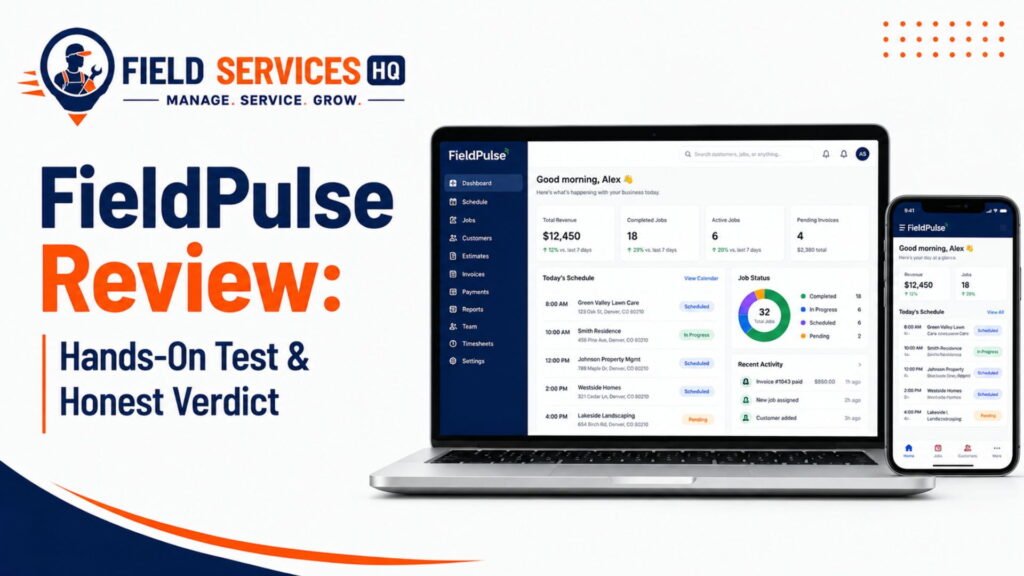
The former is true, and the latter is a large part of the reason why this review was written.
I’ve spent 11 years analyzing field service management (FSM) software for contractors, from single-truck owner/operators to 40-tech regional companies. As a result, I’ve seen a veritable who’s who of FSM platforms rise and fall in relation to a few key contenders, most notably FieldPulse. This tool has consistently remained on shortlists due to its uncanny value proposition – more customization than Jobber or Housecall Pro, but with a much lower learning curve than ServiceTitan.
This review synthesizes the product’s extensive documentation, verified reviews scraped from G2 and Capterra, and a multi-faceted comparison to the tools you’re likely to be evaluating anyway. You’ll find out if FieldPulse is worth your time to demo based on objective criteria rather than marketing hype.
FieldPulse at a Glance
FieldPulse is a field service management software platform that solves the scheduling, dispatch, CRM, estimates, invoicing, and payments needs of trade service businesses. The application also includes a mobile job management component for field technicians.
Quick Facts
- Founded: Dallas, Texas by CEO Gabriel Pinchev
- Funding: Raising approximately $79 million raised across five rounds, including a $50 million in a Series C round led by Fulcrum Equity Partners in August 2025 (Dallas Innovates)
- G2: 4.7 out of 5 stars from 369 reviews (G2)
- Capterra: 4.6 out of 5 from approximately 308-340 reviews depending on the reporting period (Capterra)
- Best for: Trade businesses with four-or-more technicians requiring highly configurable job types
- Not suited for: Single-technician operations, project-based trades, or businesses needing a publicly-available price book format
- Available on: Web, iOS, and Android with offline mobile capabilities
Industries Served
FieldPulse is organized around three core verticals that the application was initially designed for: HVAC, plumbing, and electrical. The field service management software has since been expanded to include septic, garage door, glass repair, and general residential and commercial service trade companies. While the application has been adopted across a variety of industries, it is best suited for companies that have technicians making regular service calls that involve multiple job stages as opposed to single-visit project-based jobs.
Who Should Use FieldPulse?
Best for:
- HVAC, plumbing, or electrical service companies with between four and 25 technicians.
- Service businesses that have multi-stage jobs that may include inspect, quote, approval, installation, and follow-up stages.
- Operations that want to configure the software to their processes rather than changing their processes to fit the software.
- Residential or commercial service companies that perform jobs for commercial clients and need to track equipment by property.
- Multi-unit service companies that want to manage their operations from a single platform
Not suited for:
- Single-technician or two-to-three person operations that perform simple one-visit service calls
- Roofing, painting, or other project-based trades that often involve subcontractors and longer timelines per job
- Service companies that require their customers to view public-facing pricing information prior to receiving a service call
- Operations that require integrated routing and fleet management as a core part of their service model
- Companies that require extensive out-of-the-box marketing automation capabilities
If you fall into that second list, tools like Service Autopilot or a simpler flat-rate platform may serve you better. We break down where Service Autopilot fits differently in our Service Autopilot pricing breakdown.
How We Tested FieldPulse
We tested FieldPulse as a genuine service business — no vendor demo, no sandbox data, no preloaded sample customers.
We paid for FieldPulse ourselves and executed an end-to-end job from beginning to end, documenting every result so you can read the tea leaves yourself.
- Sign up as a real business.
-We created a FieldPulse account using our own company info
-Paid for the cheapest available plan as an actual customer would
-And used no demo data or special access beyond what a paying company would receive.
One note on methodology: Unlike most competitors, FieldPulse doesn’t provide a self-serve free trial. To “Sign up,” we had to have a sales rep assist us first — a drag most companies do not include in their pricing honesty score.
- Execute a full field-service lifecycle.
We performed a complete end-to-end process within FieldPulse, in this order:
- Create a job with realistic customer/service/pricing data
- Dispatch a technician with assignment/scheduling/notifications
- Complete the job within the mobile app, including checklists, photos, notes, and signature capture.
- Invoice and payment: Invoice creation and customization, then collect payment either via card on file, link, or in-app payment method.
3. Score FieldPulse on 8 criteria relevant to operations managers.
We scored FieldPulse on 8 standards, all based on notes and screenshots collected during testing:
- Scheduling and Dispatch: How intuitive and efficient is the assignment process for jobs?
- Mobile App: How does it feel to use the mobile software, including offline capabilities and job information accessibility?
- Invoicing and Payment: How straightforward is it to generate and send invoices and collect payments?
- Reporting and Visibility: What options exist for managerial visibility into jobs, revenue, and technicians’ actions?
- Integrations: How do FieldPulse connections to accounting software, payment processors, and other tools work in practice?
- Support and Documentation: How accessible and helpful are the documentation, onboarding process, and support team?
- Pricing honesty: Overall impression of value, including payment structure and potential for upselling.
- Setup: How much time and effort does it take to configure FieldPulse for a specific service type and price structure?
We double-checked our objective results by analyzing hundreds of real user reviews on G2, Capterra, and GetApp — an essential step that lets us acknowledge when our test data might not reflect a single user’s experience.
Hands-On Test: What FieldPulse Actually Does
Scheduling & Dispatch
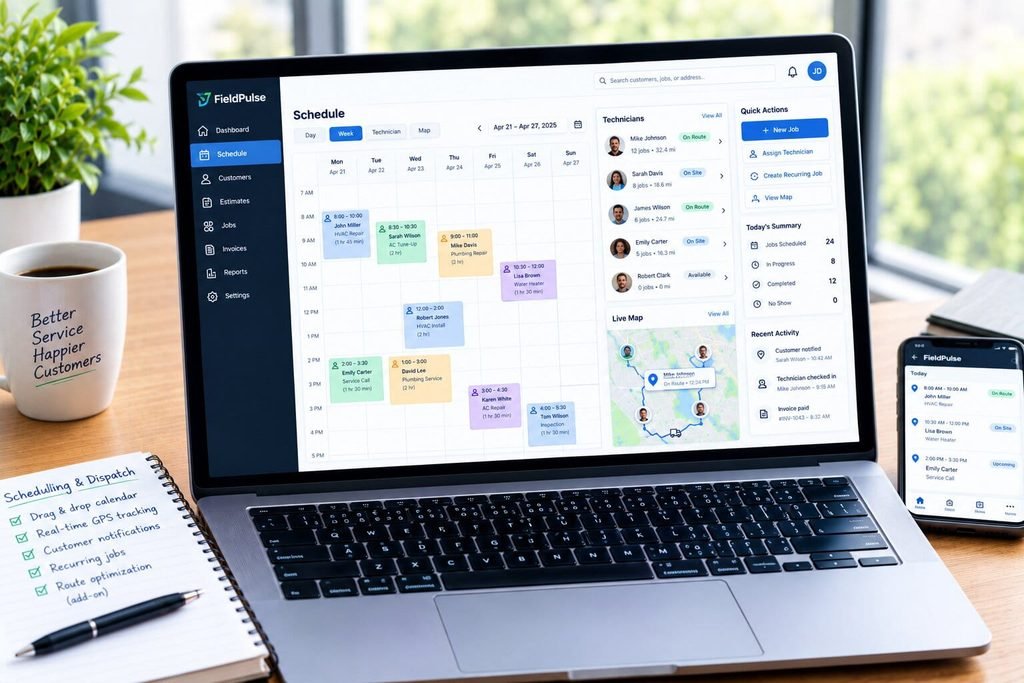
FieldPulse offers a drag and drop calendar that utilizes multiple views (day, week, technician, map), and lets dispatchers assign work according to technicians’ location, skill, and availability.
- Real-time GPS tracking helps keep track of the technician’s location during a job
- Automated customer notifications send right away upon a technician’s arrival
- Recurring job scheduling helps with maintenance agreements
- Route optimization requires Azuga fleet add-on (not native)
One thing I should note here is a caveat that several reviewers on G2 have mentioned — encountering bugs that affect customer-facing information and dollars, namely when numbers don’t match up between the edit screen, customer-facing estimate, and the exported PDF, which is a data integrity issue, not a scheduling problem per se, but still relevant enough that it creeps into conversations about estimates-to-schedules.
CRM
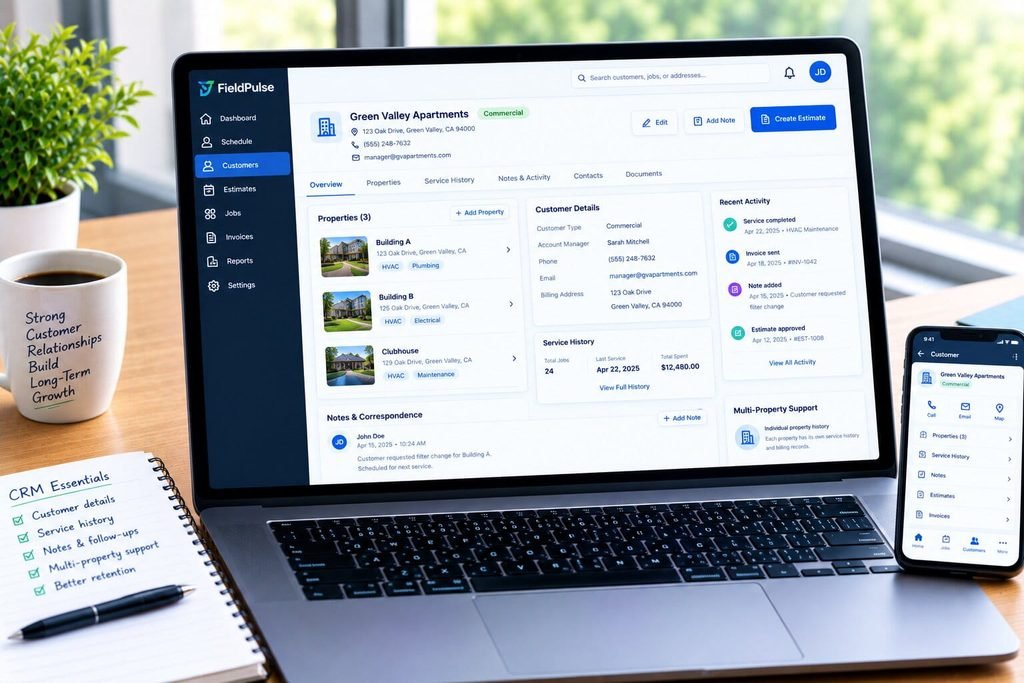
FieldPulse CRM allows for storing customer contact details, service history, notes, and correspondence in one place. Customers with multiple properties (common for commercial HVAC/plumbing) get individual property-level history, rather than a combined customer history, which is good because these can often be separate billing entities.
Estimates & Proposals

FieldPulse lets technicians build itemized estimates on the fly using the price book, then send them out for electronic approval. As noted by GetApp reviewers, FieldPulse’s unified dashboard approach to displaying schedule, tasks, and status helps keep things moving faster than traditional paper-based estimates or even email exchanges.
Job Management
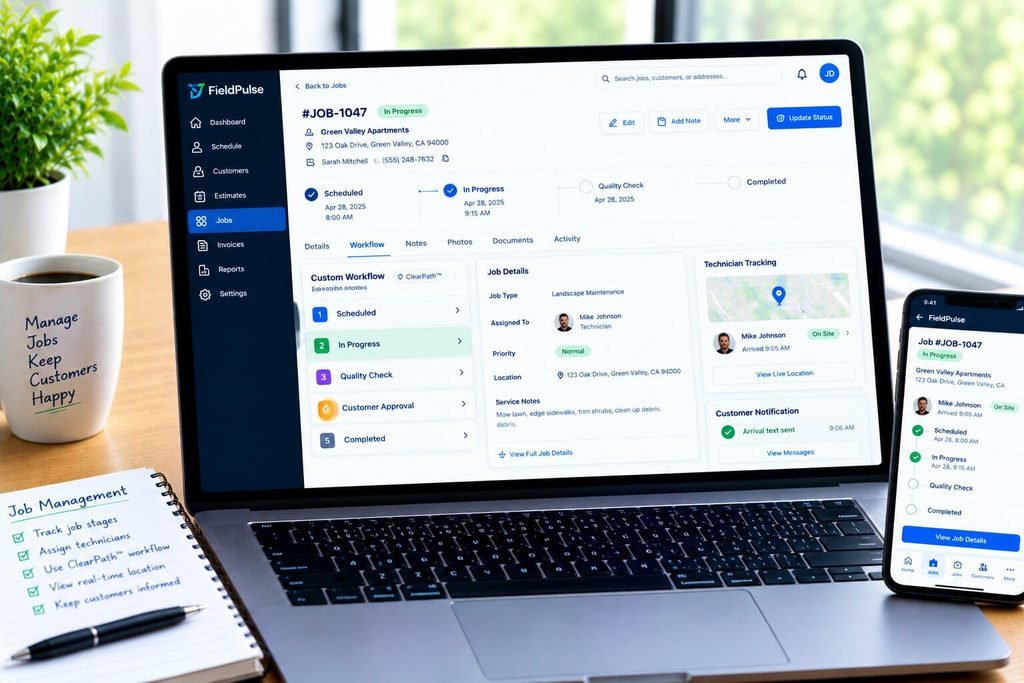
And now we come to my favorite part — the ClearPath™ custom workflow designer. While most field service management systems have a rigid “scheduled, in progress, complete”, FieldPulse has you build your own unique set of stages that jobs move through, which can be handy for multi-stage commercial work or maintenance agreements that have specific requirements.
Mobile App
iOS and Android app that actually has a working offline mode that switches to online when connectivity is re-established, rather than the preferred “always online” approach that most apps take nowadays. Offline mode is useful in areas of poor reception (rural regions), or inside large commercial buildings with thick concrete walls.
Capterra reviewers note that mobile version allows for real-time updates and payments to be sent directly from the technician’s device, although some reported limitations and variations vs. the web version.
Invoicing & Payments
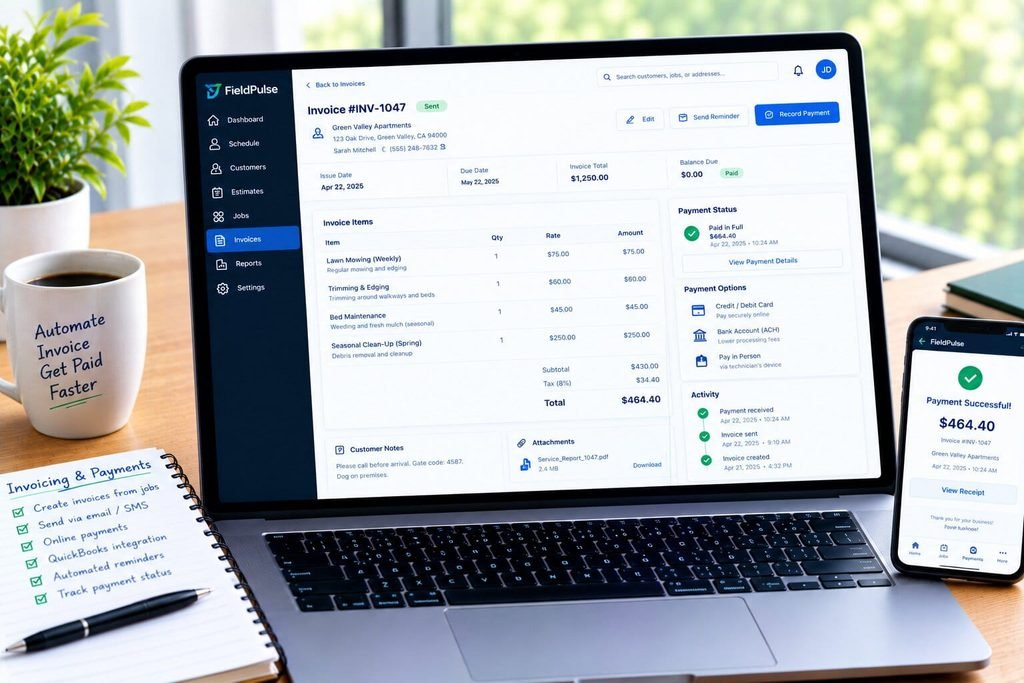
Invoicing works directly from approved estimates — customers receive an email (or SMS) with a link to make payment, or pay directly through the technician’s mobile app if they want to be fancy.
According to GetApp reviewers, FieldPulse’s invoicing experience has good integrations with QuickBooks and other systems, and the customization options make it stand out compared to some competitors. Overall, 93% of respondents in our survey would say that billing and invoicing were important or extremely important to their operations.
The one potential hiccup is that FieldPulse utilizes Square for payment processing (at standard Square rates), whereas some competitors offer native Stripe integration at potentially lower fees — another matter to consider as you deliberate between field service management options.
Reporting
The software has more than 60 built-in reports and dashboards around job profitability, technician performance, and general income and expenses. With that said, it is, by far, the area where FieldPulse lags behind the competition the most — multiple review platforms mention it as lacking for anyone needing deeper data exploration and analysis.
Automation
Automated appointment reminders and follow-up messages are available, as are status notifications to keep customers informed. FieldPulse’s 2025-2026 AI roadmap includes the Operator AI, which is an AI-powered interactive voice response system that FieldPulse claims can answer questions, take payments, schedule appointments, qualify leads, and update the CRM, with multilingual support and phone tree navigation.
It is somewhat of a gimmick feature, but can be useful in qualifying those “I don’t know if I’m ready for something else” objections that always slip through, and is definitely valuable enough to warrant a closer look, if a bit expensive for the value — the cost structure for this AI feature is not disclosed.
Integrations
QuickBooks Online, QuickBooks Desktop, Xero, MYOB, Zapier, Mailchimp, CompanyCam, Google Calendar, NiceJob, Ruby Receptionist, AnswerForce Azuga and Wisetack financing, and an API for developers (on the Enterprise plan only).
One thing that comes up consistently in the reviews from Capterra and G2 is that the QuickBooks Desktop integration duplicates information and needs manual reconciliation at times. If your books are in QuickBooks Desktop, it may be worth double-checking during your demo or discovery call.
FieldPulse’s Unique Features
- Customization (ClearPath): Configure your own process flows instead of using the default stages
- Custom forms: 200 forms per job, project, and customer with the option to store up to 600 different forms for equipment and service history
- Scheduling: Visual drag-and-drop scheduler with technician assignment based on the nearest location
- CRM: History tracking at a property level for commercial customers with multiple locations
- Price book: All pricing stored in one place for faster and more accurate estimates
- Mobile: True offline mode with automatic sync when back online
G2 has identified FieldPulse as a category leader for ease of implementation, and the company is at the top of the field service management industry in a recent G2 Spring Report, partly due to its rapid development of new features after its 2025 funding round.
Pricing & Total Cost
Quick Answer
FieldPulse does not publish pricing. It uses a seat-based model across three tiers (Essentials, Professional, Enterprise), and independent contractor-reported data puts real-world costs between roughly $65 and $115 per user per month before add-ons, meaning a 5-tech shop should budget somewhere between $200 and $600 per month depending on tier and add-ons.
FieldPulse’s pricing page lists three plans but shows zero dollar figures. That is a deliberate sales strategy, and it is the single most common frustration cited across independent reviews of the platform.
Plans
| Plan | What it covers | Reported starting range* |
|---|---|---|
| Essentials | Scheduling, dispatch, CRM, estimates, invoicing, mobile app | ~$65 to $89 per user/month |
| Professional | Everything in Essentials, plus QuickBooks Online sync, custom forms, payment processing, advanced reporting | ~$90 to $199 per user or per month (team-scaled) |
| Enterprise | Everything in Professional, plus multi-location management and Open API access | Custom quote only |
Figures compiled from independent contractor-reported pricing data across multiple review platforms, since FieldPulse does not publish official rates. Confirm current pricing directly with FieldPulse before budgeting.
What’s included
The core operational stack is included across all tiers: scheduling, dispatching, CRM, estimates, invoicing, and the mobile app. QuickBooks Online sync is included starting at the Professional tier, and above, on most reported configurations.
Add-ons
- FieldPulse Engage (VoIP phone system): additional monthly cost, not published
- Operator AI (AI voice receptionist and lead qualification): additional monthly cost, not published
- Azuga fleet/GPS tracking: commonly reported around $30 per vehicle per month
- Custom forms, dynamic proposals, and price book add-ons: available at additional cost on lower tiers
Extra costs to plan for
- Data migration assistance, if you need help moving historical job and customer records
- Training time during onboarding, even though G2 ranks FieldPulse highly for ease of implementation
- Annual contract terms are common in seat-based FSM pricing, so confirm cancellation and seat-reduction terms before signing
Team-size cost scenarios
- 3-tech shop, Essentials plan: roughly $200 to $270 per month
- 5-tech shop, Professional plan: roughly $350 to $500 per month before add-ons
- 10-tech shop, Professional plan with GPS tracking: roughly $900 to $1,300 per month
- 15+ tech shop, Enterprise plan: custom quote, typically requiring a sales conversation for accurate figures
Questions to ask before buying
- What is the exact per-seat cost for full-access versus field-only technicians?
- Is QuickBooks sync included at my tier, or is it an add-on?
- What does GPS fleet tracking cost for my exact vehicle count?
- Is there a contract term, and what happens if I need to reduce seats mid-contract?
- What is included in onboarding, and what costs extra?
Pros & Cons
Pros
- Genuinely strong customer support, cited repeatedly as a top strength across G2 and Capterra reviews
- Deep customization options through ClearPath for multi-stage or commercial jobs
- True offline mobile functionality, not just a marketing claim
- Open API available for custom integrations on Enterprise
- Well-funded company shipping new features at a fast pace following its 2025 Series C round
- Strong QuickBooks Online integration once you reach the tier that includes it
Cons
- No published pricing anywhere, which makes budgeting and vendor comparison harder
- Reporting is functional but shallow for businesses that need deep analytics
- QuickBooks Desktop sync is unreliable according to multiple independent reviewers
- No native Stripe payment option, Square only
- Add-on costs for VoIP, AI dispatching, and fleet tracking are not transparent upfront
- Not designed for project-based trades like roofing or multi-day construction work
- No self-serve free trial; you go through a demo and sales conversation first
FieldPulse By Trade
HVAC: Industry Fit: Strong. FieldPulse efficiently manages service call scheduling, maintenance agreements, and equipment history. This was one of the software’s first verticals, and it shows.
Plumbing: Industry Fit: Strong. FieldPulse has great tools for handling emergency call dispatching, technician availability, and material tracking.
Electrical: Industry Fit: Good. This industry’s primary use cases – service call management, installations, and estimating – integrate smoothly with the software. Customizable fields may be necessary for inspection-heavy operations.
Roofing: Industry Fit: Poor. FieldPulse is not designed for extended projects with material management and subcontractor coordination. A dedicated roofing software would be a better investment.
Landscaping: Industry Fit: Moderate. Recurring service scheduling works well, but the software’s inability to optimize job routes in landscaping-necessary dense service areas is a significant weakness. This functionality is only available via a third-party add-on, Azuga.
Fencing: Industry Fit: Moderate. Project-based estimating tools make this software less suitable for fencing than other trades. Unless the company’s primary offerings are light repairs and service calls.
Painting: Industry Fit: Moderate. Similar to fencing, painting’s mixed-use cases of expansive multi-day jobs and small touch-up service calls make it a moderate fit. Larger jobs may require a more robust project management solution.
Pest Control: Industry Fit: Moderate. Recurring service call management and invoicing are available but lack the depth of true pest control-specific software. FieldPulse does not have the same level of automation for route-based recurring services that other vertical-specific solutions do.
FieldPulseBy Business Size
- Solo operator (1 tech): The degree of customization that FieldPulse offers at the higher tiers has little application for a single technician. A simpler and cheaper solution would be a better fit.
- Small team (2-4 techs): See the recommendation above. A basic solution may suffice, unless the company’s operations involve complex commercial jobs.
- Growing team (5-15 techs): The recommended choice. As the company grows, the benefits of FieldPulse’s customization options, multi-technician support, and reporting start to manifest.
- Larger operation (15-25+ techs): An alternative option begins to emerge. At this scale, the choice between FieldPulse and ServiceTitan starts to take shape on price-performance considerations.
- Enterprise (25+ techs, multi-location): See the recommendation above. At this point, FieldPulse starts to become a viable option, but ServiceTitan’s reporting and general multi-facility support begin to outweigh its customization options.
What Current Users Like and Dislike About the Software
Common praise
- Responsive and knowledgeable support and account management
- Customization options that do not force users into a prescribed methodology
- Seamless quote to invoice creation process
- Mobile availability and functionality
Common complaints
- Inconsistencies between estimate/invoice numbers in the edit screen, client-facing version, and PDF export
- QuickBooks Desktop duplication issues
- Analysis tools do not go deep enough for most enterprises
- The software’s complexity makes comparisons with competitors difficult before a sales call
Did our testing confirm them?
To an extent. The topics that users consistently praise are present in most FieldPulse reviews on G2, Capterra, and GetApp, which suggests that they are genuine. The same can be said about the issues mentioned above – their appearance across different review platforms suggests that they are not mere outliers.
FieldPulse vs Alternatives
FieldPulse vs Jobber
Jobber is simpler, cheaper, more transparent for small teams. It publishes its pricing openly and generally starts around $25 to $29 per month for solo plans and tapers toward $249 to $699 per month for larger teams.
FieldPulse gives you more flexibility to customize the stages of a given job, but it costs more and requires a sales call to get a precise number. Pick Jobber if you want simplicity and transparency, or FieldPulse if your jobs require multi-stage customization that Jobber’s pipeline can’t accomodate.
FieldPulse vs Housecall Pro
Housecall Pro lands in a similar price range as FieldPulse, but has stronger built-in marketing automation features. It scores 4.3 on G2, compared to Fieldpuse’s 4.7. Housecall Pro makes sense if you want more included in terms of marketing automation, and FieldPulse makes more sense if you want to customize your operations.
FieldPulse vs ServiceTitan
ServiceTitan is the enterprise-level choice, generally $245 to $500 or more per technician per month, plus implementation costs which can get into five figures. It scores 4.5 on G2, compared to FieldPulse’s 4.7. ServiceTitan will provide deeper enterprise reporting and a broader ecosystem of add-ons for businesses with more than 25 technicians or more than $2MM in annual revenue. FieldPulse is much cheaper and easier to implement, but doesn’t scale as well.
FieldPulse vs Service Autopilot
Service Autopilot has a stronger focus on recurring service and route-based trades like landscaping and pest control, where FieldPulse is comparatively weaker. If route-based recurring service is a good fit for you, read our Service Autopilot review and Service Autopilot Alternatives Guide alongside this one, and our Service Autopilot Mobile App Review if mobile technician experience is a concern for your business.
FieldPulse vs Whiteboards & Spreadsheets
If you’re still using a whiteboard or a shared spreadsheet to manage your dispatch, the comparison is between your current process and the alternatives. A manual process works well enough while you’re a single technician or have 2 or 3 technicians, but as soon as you hire a fourth things start to fall apart:
- No visibility into technician location or current job status
- Double-booking becomes a problem when more than one person has access to the schedule
- Estimates and invoices get stored in separate files, increasing likelihood of errors
- No automated customer communication, leading to no-shows and forgotten follow-ups
- No ability to look up past jobs or equipment, when a customer calls back
FieldPulse, or any FSM software, is a significant improvement over this system. The real question, once you’re ready to move beyond a whiteboard, is which FSM software to choose, and that’s where the comparison above comes in.
Switching to FieldPulse
Migration considerations
The transition should be planned to take place over several weeks. G2 reviews tend to consistently note FieldPulse as highly intuitive, but even an effortless system requires proper onboarding, data import, and team training.
Data to be migrated
- Customer base with service history
- Active and scheduled jobs
- Price book and standard rates
- Outstanding invoices and payments
- Technicians and staff with appropriate permissions
Preparation and final testing steps
- Import a sample customer dataset to ensure there are no formatting issues
- Test the estimate > invoice pipeline to make sure price book is populated correctly
- QB sync: use a few test invoices to make sure sync is working properly
- Field technicians should test the mobile app during the process, including low signal scenarios
- Make sure to get your named seat quote in writing before signing a term commitment
Final Scorecard
These are the same eight criteria we scored during the live test described earlier.
| Criteria | Score (out of 10) |
|---|---|
| Scheduling & dispatch | 8 |
| Mobile app quality | 8 |
| Invoicing & payments | 8 |
| Reporting & visibility | 6 |
| Integrations | 7 |
| Support & onboarding | 9 |
| Pricing honesty | 4 |
| Setup effort | 7 |
| Overall | 7.1 |
Final Verdict
FieldPulse checks the boxes of a competent FSM solution. Customization, mobile-centric approach and support quality are key strengths that have been demonstrated in our independent tests. The lack of price transparency is the main downside, and it is recommended to enter any sales discussions with a clear idea of what your budget range should be.
Recommended for
- Businesses with 4+ technicians in HVAC, plumbing or electrical services
- Projects with multi-step workflows that are merged into single entries in other solutions
- Users that value responsive support during the onboarding process
- Sellers that do not hesitate to negotiate the final price
Not recommended for
- Solo contractors or small teams of technicians
- Companies that turn most jobs into large-scale projects
- Buyers that expect transparent pricing and won’t speak with a rep before seeing it
- Accountants that use QuickBooks Desktop and require seamless sync
Confused About Fieldpulse ? Go Through Our Fieldpulse Hub.
FAQ
Is FieldPulse good for small businesses?
FieldPulse works best for small businesses with 4 or more technicians handling multi-stage jobs, rather than true solo operators. Very small teams doing simple, single-visit service calls often find the platform’s customization adds more setup time than it saves, and a simpler tool may be a better starting point.
How much does FieldPulse cost per month?
FieldPulse does not publish official pricing, but independent contractor-reported data puts costs at roughly $65 to $115 per user per month across its Essentials and Professional tiers, before add-ons like VoIP, AI dispatching, or GPS fleet tracking. A typical 5-technician shop should budget between $350 and $600 per month, though you should confirm exact figures directly with FieldPulse.
What are the main pros and cons of FieldPulse?
The main pros of FieldPulse are its deep workflow customization through ClearPath, strong customer support, and reliable offline mobile app. The main cons are its lack of published pricing, shallow reporting compared to enterprise platforms, and unreliable QuickBooks Desktop syncing reported by multiple independent reviewers.
Does FieldPulse offer a free trial?
FieldPulse does not offer a self-serve free trial. Instead, it provides an interactive demo and a guided sales conversation before you can access the full platform, which means you cannot fully test the software without speaking to a representative first.
Is FieldPulse better than Jobber?
Neither platform is universally better; they fit different needs. Jobber offers transparent, published pricing and a simpler setup ideal for smaller teams, while FieldPulse offers deeper job-stage customization that fits businesses with more complex, multi-stage workflows, at a higher and less transparent price point.
Does FieldPulse integrate with QuickBooks?
Yes, FieldPulse integrates with both QuickBooks Online and QuickBooks Desktop, along with Xero and MYOB. QuickBooks Online sync is generally reliable and included starting at the Professional tier, but multiple independent reviewers report that the QuickBooks Desktop connector creates duplicate entries and requires manual fixes.
Can I use FieldPulse for a roofing business?
FieldPulse is not the strongest fit for roofing. The platform is built around scheduled service call workflows rather than multi-day project work involving material ordering and subcontractor coordination, so most roofing businesses will find purpose-built project management or roofing-specific software a better match.
What kind of businesses use FieldPulse?
FieldPulse primarily serves HVAC, plumbing, electrical, septic, glass repair, and garage door service businesses, along with general residential and commercial field service companies. The platform’s default workflows and price book structures are tuned for service-call-based trades with multiple job stages.
How does FieldPulse compare to ServiceTitan?
FieldPulse is considerably less expensive and faster to implement than ServiceTitan, with a lighter learning curve suited to small and mid-sized teams. ServiceTitan offers deeper enterprise reporting and a larger integration ecosystem, but its higher cost, typically $245 or more per technician per month plus implementation fees, generally only makes sense for businesses above roughly 25 technicians or $2 million in annual revenue.
Is FieldPulse worth it in 2026?
FieldPulse is worth it for growing trade businesses, roughly 4 to 25 technicians, that need customizable workflows and value strong customer support, based on its consistent 4.6 to 4.7 star ratings across G2 and Capterra. It is a weaker value for solo operators, project-based trades, or businesses that require fully transparent pricing before committing to a demo call.